
In the realm of mechanical engineering and product design, helical gears play a pivotal role due to their superior performance in transmitting power smoothly and quietly compared to spur gears. However, the complex geometry of helical gears, characterized by parameters such as module, number of teeth, helix angle, and pressure angle, poses significant challenges in the design process. Traditional modeling methods often involve repetitive and error-prone tasks whenever these parameters change. To address this, I have developed a parametric design system for helical gears using Pro/ENGINEER (Pro/E) and its secondary development toolkit, Pro/TOOLKIT. This system enables automated and efficient generation of helical gear models, drastically reducing design time and minimizing errors. In this article, I will delve into the intricacies of this system, covering the three-dimensional modeling techniques, the development of the parametric program, and the integration with Pro/E. Throughout, I will emphasize the importance of helical gears in modern machinery and how parametric design enhances their development.
The core of this work lies in leveraging the parametric capabilities of Pro/E to create a flexible model of helical gears. By defining key parameters and their relationships, the model can be automatically regenerated with new values, allowing for rapid prototyping and customization. The system is structured as an embedded application within Pro/E, featuring a custom menu and dialog interface built with Visual C++ and Pro/TOOLKIT. This integration facilitates seamless interaction between the designer and the software, making the design process more intuitive. The following sections will explore the system architecture, the mathematical foundations of helical gear geometry, the step-by-step modeling process, and the program development details. I will also incorporate tables and formulas to summarize critical data and equations, ensuring clarity and reproducibility. As helical gears are widely used in automotive, aerospace, and industrial applications, this parametric approach has broad implications for improving design efficiency and accuracy.
To begin, let me outline the overall system structure. The parametric design system for helical gears consists of three main components: the Pro/E environment for three-dimensional modeling, the Pro/TOOLKIT library for secondary development, and a user interface created in Visual C++. The Pro/TOOLKIT functions serve as a bridge, allowing the external program to control Pro/E operations, such as parameter modification and model regeneration. The user interface includes a dedicated menu in Pro/E, labeled “Gear Design,” with a sub-menu for helical gears. This menu triggers a dialog box where designers can input parameters like module, number of teeth, and helix angle. Upon submission, the program updates the helical gear model accordingly. This structure ensures that the system is both powerful and user-friendly, catering to the needs of engineers who frequently work with helical gears. The integration is achieved through a .dat file that registers the application with Pro/E, enabling it to run as a native tool. This seamless connection is crucial for maintaining workflow efficiency, as designers can access the parametric features without leaving the Pro/E interface.
Now, I will detail the three-dimensional modeling of helical gears in Pro/E. The process starts with defining the fundamental parameters that govern the geometry of a helical gear. These parameters are variables that can be adjusted to generate different helical gear configurations. Below is a table summarizing the initial parameters used in the model, which are essential for any helical gear design.
| Parameter | Symbol | Typical Value | Description |
|---|---|---|---|
| Normal Module | Mn | 10 mm | Module measured in the normal plane |
| Number of Teeth | Z | 20 | Total teeth on the helical gear |
| Gear Width | B | 100 mm | Axial length of the helical gear |
| Addendum Coefficient | Hax | 1 | Factor for tooth addendum height |
| Dedendum Coefficient | Cx | 0.25 | Factor for tooth dedendum height |
| Normal Pressure Angle | Alpha | 20° | Pressure angle in the normal plane |
| Helix Angle | Beta | 16° | Angle of tooth spiral relative to axis |
These parameters are interrelated through a set of equations that define the helical gear’s dimensions. For instance, the addendum height (Ha) and dedendum height (Hf) depend on the module and coefficients, while the pitch diameter (D) is derived from the module and number of teeth, adjusted for the helix angle. The relationships are expressed mathematically as follows, which are fundamental for accurate helical gear modeling:
$$ Ha = (Hax + X) \times Mn $$
$$ Hf = (Hax + Cx – X) \times Mn $$
$$ D = \frac{Mn \times Z}{\cos(Beta)} $$
$$ Da = D + 2 \times Ha $$
$$ Db = D \times \cos(Alpha) $$
$$ Df = D – 2 \times Hf $$
In these equations, X represents the profile shift coefficient (often set to zero for standard helical gears), Da is the addendum diameter, Db is the base diameter, and Df is the dedendum diameter. These formulas ensure that the helical gear model adheres to geometric principles, enabling proper meshing and functionality. The helix angle Beta is particularly critical, as it determines the oblique orientation of the teeth, which reduces noise and increases load capacity compared to spur gears. By parameterizing these equations in Pro/E, the model can dynamically update when any input changes, making it versatile for various helical gear applications.
The modeling process involves creating基准 curves, such as the involute profile and the sweep trajectory. The involute curve is generated using a parametric equation in Pro/E’s curve tool. For a helical gear, the involute is defined in the normal plane, but it must be projected onto the pitch cylinder to account for the helix angle. The Cartesian equations for the involute are given below, where r is the base radius, theta is the angular parameter, and t varies from 0 to 1:
$$ r = \frac{Db}{2} $$
$$ \theta = t \times 45 $$
$$ x = r \times \cos(\theta) + r \times (\theta \times \frac{\pi}{180}) \times \sin(\theta) $$
$$ y = 0 $$
$$ z = r \times \sin(\theta) – r \times (\theta \times \frac{\pi}{180}) \times \cos(\theta) $$
This curve represents the tooth profile in the transverse plane, which is then used to create the three-dimensional tooth shape. Next, the sweep trajectory is constructed by projecting a straight line onto the pitch cylinder. This line is inclined at the helix angle Beta, ensuring that the tooth follows a helical path. In Pro/E, this is achieved by creating a datum curve through projection, which serves as the path for sweeping the tooth cross-section. The cross-section itself is sketched with dimensions tied to parameters like module and addendum coefficient. For example, the fillet radius at the tooth root is defined conditionally based on Hax to prevent undercutting in helical gears with low addendum coefficients:
$$ \text{If } Hax \geq 1, \text{ fillet radius } = 0.38 \times Mn $$
$$ \text{If } Hax < 1, \text{ fillet radius } = 0.46 \times Mn $$
Once the cross-section and trajectory are ready, the tooth is formed using a sweep blend operation. This feature combines two cross-sections (one at each end of the trajectory) to create a smooth, helical tooth. The first cross-section is placed at the start of the trajectory, and the second is translated and rotated to account for the gear width and helix angle. The translation distance B and rotation angle are calculated as:
$$ \text{Translation distance} = B $$
$$ \text{Rotation angle} = \arcsin\left(\frac{2 \times B \times \tan(Beta)}{D}\right) $$
This ensures that the tooth twists correctly along the helix, maintaining the proper orientation for a helical gear. After creating a single tooth, it is patterned around the gear axis using an axial pattern. The number of instances equals Z-1, and the angular spacing is 360°/Z. In Pro/E, this is controlled by relations that update automatically with parameter changes. For a helical gear with Z=20, the pattern generates 19 additional teeth, resulting in a complete gear model. The parametric nature of this process means that altering Z will immediately adjust the pattern, demonstrating the power of this approach for helical gear design.
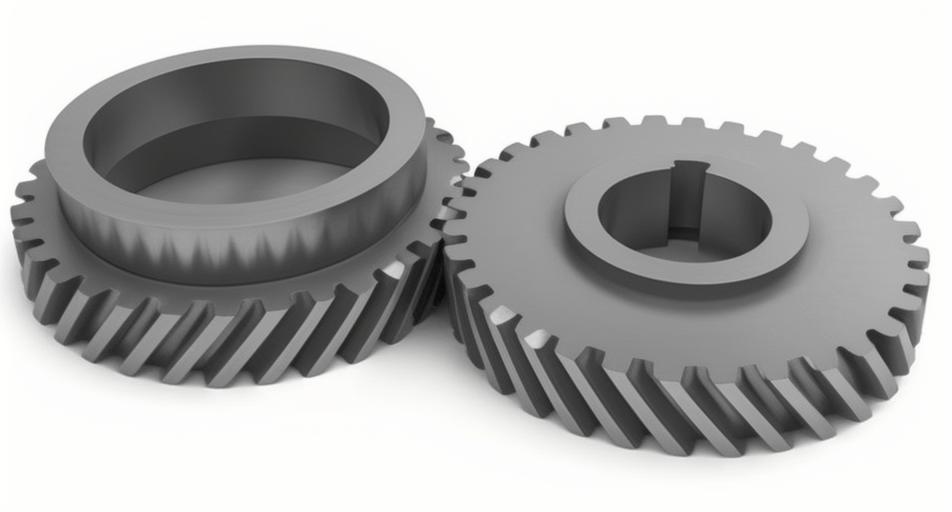
To visualize the complexity and beauty of helical gears, consider the following image, which illustrates the helical teeth arrangement in a typical gear set. This image highlights the angled teeth that characterize helical gears, contributing to their smooth operation and high torque capacity.
Moving on to the development of the parametric program, I utilized Pro/TOOLKIT, which provides a set of C-language libraries for customizing Pro/E. The program consists of two main parts: the user interface and the parameter update logic. The interface is built by adding a new menu to Pro/E’s menu bar. This involves calling Pro/TOOLKIT functions such as ProMenubarMenuAdd to create the “Gear Design” menu and ProMenubarmenuPushbuttonAdd to add items like “Helical Gear Design.” The actions associated with these buttons are defined using ProCmdActionAdd, which links to dialog boxes for parameter input. The menu text is stored in a separate .txt file for localization, but in this system, it is in English to align with the global use of helical gears in industry.
The parameter update program is more intricate, as it handles the modification of helical gear parameters and the regeneration of the model. The key steps include accessing the current helical gear model, retrieving its parameters, setting new values, and triggering a rebuild. Below is a table summarizing the Pro/TOOLKIT functions used in this process, which are essential for any helical gear parametric system.
| Step | Pro/TOOLKIT Function | Purpose |
|---|---|---|
| Get Current Model | ProMdlCurrentGet | Obtains the active helical gear model pointer |
| Convert to Model Item | ProMdlToModelitem | Converts the model to a generic item for parameter access |
| Initialize Parameter | ProParameterInit | Prepares a parameter object for manipulation |
| Get Parameter Value | ProParameterValueGet | Retrieves the current value of a helical gear parameter |
| Set Parameter Value | ProParameterValueSet | Assigns a new value to a helical gear parameter |
| Regenerate Model | ProSolidRegenerate | Rebuilds the helical gear model with updated parameters |
The program flow begins when the designer inputs new values into the dialog box. For example, if the number of teeth Z is changed from 20 to 30, the program first uses ProMdlCurrentGet to access the helical gear model. Then, it converts the model to a ProModelitem and initializes parameters like Z, Mn, and Beta using ProParameterInit. The current values are fetched with ProParameterValueGet, but in this case, they are overwritten with the new inputs via ProParameterValueSet. Finally, ProSolidRegenerate is called to update the helical gear geometry based on the revised parameters. This entire process is automated, eliminating manual steps and reducing the risk of errors. The use of Pro/TOOLKIT ensures that the program interacts directly with Pro/E’s kernel, providing robust and reliable performance for helical gear design.
To illustrate the parameter relationships more comprehensively, I have derived additional formulas that are useful for helical gear analysis. These include calculations for contact ratio, bending stress, and pitting resistance, which are critical for ensuring the durability of helical gears in real-world applications. The contact ratio (CR) for a helical gear is higher than for a spur gear due to the helical overlap, and it can be approximated as:
$$ CR = \frac{\sqrt{Da^2 – Db^2} + \sqrt{Df^2 – Db^2} – D \times \sin(\alpha_t)}{p_t} $$
where α_t is the transverse pressure angle, and p_t is the transverse pitch. For a helical gear, the transverse pressure angle is related to the normal pressure angle Alpha by:
$$ \tan(\alpha_t) = \frac{\tan(Alpha)}{\cos(Beta)} $$
This highlights how the helix angle Beta influences the gear’s performance. Additionally, the bending stress σ_b on a helical gear tooth can be estimated using the Lewis formula modified for helical gears:
$$ \sigma_b = \frac{F_t \times K_a \times K_v \times K_s}{b \times m_n \times Y} $$
where F_t is the tangential force, K_a, K_v, and K_s are application factors, b is the face width (equal to B), m_n is the normal module (Mn), and Y is the geometry factor. These equations underscore the importance of accurate parameterization in helical gear design, as small changes in Beta or Mn can significantly affect stress and lifespan. By integrating such calculations into the parametric system, designers can perform quick feasibility checks without external tools, further enhancing the utility of helical gear models.
The development of the user interface also involved creating a .dat file for registering the Pro/TOOLKIT application with Pro/E. This file contains paths to the executable and text resources, allowing Pro/E to load the program at startup. Once registered, the “Gear Design” menu appears in Pro/E, and designers can access the helical gear parametric tool effortlessly. The dialog box for parameter input includes fields for all key variables, with default values based on the initial table. When changes are made, the program validates inputs to ensure they are within reasonable ranges for helical gears—for instance, helix angles typically between 10° and 30° to balance axial thrust and smoothness. This validation prevents geometric impossibilities, such as negative tooth thickness, which could occur if parameters are set incorrectly.
In testing the system, I generated multiple helical gear models with varying parameters. For example, with Z=20, Mn=10 mm, Beta=16°, Alpha=20°, Hax=1, Cx=0.25, and B=100 mm, the model produced a standard helical gear with smooth teeth and proper helical form. Changing Z to 30 while keeping other parameters constant resulted in a larger helical gear with more teeth, and the model updated automatically without manual intervention. This demonstrates the efficiency gains offered by parametric design, especially for helical gears used in custom machinery or iterative design processes. The ability to quickly explore different configurations aids in optimization, such as minimizing weight while maintaining strength for aerospace helical gears.
Beyond the basic geometry, the parametric system can be extended to include advanced features like tooth modifications for noise reduction or thermal analysis for high-speed helical gears. By adding more parameters and relations in Pro/E, the model can accommodate crowning, tip relief, or lead corrections, which are common in precision helical gears. The Pro/TOOLKIT program can also be enhanced to export geometric data for finite element analysis (FEA) or computer-aided manufacturing (CAM), creating a seamless digital thread for helical gear production. This aligns with industry trends towards digital twins and integrated design-manufacturing workflows, where helical gears are critical components in transmissions and power systems.
In conclusion, the parametric design system for helical gears based on Pro/E and Pro/TOOLKIT represents a significant advancement in CAD customization. By automating the modeling process through parameterization, it reduces design time, minimizes errors, and enhances flexibility for engineers working with helical gears. The system’s architecture, combining three-dimensional modeling with secondary development, provides a robust framework that can be adapted to other gear types or mechanical components. The frequent emphasis on helical gears throughout this article underscores their importance in engineering, and the parametric approach ensures they can be designed with greater precision and efficiency. Future work may involve integrating machine learning algorithms to optimize helical gear parameters for specific applications or expanding the system to support bevel and worm gears. Nonetheless, this project highlights the power of parametric design in modern engineering, offering tangible benefits for the development of helical gears and beyond.
Throughout this article, I have detailed the mathematical foundations, modeling steps, and program development for helical gear parametric design. The use of tables and formulas, such as those for gear dimensions and stress calculations, provides a comprehensive reference for practitioners. The insertion of the helical gear image serves as a visual aid to appreciate the complexity of these components. As technology evolves, parametric systems like this will become increasingly vital for accelerating innovation in mechanical design, particularly for intricate parts like helical gears that demand high accuracy and performance.