
In the realm of gear manufacturing, the machining of straight bevel gears, particularly those with a shaft angle approaching 90 degrees—commonly referred to as miter gear pairs—has long presented a significant challenge. Traditional methods, heavily reliant on specialized gear planers, often struggle with the geometric complexities and setup rigidities involved, especially for high-precision or prototype work. This article details a first-person account of developing and implementing a novel, integrated Computer-Aided Manufacturing (CAM) methodology. By synergizing advanced multi-axis numerical control (NC) principles with the powerful modeling and simulation capabilities of Siemens NX (UG) software, this approach facilitates the virtual prototyping, toolpath generation, and post-processing for the machining of straight bevel gears, including the critical miter gear configuration.
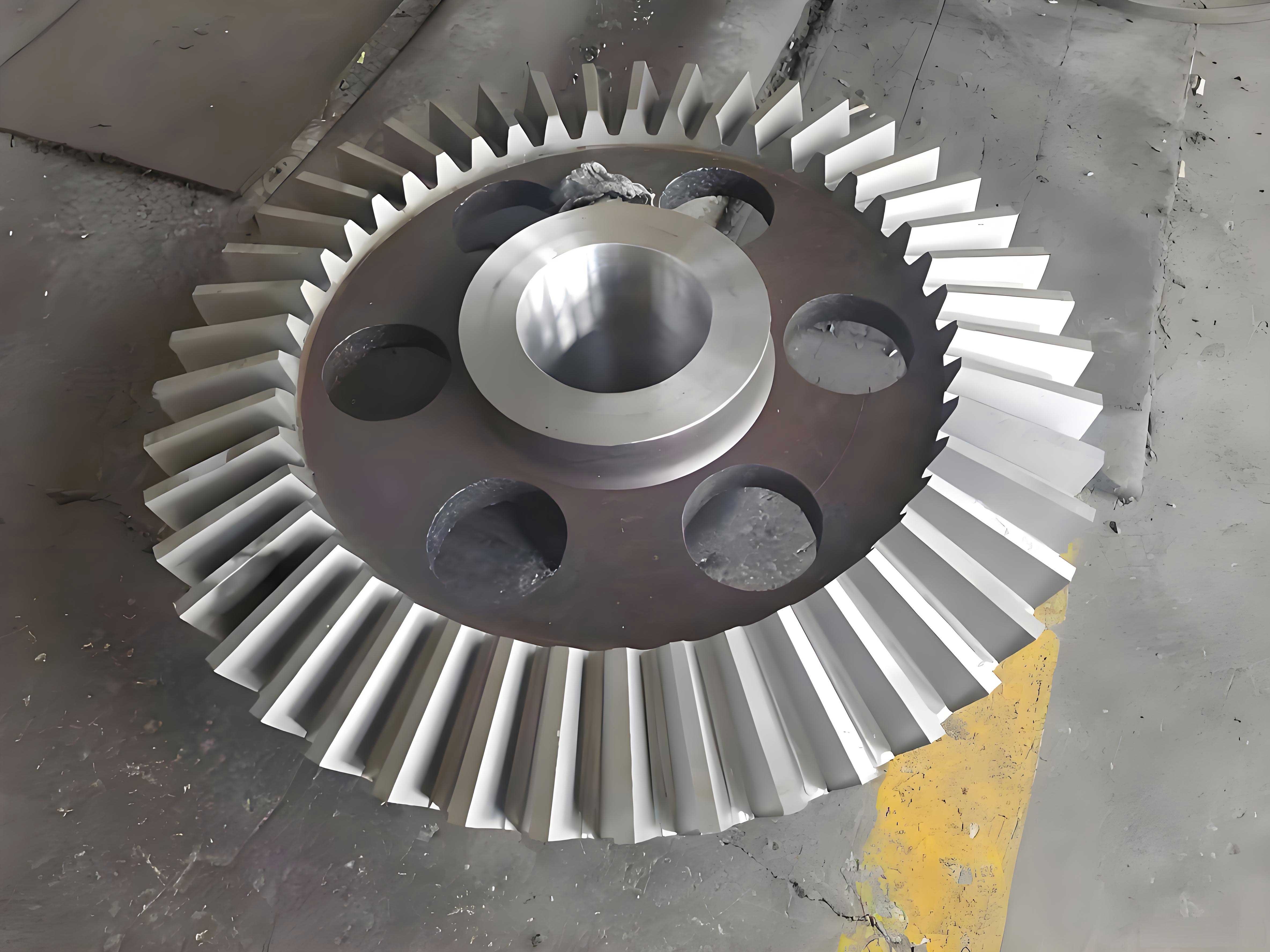
The core innovation lies in transitioning from dedicated, hardware-dependent gear cutting to a flexible, software-driven NC milling process. The workflow encompasses several key stages: three-dimensional parametric modeling of the gear geometry, creation of a suitable cutting tool library, computational generation of precise multi-axis toolpaths, rigorous simulation and verification, and finally, the generation of machine-specific NC code through post-processing. This methodology is particularly advantageous for miter gear applications, where traditional machine limitations are most acute, allowing for rapid iteration and validation in a digital environment before physical cutting.
1. Parametric Geometric Modeling and Blank Preparation
The foundation of any accurate CAM process is a precise digital model. For a straight bevel miter gear, the tooth geometry is defined by a complex set of parameters derived from gear theory. The initial step involves creating a fully parametric 3D model within the UG Modeling environment. Key design parameters are defined as expressions, allowing for easy modification and generation of gear families. The basic geometric parameters for a standard straight bevel miter gear are summarized in the table below:
| Parameter | Symbol | Formula / Description |
|---|---|---|
| Number of Teeth | $z$ | Defined by design requirements. |
| Module (at Large End) | $m$ | Standard metric module. |
| Shaft Angle | $\Sigma$ | For a miter gear, $\Sigma = 90^\circ$. |
| Pitch Cone Angle | $\delta$ | For a miter gear pair with equal teeth, $\delta = 45^\circ$. |
| Face Width | $b$ | Typically $b \leq R/3$, where $R$ is the cone distance. |
| Pressure Angle | $\alpha$ | Commonly $20^\circ$. |
| Cone Distance | $R$ | $R = \frac{m z}{2 \sin\delta}$. |
Using these parameters, the basic conical blank is modeled. The tooth profiles are then generated using laws governing the spherical involute or the equivalent octoid form, which is standard for straight bevel gears. UG’s curve and surface modeling tools, such as Law Curves and Swept features, are employed to construct the precise tooth flank surfaces. The final solid model represents the finished miter gear.
Subsequently, a machining blank must be defined. This is achieved by creating a separate solid body representing the gear without teeth—essentially the conical frustum from which material will be removed. In practice, this blank body can be modeled by extracting the outer conical faces and using surface patching or boolean subtraction operations to “fill” the tooth spaces. Having a distinct blank geometry is crucial for realistic material removal simulation and for defining stock in the CAM setup.
2. Cutting Tool Modeling and Library Creation
For multi-axis milling of bevel gear teeth, the selection and accurate digital representation of the cutting tool are paramount. A disc-type milling cutter (end mill) or a form cutter mimicking the gear tooth space is typically used. Within the UG Manufacturing (CAM) module, the tool creation process begins.
Accessing the ‘Create Tool’ dialog, the type is set to mill_multi-axis to accommodate the complex tool orientations required. The tool library (Retrieve Tool) provides a standardized starting point. For machining a miter gear, a suitable end mill is selected from the library. Its critical parameters must be meticulously defined to match the physical tool, as these dimensions directly influence toolpath calculation and collision checking.
| Tool Parameter | Description | Impact on Machining |
|---|---|---|
| Diameter ($D$) | Cutting edge diameter. | Determines minimum radius of concave surfaces; affects stepover. |
| Flute Length ($L_f$) | Length of the cutting portion. | Must exceed the maximum depth of cut along the tooth face. |
| Shank Diameter ($D_s$) | Diameter of the non-cutting holder. | Critical for interference checking with adjacent teeth or fixtures. |
| Corner Radius ($R_c$) | Radius at the tool’s end corner. | Can be zero (flat end) or positive (ball nose or bull nose); affects surface finish and geometry. |
The tool is modeled as an assembly, including both the cutter and its holder. This comprehensive representation is vital for a truthful simulation, enabling the system to detect not just cutter-workpiece collisions, but also potential clashes between the tool holder, the workpiece, and the fixture—a critical consideration when machining the deep, constrained geometry of a miter gear tooth space.
3. Multi-Axis Toolpath Generation Strategy
The essence of this methodology is generating a toolpath that guides a standard milling cutter to sweep out the complex geometry of a bevel gear tooth flank. This requires simultaneous control of the tool’s position $(X, Y, Z)$ and its orientation (tool axis vector). The process in UG CAM involves creating a multi-axis milling operation.
First, the CAM setup is initialized: the finished gear part is designated as the ‘Part’ geometry, and the conical frustum is assigned as the ‘Blank’ geometry. A new operation of type VARIABLE_CONTOUR (a multi-axis contouring operation) is created. This operation inherits the predefined tool and geometry settings.
The most critical step is defining the Drive Method. Instead of using standard planar or surface drives, a Tool Path drive method is utilized. This powerful option allows the import of a pre-calculated, idealized toolpath data file. This data file contains a sequence of tool position and orientation points that describe the fundamental generating motion required to form a bevel gear tooth. This motion is derived from the kinematic simulation of a virtual gear generator, where the relative motion between the cutter (representing a generating gear) and the workpiece (miter gear blank) creates the desired tooth form.
The governing principle for a straight bevel miter gear is based on the relative rolling of two pitch cones without slip. The basic relationship between the workpiece rotation ($\phi_w$) and the imaginary generating gear rotation ($\phi_c$) is given by the ratio of their tooth numbers. For a generating process, the relationship is:
$$ \frac{d\phi_w}{d\phi_c} = \frac{z_c}{z_w} $$
where $z_w$ is the number of teeth on the workpiece miter gear and $z_c$ is the number of teeth on the imaginary generating gear (cutter head).
The imported toolpath data defines this motion. In the operation dialog, after selecting the Tool Path drive method and linking to the data file, the Tool Axis control is set to Same as Drive Path. This instructs UG to use the tool orientation vectors directly from the imported data, ensuring the cutter axis remains correctly aligned with the generating motion throughout the path. The tool is then projected onto the selected part geometry (the tooth flank surface), resulting in a final toolpath that respects both the generating kinematics and the actual part surface.
Key machining parameters are configured in this stage:
| Parameter Group | Typical Settings for Miter Gear Finishing |
|---|---|
| Cutting Mode | Zig-Zag or One-Way following the tooth length. |
| Stepover | Defined by Scallop Height (e.g., 0.01 mm) for fine surface finish. |
| Feed Rates | Setting appropriate cutting and rapid traverse speeds. |
| Collision Checking | Enabled for both tool and holder against part and blank. |
Finally, the toolpath is generated. UG computes the precise coordinates and axis orientations for the selected tool, creating a visible toolpath displayed over the part geometry. This path represents the centerline of the tool tip (for a flat end mill) or the tool center point (for a ball nose), along with continuously varying tool axis vectors.
4. Simulation, Verification, and the Importance of Dynamic Checking
Before committing to physical metal cutting, the generated toolpath must be rigorously validated. UG CAM provides robust simulation tools for this purpose. The verification is performed in two primary modes: Replay and Dynamic (Material Removal).
Replay Mode: This mode animates the tool assembly moving along the computed toolpath. It allows for visual inspection of the tool motion, ensuring smooth transitions and the absence of erratic axis movements. The tool orientation relative to the complex miter gear tooth surface can be closely examined. Crucially, Gouge Checking is performed in this mode. The system analyzes whether the tool or holder penetrates the designated ‘Part’ geometry, which would represent an overcutting error. For a miter gear, special attention is paid to the tool tip and shank near the root and the toe of the tooth, where clearances are minimal.
Dynamic Mode (Material Removal): This is the most realistic simulation. It visually replicates the milling process by subtracting material from the defined ‘Blank’ geometry as the virtual tool moves. The user witnesses the stock being gradually carved away to reveal the final tooth form. This simulation confirms:
- Correct Geometry Generation: The final shape of the material remaining matches the design model of the miter gear tooth.
- Complete Material Removal: No uncut stock remains in the tooth space.
- Fixturing and Machine Limits: By simulating the entire setup, potential collisions between the moving tool/holder assembly and the workpiece fixture or machine components can be detected. This is especially vital when machining the deeply recessed areas of a miter gear where the tool may need to tilt at extreme angles.
The underlying mathematical check ensures the cutting tool’s effective cutting surface is tangent to the desired gear tooth surface at the contact point. For a point on the tool edge with position vector $\vec{P_t}$ and surface normal $\vec{N_t}$, and a corresponding point on the design tooth surface with position $\vec{P_g}$ and normal $\vec{N_g}$, the conditions for correct generation are:
$$ \vec{P_t} = \vec{P_g} $$
$$ \vec{N_t} \parallel \vec{N_g} $$
within a defined tolerance. The simulation software inherently validates these conditions during toolpath calculation and can highlight violations.
Only after a successful simulation—with no gouging, complete material removal, and no collisions—can the process be considered verified. This digital validation is the cornerstone of the methodology, eliminating costly trial-and-error on the physical machine, particularly for critical components like a precision miter gear.
5. Post-Processing and Generation of Machine-Specific NC Code
The verified toolpath, stored in UG’s internal CLSF (Cutter Location Source File) format, is generic. It contains tool center point coordinates and axis vector data (I, J, K components) but is not directly executable on a specific NC machine tool. Post-processing is the essential translation step that converts this neutral data into a G-code program tailored to the particular kinematics, controller syntax, and functionality of the target machine.
For machining a miter gear using this multi-axis milling strategy, a 5-axis machine configuration is typically targeted. The machine’s two rotational axes (commonly A and B, or C and A) will be used to orient the workpiece or the tool, while the three linear axes (X, Y, Z) control the tool’s position. The post-processor must be configured to map the tool axis vectors from the CLSF to the specific rotational axes of the target machine. For instance, a common configuration for a table-table 5-axis mill might map the tool orientation to rotations of the workpiece around the X-axis (A-axis) and Y-axis (B-axis).
The critical data extracted from the toolpath for a miter gear operation are:
- X, Y, Z: The linear coordinates defining the tool tip position for its reciprocating motion across the tooth face.
- A, B (or similar): The synchronized rotational angles that orient the workpiece so that the tool remains tangent to the tooth flank throughout the cut. These angles are derived from the tool axis vector (I,J,K).
A snippet of generic 5-axis G-code generated for one stroke across a tooth flank might look like this, where A and B represent workpiece rotation angles:
N0010 G90 G54 G00 X-23.380 Y-46.118 Z0.760 A358.294 B109.920
N0020 G01 X-14.976 Y-70.553 Z1.140 F250.0
N0030 X-14.959 Y-70.536 Z1.140 A358.106 B111.121
...
In a practical implementation using a custom 2-axis rotary fixture, the A and B values from the code become the command setpoints for the two servo or stepper motors controlling the fixture’s rotations. The linear X, Y, Z motions are executed by the machine’s linear axes. This coordinated movement between the machine’s linear axes and the fixture’s rotary axes successfully generates the tooth surface. After one tooth flank is completed, the workpiece is indexed (via a B-axis rotation of $360^\circ / z$) to machine the next flank on the same side. The opposite flank of each tooth requires a mirrored toolpath or a repositioning of the cutter.
Post-processing configuration is critical. The correct postprocessor for the machine model (e.g., 5-axis mill with dual rotary table) must be selected. Key parameters in the postprocessor definition include linear and rotary axis limits, maximum feed rates for rotary axes, circular interpolation support, and the specific G/M code dialect for the machine controller (e.g., Fanuc, Heidenhain, Siemens). A properly configured postprocessor ensures efficient, safe, and accurate code. A common issue, such as the random insertion of redundant intermediate points in the output code, is often resolved by ensuring clean toolpath regeneration and using a postprocessor optimized for smooth multi-axis interpolation.
6. Conclusion and Extended Applications
The integration of UG’s advanced CAD/CAM capabilities with the principles of multi-axis NC machining presents a robust and flexible solution for manufacturing straight bevel gears. This methodology effectively addresses the limitations of conventional miter gear production, offering distinct advantages in prototyping, small-batch production, and the machining of gears with non-standard or extreme geometry. The workflow—from parametric design and tool modeling through to simulated verification and post-processed code generation—creates a seamless digital thread.
The key benefits of this approach for manufacturing a miter gear are:
- Flexibility: Rapid design changes are accommodated by simply updating the parametric model and regenerating the toolpath, with no need for physical tooling changes.
- Accuracy: Digital simulation and verification minimize errors, ensuring the geometric integrity of the final gear.
- Reduced Lead Time: The virtual elimination of physical try-outs significantly shortens the development cycle for new gear designs.
- Resource Efficiency: Optimal toolpaths can be developed to reduce machining time and tool wear.
The underlying equations governing the gear geometry and toolpath generation ensure technical rigor. For instance, the relationship between the machine coordinates and the gear geometry can be expressed through a series of transformation matrices. The overall transformation $T_{total}$ from the workpiece coordinate system to the machine coordinate system for a given point involves rotations corresponding to the machine’s rotary axes (A, B) and the linear offsets (X, Y, Z):
$$ T_{total} = T_{translate}(X,Y,Z) \cdot R_y(B) \cdot R_x(A) \cdot \vec{P}_{workpiece} $$
where $R_x(A)$ and $R_y(B)$ are rotation matrices about the X and Y axes, respectively, and $\vec{P}_{workpiece}$ is a point on the tool in the workpiece coordinate system. The toolpath calculation solves for the sequences of $(X,Y,Z,A,B)$ that satisfy the tangency condition between the tool and the desired tooth surface $\vec{S}(u,v)$.
This methodology is not limited to standard miter gear forms. It can be extended to helical bevel gears, hypoid gears, and even custom gear-like components by modifying the underlying drive toolpath data and the part surface model. The continued advancement of CAM software and multi-axis machine tools will only enhance the precision and accessibility of this digital manufacturing approach, solidifying its role in the future of gear production technology.