
In my extensive experience designing and implementing specialized manufacturing systems, I have consistently encountered the challenge of developing high-fidelity, efficient, and maintainable simulation software. This challenge is particularly pronounced in complex domains such as the machining of spiral bevel gears. The intricate geometry, demanding kinematic requirements, and critical need for precision in simulating these components necessitate a software architecture that is both robust and flexible. This article details a development paradigm I have successfully employed, centered on the Component Object Model (COM), which facilitates the integration of diverse programming environments and tools to create powerful, modular simulation systems for spiral bevel gears and similar complex parts.
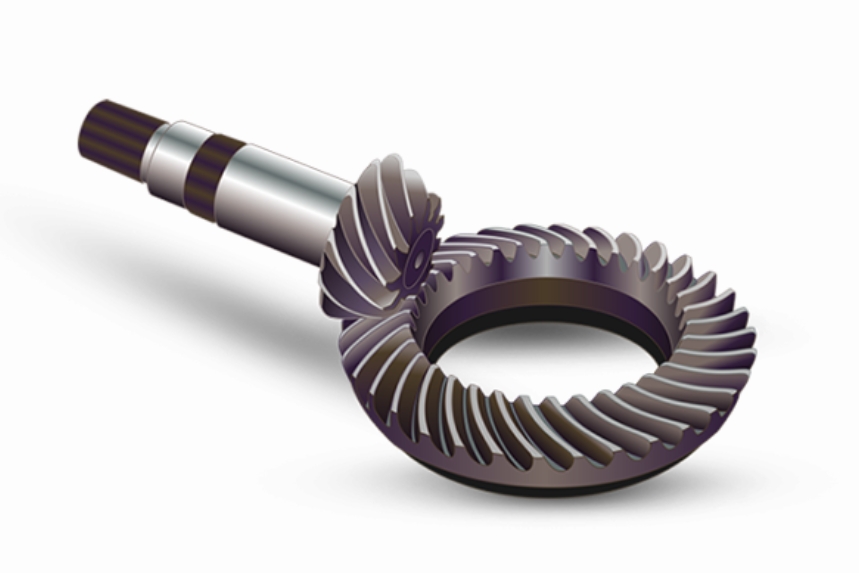
The manufacture of spiral bevel gears represents one of the pinnacles of gear production technology. These gears are essential for transmitting power between non-parallel, intersecting shafts with high efficiency and load capacity, commonly found in automotive differentials, aerospace applications, and heavy machinery. The complexity arises from their curvilinear teeth, which are designed for gradual engagement and reduced noise. The machining process itself, often performed on sophisticated multi-axis CNC mills or dedicated gear generators, involves complex synchronized motions between the cutter and the gear blank. Simulating this process accurately is not merely a visualization exercise; it is a critical tool for process verification, optimization, collision detection, and operator training before physical metal is cut.
Demand Analysis and Modular Decomposition of a Gear Simulation System
Before delving into technical implementation, a clear architectural blueprint is essential. Based on the functional requirements, a comprehensive CNC simulation system for spiral bevel gears can be decomposed into several core, interdependent modules. Each module addresses a distinct aspect of the simulation pipeline.
| Module Name | Primary Function | Key Responsibilities |
|---|---|---|
| Core Controller & UI | System Orchestration & User Interaction | Provides the main application window, handles user inputs (loading files, starting/pausing simulation, adjusting views), manages the simulation event loop, and coordinates data flow between all other modules. |
| Kinematic & Geometric Computation Engine | Mathematical Modeling & Calculation | Calculates cutter paths, gear tooth geometry based on design parameters (e.g., Gleason or Klingelnberg systems), performs real-time kinematic transformations for all machine axes, and executes Tooth Contact Analysis (TCA). |
| 3D Visualization & Rendering Engine | Graphical Representation | Manages the 3D scene graph, renders the machine tool, cutter, gear blank, and fixture models, displays toolpaths, and provides visual feedback for collisions and material removal. |
| CAD/CAM Interface & Design Module | Geometry Input & Process Planning | Imports or generates the 3D CAD models of components. Converts high-level machining instructions (G-code, APT) into internal data structures. Allows for pre-process parameter setting. |
| Data Logging & Output Module | Result Persistence & Reporting | Records simulation parameters, errors, and performance metrics. Exports the simulated gear model in standard formats (e.g., STL, STEP). Generates reports on machining time and potential issues. |
The mathematical foundation for the Kinematic & Geometric Computation Engine is critical. The tooth surface of a spiral bevel gear is a complex 3D manifold. Its generation can be described by the theory of gearing, often using the concept of a imaginary crown gear or generating gear. The fundamental equation of meshing between the tool surface (cutter) $\Sigma_t$ and the workpiece surface $\Sigma_w$ must be satisfied:
$$ \mathbf{n}_t \cdot \mathbf{v}_{tw} = 0 $$
where $\mathbf{n}_t$ is the unit normal vector to the cutter surface at the contact point, and $\mathbf{v}_{tw}$ is the relative velocity vector between the cutter and the workpiece at that point. For a CNC simulation, this is extended to the full machine kinematics. A 5-axis machine for machining spiral bevel gears typically involves three linear axes (X, Y, Z) and two rotational axes (A, C). The transformation from the workpiece coordinate system to the machine tool coordinate system is given by a series of homogeneous transformation matrices:
$$ \mathbf{P}_{machine} = \mathbf{T}_{base} \cdot \mathbf{R}_A(\alpha) \cdot \mathbf{R}_C(\gamma) \cdot \mathbf{T}_{linear}(x, y, z) \cdot \mathbf{P}_{workpiece} $$
Where $\mathbf{R}_A$ and $\mathbf{R}_C$ are rotation matrices for the A and C axes, and $\mathbf{T}_{linear}$ is the translation matrix. The core computation module must solve these transformations in real-time for every interpolation step of the toolpath.
Strategic Selection of Development Environments: The Mixed-Programming Approach
A single programming language or environment is rarely optimal for implementing all modules listed above. The strategic choice, which I advocate, is a mixed-programming paradigm. This involves selecting the best tool for each specific task and then integrating them seamlessly. The following table summarizes my rationale for environment selection for each module:
| Module | Recommended Environment | Justification |
|---|---|---|
| Core Controller & UI | C++ (MSVC), C# (.NET WinForms/WPF) | Offers high performance, direct access to system APIs, mature GUI frameworks, and excellent support for COM interoperability. Essential for building a responsive desktop application shell. |
| Kinematic & Geometric Computation Engine | MATLAB, Mathematica, or dedicated C++ numerical libraries (e.g., Eigen) | Provides an unparalleled suite of built-in mathematical functions, matrix operations, equation solvers, and visualization tools for algorithm development and validation. Prototyping complex gear geometry algorithms is significantly faster. |
| 3D Visualization & Rendering Engine | C++ with OpenGL/Direct3D, or leveraging APIs of commercial CAD kernels (SolidWorks, AutoCAD, Parasolid) | OpenGL/Direct3D offer maximum control and performance for custom, real-time graphics. Using a CAD kernel’s API (e.g., SolidWorks API) provides immediate access to robust geometric modeling, rendering, and file I/O capabilities, drastically reducing development time for industrial-grade visualization. |
| CAD/CAM Interface & Design Module | Environment tied to the CAD/CAM kernel being used (e.g., C# for SolidWorks, C++ for OpenCASCADE) | Direct integration ensures reliable model import/export and allows the simulation to be embedded within the design environment itself. |
| Data Logging & Output Module | Flexible; often implemented in the Core Controller’s language (C++/C#) using standard libraries. | Primarily involves file I/O and string formatting, tasks well-suited for general-purpose languages. |
The central challenge then becomes: how do we make a MATLAB computation module, a SolidWorks-based renderer, and a C# user interface communicate as a single, cohesive application? This is where the Component Object Model (COM) provides an elegant and powerful solution.
The Unifying Foundation: Component Object Model (COM) Architecture
COM is a platform-independent, distributed, object-oriented system for creating binary software components that can interact. Its core promise is language independence and binary reuse. A COM component exposes its functionality through one or more interfaces, which are essentially contracts defining a set of related methods. Any client application that understands how to call COM interfaces can use the component, regardless of the language in which either was written.
In the context of our spiral bevel gear simulation system, each major module is developed as a COM component (or leverages a COM-aware application). The architecture resembles the following:
- COM-Enabled Computation Engine: The complex mathematical algorithms for spiral bevel gears are developed in MATLAB. Using MATLAB Compiler SDK, these algorithms can be packaged into a COM component (a DLL). This component exposes interfaces like
IGeometryCalculatorwith methods such asCalculateToolPath(GearParams params)orPerformTCA(MeshData gear1, MeshData gear2). - COM-Enabled Visualization Engine: Commercial CAD software like SolidWorks has a rich, COM-based Application Programming Interface (API). Our Core Controller can instantiate a SolidWorks application object (via COM) and use its methods to create scenes, load models, transform objects, and control the view—all programmatically. Alternatively, a custom OpenGL renderer can be wrapped in a COM DLL exposing an
IRendererinterface. - The Core Controller as COM Client: The main application, written in C++, acts as the master COM client. It creates instances of the computation and visualization components. It feeds gear design parameters into the computation component, receives the resulting toolpath data, and then commands the visualization component to animate the machining process using that data.
The data exchange between components is standardized through the COM interfaces. Parameters for spiral bevel gears—such as module, number of teeth, spiral angle, pressure angle—can be defined in a custom COM-compliant data structure or passed as arrays of doubles. The toolpath can be returned as an array of transformation matrices or a series of position vectors. The key formulas for gear generation are encapsulated within the computation component. For instance, the basic geometry of a Gleason system spiral bevel gear involves calculations for pitch cone angle $\delta$, outer cone distance $A_0$, and mean spiral angle $\beta_m$:
$$ \delta_1 = \arctan\left(\frac{z_1}{z_2}\right) \quad \text{(for pinion)} $$
$$ A_0 = \frac{m_t \cdot z_1}{2 \sin \delta_1} $$
$$ \beta_m = \text{(specified design value, e.g., 35°)} $$
Where $m_t$ is the transverse module, and $z_1, z_2$ are the numbers of teeth on the pinion and gear, respectively. All these calculations are hidden within the COM component, which simply provides a GetGearGeometry(InputParams params) method returning the results.
System Realization: A Concrete Implementation Workflow
To validate this paradigm, I led the development of a 5-axis CNC simulation system specifically for the dry-cutting and formate machining of spiral bevel gears. The workflow concretely followed the COM-based, mixed-programming approach.
Step 1: Core Application Foundation. The main shell was developed in C++ using the Microsoft Foundation Classes (MFC) for the user interface. This application had no inherent knowledge of gear mathematics or advanced 3D graphics.
Step 2: Computation Component Development. The core algorithms for cutter location calculation, based on the modified kinematics of a Phoenix-type machine, and for basic TCA were developed and debugged in MATLAB. The critical simulation loop for material removal used a dexel-based or voxel-based model, the mathematics for which is efficiently expressed in MATLAB. The core removal test for a tool movement can be modeled as checking which dexels intersect the swept volume of the tool. For a cylindrical cutter moving from point $P_0$ to $P_1$, the condition for a dexel at point $D$ being cut might involve solving:
$$ \min_{0 \le t \le 1} \| (\mathbf{P_0} + t(\mathbf{P_1}-\mathbf{P_0})) – \mathbf{D} \| \le R_{cutter} $$
Once validated, these MATLAB scripts (.m files) were compiled using MATLAB Compiler SDK into a standalone COM DLL named GearMathCOM.dll. This DLL exposed an interface with key methods.
| Interface Method (Example) | Purpose |
|---|---|
InitializeMachine(kinematicConfig cfg) |
Sets up the machine tool kinematic chain. |
GenerateToolPath(gearDesignData data) |
Calculates the NC toolpath for the given spiral bevel gear design. |
SimulateMaterialRemoval(toolpath path, blankMesh blank) |
Executes the dexel/voxel simulation, returning the in-process workpiece state at each step. |
Step 3: Visualization Component Integration. Instead of building a renderer from scratch, we leveraged SolidWorks. The C++ core application used COM to launch an invisible instance of SolidWorks. Through the SolidWorks API (a vast set of COM interfaces itself), the application programmatically:
- Created a new assembly document.
- Imported STEP models of the machine bed, spindle, rotary tables, cutter, and gear blank.
- Mated these components into a realistic machine assembly.
- In the simulation loop, for each calculated machine axis position from the
GearMathCOMcomponent, it updated the transformation matrices of the corresponding SolidWorks components using methods likeIComponent2::Transform2. - Controlled the camera view and generated snapshot images or animations.
Step 4: System Integration and Data Flow. The C++ core managed the entire data flow:
1. The UI collected gear parameters (module, teeth, spiral angle, pressure angle, cutter diameter).
2. It called GearMathCOM->GenerateToolPath(…), receiving an array of axis positions.
3. It iterated through these positions. For each step, it optionally called GearMathCOM->SimulateMaterialRemoval(…) for volumetric verification.
4. It called SolidWorks API methods to update the positions of the 3D models to match the calculated axis positions.
5. It logged the results and, upon completion, exported the final simulated gear mesh via SolidWorks’ SaveAs method into an STL file.
This architecture proved highly effective. The development of the mathematically intense modules was accelerated by using MATLAB. The visualization achieved industrial quality with minimal low-level graphics programming by reusing SolidWorks. The COM layer acted as a flawless interpreter, enabling flawless communication between C++, MATLAB, and SolidWorks. The resulting system provided a high-degree of confidence in the machining process for spiral bevel gears before actual machine setup.
Conclusions and Advantages of the COM-Based Paradigm
The adoption of a COM-centric, mixed-programming architecture for developing CNC simulation systems, particularly for complex components like spiral bevel gears, presents a compelling set of advantages that I have confirmed through practical implementation.
| Advantage | Description |
|---|---|
| Optimal Tool Utilization | Allows developers to use the most productive environment for each task (MATLAB for math, CAD APIs for graphics, C++ for system control), maximizing development speed and code quality. |
| Enhanced Maintainability & Scalability | The system becomes modular. The computation component can be upgraded (e.g., to a new gear theory algorithm) without touching the visualization code, and vice-versa. New modules (e.g., a finite element analysis post-processor) can be added as new COM components. |
| Leverage of Existing Software Assets | Capitalizes on massive investments in commercial software like MATLAB and SolidWorks, incorporating their proven, robust functionality directly into the custom application. |
| Team Parallelization | Different teams can work simultaneously on the math engine, the UI, and the visualization integrator, as long as the COM interfaces are defined upfront. |
| Binary Stability and Language Neutrality | The COM interface provides a stable, versionable contract. The core application does not need to know or care about the internal implementation language of its components, future-proofing the system against technology shifts. |
In conclusion, the simulation of advanced manufacturing processes for components such as spiral bevel gears demands software that is as sophisticated as the processes themselves. A monolithic, single-language approach often leads to compromises in capability, development time, or performance. The paradigm I have outlined—decomposing the system into logical modules, implementing each in its optimal environment, and integrating them via the standardized glue of COM technology—provides a structured, efficient, and powerful pathway to building state-of-the-art simulation systems. This approach not only accelerates the initial development but also creates a flexible foundation for future enhancements, ensuring the simulation platform can evolve alongside the ever-advancing technology of machining spiral bevel gears.