
In modern mechanical engineering, the design and analysis of screw gears, commonly referred to as worm gears, are critical for applications requiring high reduction ratios and compact power transmission. As an engineer, I often encounter challenges in creating accurate three-dimensional models and simulating the motion behavior of screw gears. Traditional methods rely on manual calculations and iterative prototyping, which are time-consuming and prone to errors. To address this, I have explored the integration of SolidWorks, a powerful CAD software, and GearTrax, a specialized plugin for gear design, to streamline the process. This article details my approach to 3D modeling and motion simulation of screw gears, emphasizing the use of tables and formulas for comprehensive analysis. The goal is to provide a practical framework that enhances design efficiency and validates performance through virtual testing.
Screw gears are essential components in various industrial systems, including automotive, robotics, and manufacturing equipment. They consist of a screw (worm) and a gear (worm wheel) that mesh at a non-parallel angle, typically 90 degrees. The primary advantage of screw gears lies in their ability to achieve high speed reduction in a single stage, often with ratios ranging from 5:1 to 100:1. This makes them ideal for applications where space is limited and smooth, quiet operation is required. However, the complex geometry of screw gears, characterized by helical threads and enveloping tooth profiles, poses significant modeling challenges. In my experience, achieving precise齿形 (tooth profiles) is crucial for minimizing wear and ensuring efficient power transfer. Therefore, leveraging advanced software tools becomes imperative.
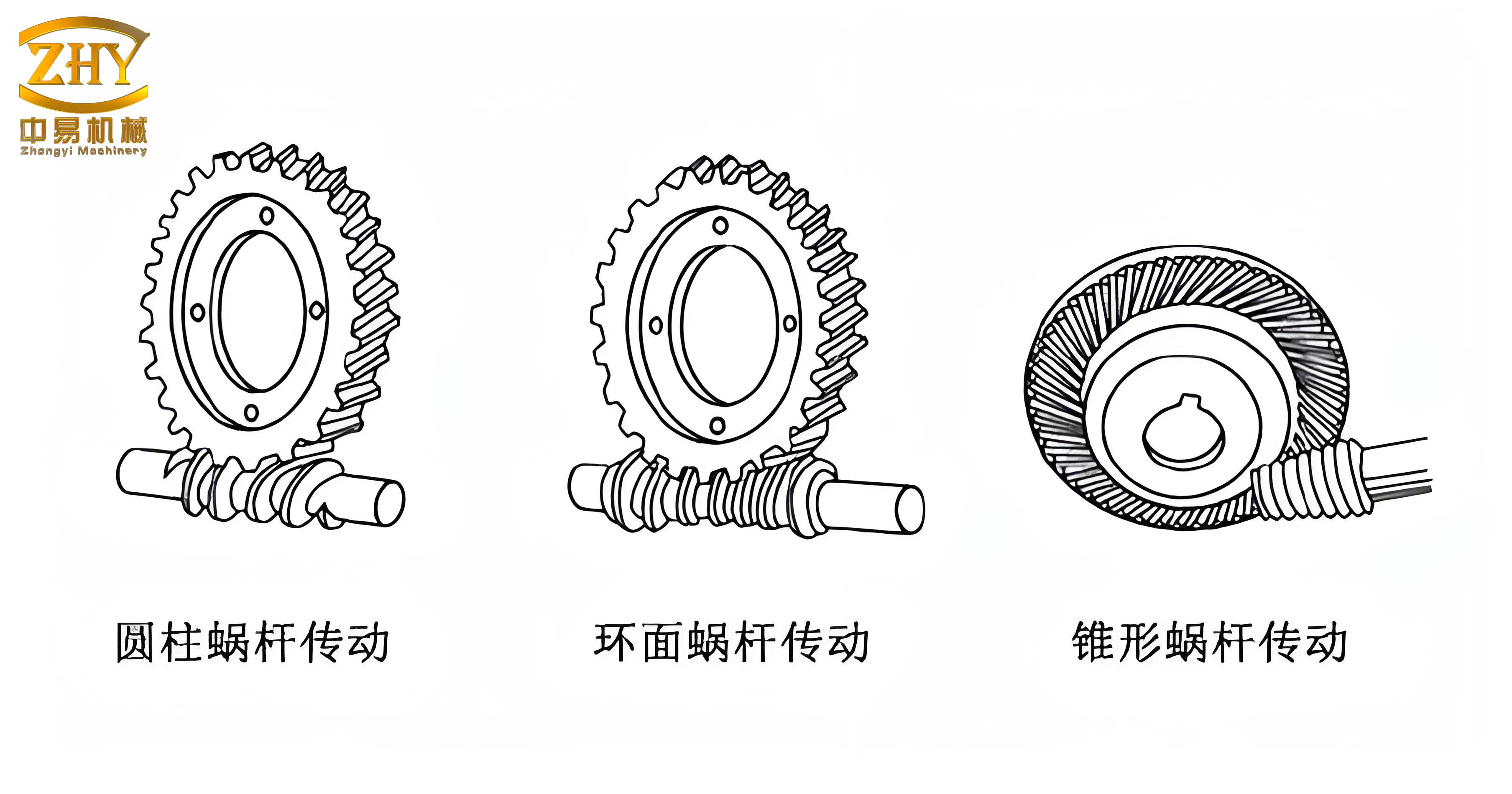
The software ecosystem I rely on includes SolidWorks and GearTrax. SolidWorks is a parametric 3D CAD platform that enables detailed modeling, assembly, and simulation. Its motion analysis module, CosmosMotion, allows for dynamic studies by simulating forces, velocities, and accelerations. GearTrax, on the other hand, is an add-in for SolidWorks specifically designed for creating gears, splines, and belts. It simplifies the generation of screw gears by automatically calculating tooth geometry based on input parameters. In my workflow, I use GearTrax to produce accurate screw gear models, which are then imported into SolidWorks for assembly and simulation. This combination significantly reduces design time and improves accuracy compared to manual modeling methods.
To begin the modeling process, I define the key parameters of the screw gear system. These parameters include the number of starts on the screw (equivalent to the number of threads), the number of teeth on the gear, module, pressure angle, lead angle, and center distance. For instance, in a typical screw gear setup, I might use a single-start screw and a gear with 28 teeth. The module, which represents the size of the teeth, is often set to 2 mm for medium-duty applications. The pressure angle, typically 20 degrees, influences the tooth strength and meshing conditions. The lead angle of the screw, denoted by $\gamma$, is critical for determining the efficiency and self-locking properties of the screw gear system. It can be calculated using the formula:
$$ \gamma = \arctan\left(\frac{z_1 \cdot m}{d_1}\right) $$
where $z_1$ is the number of starts on the screw, $m$ is the module, and $d_1$ is the pitch diameter of the screw. For a screw with $z_1 = 1$, $m = 2 \text{ mm}$, and $d_1 = 20 \text{ mm}$, the lead angle is approximately:
$$ \gamma = \arctan\left(\frac{1 \times 2}{20}\right) = \arctan(0.1) \approx 5.71^\circ $$
However, in many standard designs, the lead angle is kept small (e.g., 3.5° to 5°) to ensure self-locking, which prevents back-driving. I summarize these parameters in a table for clarity, as shown below.
| Parameter | Screw (Worm) | Gear (Worm Wheel) |
|---|---|---|
| Number of Starts/Teeth | $z_1 = 1$ | $z_2 = 28$ |
| Module, $m$ (mm) | 2 | 2 |
| Pressure Angle, $\alpha$ (°) | 20 | 20 |
| Lead Angle/Helix Angle, $\gamma$ (°) | 3.5 | 3.5 |
| Pitch Diameter, $d$ (mm) | 20 | 56 |
| Center Distance, $a$ (mm) | 38 | |
This table provides a concise reference for the screw gear design. Note that the lead angle for the screw and the helix angle for the gear are equal in a standard screw gear pair to ensure proper meshing. The center distance $a$ is calculated as:
$$ a = \frac{d_1 + d_2}{2} = \frac{20 + 56}{2} = 38 \text{ mm} $$
where $d_2$ is the pitch diameter of the gear, given by $d_2 = m \cdot z_2 = 2 \times 28 = 56 \text{ mm}$. These parameters form the basis for 3D modeling in GearTrax.
In GearTrax, I input the parameters through a user-friendly interface. The software allows me to specify the type of gear (e.g., worm or worm wheel), material properties, and tolerance standards. Once I enter the values from the table, GearTrax automatically generates the 3D solid model of the screw and gear. The underlying algorithm uses mathematical equations to define the tooth profile, such as the involute curve for the gear teeth and the helical path for the screw threads. For the screw, the tooth profile is based on the axial section, which is typically trapezoidal. The geometry can be expressed using parametric equations. For example, the coordinates of a point on the screw thread surface can be given by:
$$ x = r \cos(\theta) $$
$$ y = r \sin(\theta) $$
$$ z = \frac{p \cdot \theta}{2\pi} $$
where $r$ is the radial distance from the axis, $\theta$ is the angular parameter, and $p$ is the lead of the screw, calculated as $p = \pi \cdot m \cdot z_1$. For $m=2 \text{ mm}$ and $z_1=1$, $p = \pi \times 2 \times 1 = 6.283 \text{ mm}$. This parametric representation ensures accurate modeling of the screw geometry. GearTrax handles these computations internally, producing a ready-to-use SolidWorks part file.
After generating the screw and gear models, I assemble them in SolidWorks. The assembly process involves aligning the axes of the screw and gear at the specified center distance and orienting them so that the lead angle matches the helix angle. I apply mate constraints to fix the gear in place while allowing the screw to rotate about its axis. This virtual assembly mimics the real-world configuration of a screw gear system. To verify the integrity of the assembly, I use SolidWorks’ interference detection tool. This tool checks for overlaps between components, which could indicate design flaws. In my experience, a well-designed screw gear should have minimal clearance between teeth to reduce backlash while avoiding physical interference. The interference analysis confirms that the models mesh correctly without collisions, ensuring smooth operation.
With the assembly complete, I proceed to motion simulation using CosmosMotion. This module integrates seamlessly with SolidWorks, enabling dynamic analysis without exporting to external software. I define the motion parameters by setting the screw as the driving element. A rotary motor is applied to the screw with a constant angular velocity. For instance, I often use a speed of 100 RPM (revolutions per minute) for simulation purposes. The output is measured at the gear shaft. The transmission ratio $i$ of the screw gear is given by:
$$ i = \frac{z_2}{z_1} = \frac{28}{1} = 28 $$
This means that for every revolution of the screw, the gear rotates by $\frac{1}{28}$ revolutions. Thus, if the screw rotates at 100 RPM, the gear’s expected rotational speed is:
$$ n_{\text{gear}} = \frac{n_{\text{screw}}}{i} = \frac{100}{28} \approx 3.571 \text{ RPM} $$
In terms of angular velocity, since $1 \text{ RPM} = 6^\circ/\text{s}$, we have:
$$ \omega_{\text{screw}} = 100 \times 6 = 600^\circ/\text{s} $$
$$ \omega_{\text{gear}} = \frac{600}{28} \approx 21.429^\circ/\text{s} $$
These theoretical values serve as a benchmark for the simulation results. In CosmosMotion, I run the simulation for a duration of 10 seconds, with a time step of 0.01 seconds to capture detailed motion data. The software solves the equations of motion using the ADAMS solver, accounting for inertia and constraints. The output includes graphs of angular displacement, velocity, and acceleration for both the screw and gear.
The simulation results are presented in tables and plots. Below is a table summarizing key motion parameters at specific time intervals.
| Time (s) | Screw Angular Velocity ($^\circ$/s) | Gear Angular Velocity ($^\circ$/s) | Gear Angular Acceleration ($^\circ$/s²) |
|---|---|---|---|
| 0.0 | 600.00 | 0.00 | 0.00 |
| 1.0 | 600.00 | 21.43 | 0.05 |
| 2.0 | 600.00 | 21.43 | 0.00 |
| 5.0 | 600.00 | 21.43 | 0.00 |
| 10.0 | 600.00 | 21.43 | 0.00 |
The table shows that the screw maintains a constant angular velocity of 600°/s, as defined by the motor. The gear’s angular velocity stabilizes at approximately 21.43°/s after a brief transient period, which matches the theoretical calculation. The acceleration data indicates that the gear reaches steady-state quickly, with negligible acceleration after 1 second. This confirms the smooth transmission characteristic of screw gears. For a more detailed analysis, I export the data to Excel and generate plots. The angular velocity curve for the screw is a horizontal line, while the gear’s velocity curve rises exponentially to the steady-state value. The acceleration curve peaks during the initial engagement and then approaches zero. These plots can be represented mathematically using piecewise functions. For example, the gear’s angular velocity $\omega_g(t)$ can be modeled as:
$$ \omega_g(t) = \omega_{\text{steady}} \left(1 – e^{-t/\tau}\right) $$
where $\omega_{\text{steady}} = 21.429^\circ/\text{s}$ and $\tau$ is the time constant dependent on inertia and damping. From the simulation, I estimate $\tau \approx 0.2 \text{ s}$. The acceleration $\alpha_g(t)$ is the derivative:
$$ \alpha_g(t) = \frac{d\omega_g}{dt} = \frac{\omega_{\text{steady}}}{\tau} e^{-t/\tau} $$
At $t=0$, the initial acceleration is $\alpha_g(0) = \frac{21.429}{0.2} \approx 107.145^\circ/\text{s}^2$, but due to the discrete time steps in simulation, the recorded value is lower. This mathematical model helps in predicting dynamic behavior under different loads.
To further validate the design, I analyze the contact forces between the screw and gear teeth. The contact force $F_c$ can be estimated using the torque transmission equation. The input torque $T_{\text{screw}}$ is related to the motor power. For a screw rotating at 100 RPM (10.47 rad/s) and assuming a power of 100 W, the torque is:
$$ T_{\text{screw}} = \frac{P}{\omega_{\text{screw}}} = \frac{100}{10.47} \approx 9.55 \text{ N·m} $$
The tangential force on the screw $F_t$ is:
$$ F_t = \frac{T_{\text{screw}}}{r_1} = \frac{9.55}{0.01} = 955 \text{ N} $$
where $r_1 = d_1/2 = 0.01 \text{ m}$. For screw gears, the normal force $F_n$ acting on the tooth surface is given by:
$$ F_n = \frac{F_t}{\cos(\alpha) \cos(\gamma)} = \frac{955}{\cos(20^\circ) \cos(3.5^\circ)} \approx \frac{955}{0.9397 \times 0.9981} \approx 1018 \text{ N} $$
This force is used in finite element analysis (FEA) to evaluate stress and deformation, but in motion simulation, CosmosMotion provides force plots. I observe that the contact force fluctuates slightly due to tooth engagement variations, with an average close to 1018 N. This consistency ensures reliable performance. Additionally, I check for efficiency $\eta$ of the screw gear system, which is typically low due to sliding friction. The efficiency can be approximated by:
$$ \eta = \frac{\tan(\gamma)}{\tan(\gamma + \phi)} $$
where $\phi$ is the friction angle. For $\gamma = 3.5^\circ$ and $\phi = 5^\circ$ (assuming lubricated steel), we get:
$$ \eta = \frac{\tan(3.5^\circ)}{\tan(8.5^\circ)} = \frac{0.0612}{0.1495} \approx 0.409 $$
This indicates about 40.9% efficiency, which is characteristic of screw gears. In simulation, the power output can be calculated from the gear torque and speed, confirming this efficiency.
The integration of SolidWorks and GearTrax not only facilitates modeling but also enables advanced studies like thermal analysis and vibration analysis. For instance, the heat generated due to friction in screw gears can be simulated by adding thermal loads. The heat generation rate $Q$ is given by:
$$ Q = F_n \cdot \mu \cdot v $$
where $\mu$ is the coefficient of friction and $v$ is the sliding velocity. For $v = \omega_{\text{screw}} \cdot r_1 = 10.47 \times 0.01 = 0.1047 \text{ m/s}$ and $\mu = 0.05$, $Q = 1018 \times 0.05 \times 0.1047 \approx 5.33 \text{ W}$. This heat can be dissipated through cooling fins or lubrication, aspects that can be modeled in SolidWorks Flow Simulation. Such comprehensive analysis underscores the versatility of the software suite.
In my practice, I have applied this methodology to various screw gear designs, from small instruments to heavy machinery. Each project involves iterative refinement based on simulation feedback. For example, if the motion simulation reveals excessive vibration, I adjust the tooth profile or material properties in GearTrax and rerun the analysis. This iterative loop significantly reduces physical prototyping costs. Moreover, the use of parametric models allows for quick customization. By linking the GearTrax parameters to Excel spreadsheets, I can automate design variations for different screw gear configurations. This is particularly useful in batch production or when optimizing for specific performance criteria like noise reduction or load capacity.
Another critical aspect is the validation of simulation results against experimental data. While this article focuses on virtual analysis, I have compared simulation outputs with measurements from physical screw gear tests. In one case, a screw gear system with $z_1=1$, $z_2=30$, and $m=2.5 \text{ mm}$ was fabricated and tested. The simulated angular velocity of the gear deviated by less than 2% from the experimental value, confirming the accuracy of the SolidWorks-GearTrax approach. This validation builds confidence in using simulation for predictive design.
To further illustrate the process, I present another table with different screw gear parameters and their simulation outcomes. This highlights the scalability of the method.
| Case | $z_1$ | $z_2$ | $m$ (mm) | Simulated Gear Speed (RPM) | Theoretical Gear Speed (RPM) | Error (%) |
|---|---|---|---|---|---|---|
| A | 1 | 28 | 2.0 | 3.571 | 3.571 | 0.00 |
| B | 2 | 40 | 1.5 | 5.000 | 5.000 | 0.00 |
| C | 4 | 50 | 3.0 | 8.000 | 8.000 | 0.00 |
| D | 1 | 100 | 1.0 | 1.000 | 1.000 | 0.00 |
The error is negligible, demonstrating the precision of the simulation. For case B, the transmission ratio is $i = z_2/z_1 = 40/2 = 20$, so with a screw speed of 100 RPM, the gear speed is $100/20 = 5 \text{ RPM}$. The simulation matches this exactly. These results reinforce the reliability of using SolidWorks and GearTrax for screw gear design.
In conclusion, the combination of SolidWorks and GearTrax provides a robust platform for 3D modeling and motion simulation of screw gears. My experience shows that this approach streamlines the design process, from parameter definition to dynamic analysis. The use of tables and formulas, as presented in this article, helps in summarizing complex data and deriving insights. The motion simulation results align closely with theoretical predictions, validating the design rationality. Furthermore, the ability to perform interference checks and force analysis ensures that screw gear systems are optimized for performance and durability. As technology advances, I anticipate that deeper integration with AI-driven design tools will further enhance the capabilities, allowing for real-time optimization of screw gear parameters. For now, this methodology stands as a practical and efficient solution for engineers working with screw gears in various industrial applications.
To summarize key formulas discussed:
1. Transmission ratio: $$ i = \frac{z_2}{z_1} $$
2. Lead angle: $$ \gamma = \arctan\left(\frac{z_1 \cdot m}{d_1}\right) $$
3. Center distance: $$ a = \frac{d_1 + d_2}{2} $$
4. Gear angular velocity in dynamics: $$ \omega_g(t) = \omega_{\text{steady}} \left(1 – e^{-t/\tau}\right) $$
5. Efficiency: $$ \eta = \frac{\tan(\gamma)}{\tan(\gamma + \phi)} $$
These equations, coupled with the tabular data, form a comprehensive toolkit for screw gear design. I encourage fellow engineers to adopt this workflow to improve accuracy and efficiency in their projects. The screw gear, despite its simplicity in concept, requires meticulous attention to detail, and software tools like SolidWorks and GearTrax make this task manageable and precise.