
In modern mechanical engineering, particularly in agricultural machinery, the use of screw gears—commonly referred to as worm and worm wheel systems—is widespread due to their compact design, high transmission ratios, and smooth operation. However, the complex curved surfaces of screw gears pose significant challenges in 3D modeling, often leading to inefficiencies in design workflows. In this article, I will present a detailed methodology for the parametric design of screw gears based on SolidWorks, leveraging secondary development techniques to streamline the modeling process. By establishing mathematical models, utilizing macro recording and editing, and implementing Visual Basic (VB) programming with Microsoft Visual Studio, I have developed an add-in plugin that automates the generation of 3D models from basic parameters. This approach not only simplifies the modeling steps but also enhances design efficiency, providing a foundation for advanced parametric design in agricultural and other mechanical applications. Throughout this discussion, I will emphasize the importance of screw gears in various systems, and I will incorporate tables and formulas to summarize key concepts, ensuring a thorough understanding of the parametric design process.
The parametric design of screw gears is crucial for accelerating product development cycles. Traditionally, creating 3D models of screw gears in SolidWorks involves manual steps that are time-consuming and prone to errors, especially given the intricate geometry of these components. My work addresses this by automating the process through secondary development, which allows for dynamic model generation based on input parameters. This method is particularly beneficial for industries like agriculture, where screw gears are used in equipment such as tractor steering systems, greenhouse curtain machines, and tiller adjustments. By focusing on screw gears, I aim to demonstrate how parametric design can revolutionize mechanical design practices. The following sections will delve into the modeling principles, parameterization techniques, and implementation details, all while highlighting the role of screw gears in modern machinery.
To begin, let’s explore the mathematical foundation for modeling screw gears. The most common type is the Archimedean cylindrical screw gear, where the worm and worm wheel interact in a specific manner. In the mid-plane—defined as the plane through the worm axis perpendicular to the worm wheel axis—the engagement resembles that of a straight rack and an involute gear. This forms the basis for deriving the coordinates and equations needed for 3D modeling. For the worm (the screw component), the tooth profile is generated by sweeping an isosceles trapezoid along an Archimedean spiral. The key parameters include the axial pitch \(p_x\), number of starts \(z_1\), pressure angle \(\alpha\) (typically 20°), and diameters such as the tip diameter \(d_{a1}\), pitch diameter \(d_1\), and root diameter \(d_{f1}\). The vertex coordinates for the tooth profile, as shown in the mathematical model, can be expressed as follows:
$$X_1 = \frac{p_x}{4} + \tan\alpha \frac{d_{a1} – d_1}{2}, \quad Y_1 = \frac{d_{a1}}{2}$$
$$X_2 = \frac{p_x}{4} – \tan\alpha \frac{d_1 – d_{f1}}{2}, \quad Y_2 = \frac{d_{f1}}{2}$$
$$X_3 = -X_2 = \tan\alpha \frac{d_1 – d_{f1}}{2} – \frac{p_x}{4}, \quad Y_3 = Y_2 = \frac{d_{f1}}{2}$$
$$X_4 = -X_1 = -\frac{p_x}{4} – \tan\alpha \frac{d_{a1} – d_1}{2}, \quad Y_4 = Y_1 = \frac{d_{a1}}{2}$$
These coordinates define the cross-section used in a sweep-cut operation along an Archimedean spiral, which serves as the guide curve. The spiral is based on the pitch circle of the worm, with a height equal to the worm length \(L\) and a lead \(p_z = z_1 p_x\). For multi-start screw gears, a circular array is applied around the central axis. This process ensures accurate representation of the worm’s geometry, which is essential for efficient meshing with the worm wheel. The modeling steps are summarized in Table 1, which outlines the sequential actions for creating the worm component.
| Step | Action | Parameters Involved |
|---|---|---|
| 1 | Extrude base body using tip diameter | \(d_{a1}\), \(L\) |
| 2 | Create Archimedean spiral guide curve | \(d_1\), \(p_z\), \(L\) |
| 3 | Define tooth profile sketch from coordinates | \(X_i\), \(Y_i\) (as above) |
| 4 | Perform sweep-cut along spiral | Tooth profile, spiral curve |
| 5 | Apply circular array for multi-start worms | \(z_1\), central axis |
Moving to the worm wheel, its tooth profile in the mid-plane is based on an involute curve, which approximates the engagement with the worm. Since SolidWorks lacks a built-in function for drawing involutes, I compute multiple points on the involute using parametric equations and fit a spline curve to approximate it. The involute equations in Cartesian coordinates are given by:
$$X(r_k) = r_k \sin(\phi + \theta_k), \quad Y(r_k) = r_k \cos(\phi + \theta_k)$$
$$\text{where } \theta_k = \tan\alpha_k – \alpha_k, \quad \alpha_k = \arccos\left(\frac{r_b}{r_k}\right), \quad \phi = \frac{\pi}{2z_2} – \tan\alpha + \alpha$$
Here, \(r_k\) varies between the root radius \(d_{f2}/2\) and tip radius \(d_{a2}/2\), \(r_b\) is the base radius, \(z_2\) is the number of teeth on the worm wheel, and \(\alpha\) is the pressure angle. The coordinates for the worm wheel profile are then adjusted to account for the center distance, with \(X’ = -X(r_k)\) and \(Y’ = d_1/2 + d_2/2 + Y(r_k)\), where \(d_2\) is the pitch diameter of the worm wheel. This profile is used in a sweep-cut operation along an Archimedean spiral on a new reference plane, followed by a circular array to generate all teeth. Additional features like fillets, chamfers, and keyways are added to complete the model. Table 2 summarizes the modeling steps for the worm wheel, emphasizing the use of screw gears terminology.
| Step | Action | Key Formulas and Parameters |
|---|---|---|
| 1 | Extrude base body for worm wheel blank | \(d_{a2}\), width |
| 2 | Compute involute points using equations | \(X(r_k)\), \(Y(r_k)\), \(r_k\) range |
| 3 | Create spline approximation for tooth profile | Involute points, symmetry |
| 4 | Sweep-cut along spiral guide curve | Profile, spiral based on \(p_x\) |
| 5 | Circular array for all teeth | \(z_2\), central axis |
| 6 | Add finishing features (e.g., fillets) | Design specifications |
The parametric design process leverages SolidWorks’ application programming interface (API) and macro functionality. I start by recording a macro while manually modeling a screw gear in SolidWorks. This macro captures all actions—such as sketches, extrusions, and cuts—in VB code. However, the recorded code often contains redundant operations, so I edit it to remove unnecessary lines and optimize for parameterization. Key modifications include defining variables for gear parameters (e.g., \(p_x\), \(z_1\), \(\alpha\)) and adjusting API function calls to accept these variables dynamically. For instance, to handle multi-start screw gears, I implement a circular array feature in the code, as shown in the following snippet:
boolstatus = Part.SetUserPreferenceToggle(swUserPreferenceToggle_e.swDisplayTemporaryAxes, True)
boolstatus = Part.Extension.SelectByID2("Cut-Sweep1", "BODYFEATURE", 0, 0, 0, False, 4, Nothing, 0)
boolstatus = Part.Extension.SelectByID2("", "AXIS", 0, 0, 0, True, 1, Nothing, 0)
Part.FeatureManager.FeatureCircularPattern2 z1, 2 * 3.14159265358988 / z1, False, "NULL", False
This code selects the sweep-cut feature and arrays it around the central axis based on the number of starts \(z_1\), ensuring accurate modeling of screw gears with multiple threads. After editing, I add a user form in VB to create a graphical interface for inputting parameters. The form includes fields for basic screw gears parameters like module, number of teeth, pressure angle, and center distance, along with buttons to generate the 3D model. This enhances usability and allows designers to quickly iterate on designs. The integration of screw gears parameters into the form is critical for streamlining the workflow, as it reduces manual input errors and accelerates model generation.
To make the tool accessible within SolidWorks, I develop an add-in plugin using Microsoft Visual Studio. This involves creating a new SolidWorks Add-In project in Visual Basic .NET, referencing SolidWorks type libraries (e.g., SolidWorks 2009 type library), and incorporating the edited macro code. The add-in compiles into a dynamic-link library (*.dll) file, which can be loaded directly into SolidWorks via the Tools > Add-Ins menu. Once loaded, the plugin adds a custom toolbar or menu item for screw gears design, enabling users to input parameters and output 3D models with a few clicks. This plugin approach not only automates modeling but also ensures compatibility with subsequent steps like engineering drawing generation and finite element analysis. For visual reference, consider the following representation of a screw gear system, which illustrates the complex geometry involved in these components.
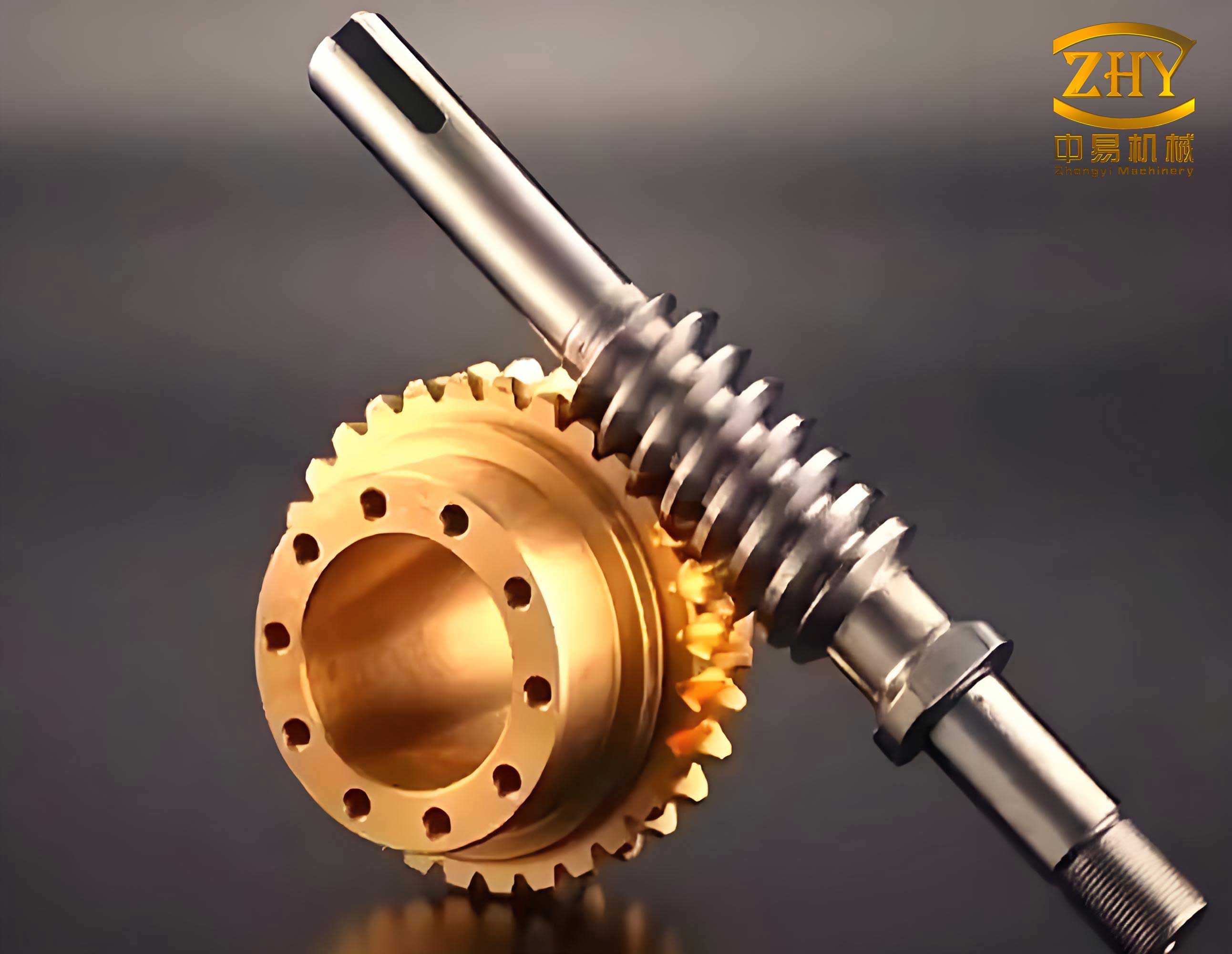
The advantages of this parametric design method for screw gears are manifold. First, it significantly reduces modeling time—from hours to minutes—by automating repetitive tasks. Second, it improves accuracy by enforcing mathematical consistency through formulas and equations. Third, it facilitates design optimization; for example, designers can easily adjust parameters like the lead angle or number of starts to evaluate performance trade-offs. In agricultural machinery, where screw gears are used in applications requiring high torque and precise motion control, this efficiency translates to faster product development and lower costs. Moreover, the parametric models can be linked to engineering drawings, automatically generating 2D drafts with dimensions and annotations that adhere to industry standards. This bidirectional associativity between 3D models and drawings ensures that any design change is propagated seamlessly, reducing errors in manufacturing.
From a technical perspective, the mathematical models for screw gears involve several derived formulas beyond the basic coordinates. For instance, the relationship between axial pitch \(p_x\), lead \(p_z\), and number of starts \(z_1\) is fundamental: \(p_z = z_1 p_x\). Additionally, the center distance \(a\) between worm and worm wheel is calculated as \(a = \frac{d_1 + d_2}{2}\), where \(d_1\) and \(d_2\) are pitch diameters. These parameters are interlinked, and their optimization is crucial for efficient screw gears design. To summarize key relationships, I present Table 3, which lists essential formulas for screw gears parameterization.
| Parameter | Formula | Description |
|---|---|---|
| Axial Pitch (\(p_x\)) | \(p_x = \pi m\) | Where \(m\) is the module |
| Lead (\(p_z\)) | \(p_z = z_1 p_x\) | For multi-start screw gears |
| Tip Diameter (\(d_a\)) | \(d_a = d + 2m\) (worm), \(d_a = d + 2m\) (wheel) | Based on pitch diameter \(d\) |
| Root Diameter (\(d_f\)) | \(d_f = d – 2.5m\) (worm), \(d_f = d – 2.5m\) (wheel) | Standard clearance |
| Center Distance (\(a\)) | \(a = \frac{d_1 + d_2}{2}\) | For worm and worm wheel assembly |
| Pressure Angle (\(\alpha\)) | Typically 20° | Common in screw gears design |
In implementing the plugin, I also address data management and security considerations. The parametric models are stored in a structured format, allowing for version control and reuse in larger assemblies. For example, in agricultural machinery design, screw gears components can be integrated into systems like tractor transmissions or irrigation systems, with parameters adjusted for specific loads and speeds. The plugin includes error handling to validate input parameters, preventing unrealistic values that could lead to modeling failures. Furthermore, the use of VB.NET and SolidWorks API ensures that the tool is robust and scalable, capable of handling complex screw gears configurations such as double-enveloping worms or non-standard pressure angles.
The impact of this work extends beyond individual components. By enabling rapid prototyping of screw gears, it supports iterative design processes common in modern engineering. For instance, in the development of a new greenhouse curtain machine, designers can quickly test different screw gears ratios to optimize torque and speed without manual remodeling. Similarly, in educational settings, students can explore the geometry of screw gears through interactive parameter changes, enhancing their understanding of gear mechanics. The plugin’s open architecture also allows for future enhancements, such as integration with finite element analysis tools for stress evaluation or with optimization algorithms for weight reduction.
To further illustrate the parametric design process, let’s consider a detailed example. Suppose we need to design a screw gear set for a hand tractor steering mechanism. The input requirements are a transmission ratio of 20:1, a center distance of 50 mm, and a module of 2 mm. Using the formulas from Table 3, we calculate the pitch diameters: for the worm, \(d_1 = \frac{2a}{1 + i}\), where \(i\) is the ratio, and for the worm wheel, \(d_2 = i \cdot d_1\). With \(i = 20\), we get \(d_1 \approx 4.76\) mm and \(d_2 \approx 95.24\) mm. Then, using the plugin, we input these values along with \(z_1 = 2\) (for a double-start worm), \(\alpha = 20^\circ\), and \(L = 40\) mm for the worm length. The plugin automatically generates the 3D models, as shown in the earlier image link, and we can verify the meshing in a virtual assembly. This example underscores how parametric design streamlines the initial design phase for screw gears, allowing engineers to focus on performance rather than modeling details.
In conclusion, my approach to parametric design of screw gears using SolidWorks demonstrates a significant advancement in mechanical design automation. By combining mathematical modeling, macro recording, VB programming, and plugin development, I have created a tool that simplifies the 3D modeling of complex screw gears components. This method not only improves efficiency but also ensures accuracy and consistency, making it invaluable for applications in agriculture and beyond. The repeated emphasis on screw gears throughout this article highlights their importance in transmission systems, and the integration of tables and formulas provides a clear reference for practitioners. As technology evolves, such parametric tools will become increasingly essential for competitive product development, and I believe this work lays a strong foundation for future innovations in gear design.
Looking ahead, there are several avenues for extending this research. For instance, the plugin could be enhanced to support other types of screw gears, such as helical or bevel variants. Additionally, cloud-based parameter storage could facilitate collaborative design across teams. Regardless, the core principle remains: parametric design empowers engineers to create better screw gears faster, driving progress in mechanical engineering. I hope this detailed exposition inspires further exploration and adoption of parametric methods in the design community, ultimately leading to more efficient and reliable machinery worldwide.