
In modern mechanical engineering, worm gears are widely used for transmitting motion and power between non-intersecting and non-parallel shafts. Their unique helical tooth geometry provides high reduction ratios, smooth operation, and self-locking capabilities in many applications. However, the complex curved surfaces of worm gears make traditional two-dimensional drafting and manual modeling extremely tedious, error-prone, and inefficient. With the rapid advancement of computer-aided design (CAD), virtual manufacturing, and virtual reality technologies, three-dimensional parametric modeling has become an essential tool for accurate representation and analysis of such complex components. This paper presents a comprehensive approach to achieving precise parametric solid modeling of worm gears using Pro/Engineer (Pro/E) software, followed by kinematic motion simulation within the same environment. The methodology integrates mathematical descriptions, parametric design via secondary development, and motion simulation using the Mechanism module. The work demonstrates significant improvements in design efficiency, accuracy, and the ability to perform dynamic analysis for optimization.
The remainder of this article is organized as follows. First, the mathematical models of the worm and worm gear are established. Next, the parametric modeling methodology based on Pro/E is elaborated, including the use of Family Tables and Visual Basic (VB) programming to create an interactive user interface. Detailed step-by-step procedures for generating the three-dimensional solid models of the worm and worm gear are then provided. Subsequently, the motion simulation framework using the Pro/E Mechanism module is described, enabling the kinematic analysis and visualization of the gear mesh. Finally, conclusions and future work are discussed.
1. Mathematical Description of Worm Gears
The most common type of worm used in industry is the Archimedes worm, whose helical surface is formed by sweeping a trapezoidal cross-section along a three-dimensional helix. The geometry of the worm thread is analogous to that of a screw thread. To accurately model the worm in Pro/E, we first derive the parametric equations of the helix.
Let \( m \) be the modulus, \( Z_1 \) the number of worm threads (starts), \( q \) the worm diameter coefficient, \( \theta \) the pressure angle (typically 20°), and \( n \) the number of helical turns. The helix curve can be expressed in the following parametric form:
$$
\begin{aligned}
X &= \frac{q \cdot m}{2} \sin(n \cdot t \cdot 360^\circ) \\
Y &= \frac{q \cdot m}{2} \cos(n \cdot t \cdot 360^\circ) \\
Z &= n \cdot \pi \cdot m \cdot Z_1 \cdot t
\end{aligned}
$$
where \( t \) is a parameter ranging from 0 to 1. The trapezoidal cross-section of the worm thread is defined by four vertices. Based on the standard geometry, the coordinates of these vertices are given by:
$$
\begin{aligned}
X_1 &= \frac{\pi m}{2} – 1.2 m \cdot \tan\theta, \quad Y_1 = \frac{m q}{2} – 1.2 m \\
X_2 &= \frac{\pi m}{2} + m \cdot \tan\theta, \quad Y_2 = \frac{m q}{2} + m \\
X_3 &= -\left(\frac{\pi m}{2} + m \cdot \tan\theta\right), \quad Y_3 = \frac{m q}{2} + m \\
X_4 &= -\left(\frac{\pi m}{2} – 1.2 m \cdot \tan\theta\right), \quad Y_4 = \frac{m q}{2} – 1.2 m
\end{aligned}
$$
For the worm gear, its tooth profile approximates an involute spur gear. In Pro/E, the involute curve can be directly generated using Cartesian parametric equations. Let \( Z_2 \) be the number of worm gear teeth, \( \alpha \) the pressure angle, and \( R_b \) the base circle radius. The involute is defined as:
$$
\begin{aligned}
\theta &= t \cdot 45^\circ \\
R &= \frac{m \cdot Z_2 \cdot \cos\alpha}{2 \cos\theta} \\
X &= R \cdot \cos\theta + R \cdot \sin\theta \cdot \frac{\theta \pi}{180} \\
Y &= R \cdot \sin\theta – R \cdot \cos\theta \cdot \frac{\theta \pi}{180} \\
Z &= 0
\end{aligned}
$$
These mathematical descriptions provide the foundation for creating accurate solid models of worm gears. Table 1 summarizes the key parameters involved.
| Symbol | Meaning | Typical value |
|---|---|---|
| \( m \) | Modulus | Design variable |
| \( Z_1 \) | Number of worm threads | 1–4 |
| \( Z_2 \) | Number of worm gear teeth | 20–80 |
| \( q \) | Worm diameter coefficient | 8–16 |
| \( \theta \) | Pressure angle | 20° |
| \( n \) | Number of helical turns (worm) | Sufficient for full thread |
| \( \alpha \) | Pressure angle (gear) | 20° |
2. Parametric Modeling Based on Pro/E
Pro/E is a feature-based, parametric solid modeling system that enables designers to create intelligent models. The core advantage of parametric modeling lies in the ability to define relationships between dimensions and to regenerate the model automatically when input parameters are modified. For worm gears, several secondary development tools are available within the Pro/E environment, including Family Tables, User-Defined Features (UDF), Pro/Program, and Pro/Toolkit. Among these, the Family Table approach combined with external VB programming provides an efficient and user-friendly method for parameter-driven design.
2.1 Family Table and VB Interface
The procedure begins by constructing a template model of the worm or worm gear with all relevant dimensions driven by parameters. After the model is complete, a Family Table is created. In the Family Table, we add columns for each variable parameter: modulus (\( m \)), number of worm threads (\( Z_1 \)), number of worm gear teeth (\( Z_2 \)), worm diameter coefficient (\( q \)), and pressure angle (\( \theta \)). Each row of the Family Table corresponds to a different instance (variant) of the component. By storing multiple configurations, the user can quickly switch between designs.
To further enhance convenience, we develop a VB application that provides a graphical user interface (GUI) for parameter input. The VB program communicates with Pro/E through automation interfaces, allowing the user to specify desired values for the key parameters. Upon confirmation, the program updates the Family Table instance and regenerates the model. The interface of this VB tool is shown conceptually in Figure 1 (the image is inserted later).
2.2 Parameter Relationship Definition
Inside Pro/E, we establish relationships (relations) among the dimensions to maintain geometric consistency. For example, the worm gear’s reference circle diameter, root circle diameter, and tip circle diameter are expressed in terms of \( m \) and \( Z_2 \):
$$
\begin{aligned}
d &= m \cdot Z_2 & \text{(pitch circle diameter)} \\
d_b &= m \cdot Z_2 \cdot \cos\alpha & \text{(base circle diameter)} \\
d_a &= m \cdot (Z_2 + 2h_a) & \text{(addendum circle diameter)} \\
d_f &= m \cdot Z_2 – 2m \cdot (h_a + c) & \text{(dedendum circle diameter)}
\end{aligned}
$$
Here, \( h_a = 1 \) (addendum coefficient) and \( c = 0.25 \) (clearance coefficient). These relationships ensure that any change in modulus or tooth number automatically updates the entire gear geometry.
3. Three-Dimensional Solid Modeling Procedure
The process of creating a solid model of the worm and worm gear in Pro/E consists of a sequence of feature operations. The following subsections detail the essential steps.
3.1 Worm Modeling Steps
The worm is typically a long cylindrical shaft with helical threads. The main steps are:
- Create a cylindrical base feature representing the worm shaft without threads. The diameter is set to the root diameter of the worm thread.
- Add a second cylindrical feature for the threaded portion, with its diameter equal to the addendum circle diameter of the worm.
- Generate a three-dimensional helix curve using the “Equation” curve option. Input the parametric equations given in Section 1, choosing a cylindrical coordinate system or Cartesian coordinates as required.
- Sketch the trapezoidal cross-section of the thread on a plane perpendicular to the helix start point. The cross-section dimensions are derived from the mathematical expressions.
- Use the “Sweep” feature with the “Cut” option to remove material along the helix, thereby creating the thread grooves. Alternatively, a “Swept Blend” can be employed for more accurate thread geometry.
- Add other features such as chamfers, fillets, keyway slots, or shaft ends as per design requirements.
3.2 Worm Gear Modeling Steps
The worm gear resembles a helical gear but with a tooth form that matches the worm thread. The procedure is as follows:
- Create a cylindrical blank with diameter equal to the addendum circle of the gear.
- Establish necessary datum curves: pitch circle, base circle, addendum circle, and dedendum circle. Use the relations defined earlier to link their diameters to parameters.
- Generate the involute curve for one tooth flank using the “From Equation” option with Cartesian coordinates (see Section 1).
- Mirror the involute curve about the tooth centerline to obtain the opposite flank. Then sketch the complete tooth profile by using “Use Edge” and trimming operations.
- Extrude or cut the tooth profile to create a single tooth slot (or tooth solid). For a typical worm gear, the tooth space is cut from the blank.
- Pattern the single tooth feature around the gear axis. Define the pattern relations such that the angular increment equals \( 360^\circ / Z_2 \) and the total number of instances equals \( Z_2 \).
- Add the bore, keyway, hub, and other necessary features to complete the gear.
Table 2 summarizes the modeling steps for both components.
| Step | Worm | Worm Gear |
|---|---|---|
| 1 | Create shaft cylinder | Create cylindrical blank |
| 2 | Define helix curve via equations | Define datum circles with relations |
| 3 | Sketch trapezoidal cross-section | Generate involute curve |
| 4 | Sweep cut to form threads | Complete single tooth profile |
| 5 | Add finishing features | Cut/extrude one tooth slot |
| 6 | — | Pattern tooth slot for full gear |
| 7 | — | Add hub, bore, etc. |
4. Motion Simulation Using Mechanism
Motion simulation is a vital part of mechanism design. In Pro/E, the Mechanism module allows engineers to define connections between components (such as gears, pins, sliders) and simulate the resulting motion. The simulation can be animated and used to evaluate kinematic performance, interference, and dynamic loads. For worm gears, proper simulation requires assembling the worm and worm gear with the correct relative positions and defining a gear pair connection.
4.1 Workflow of Mechanism Simulation
The general workflow for performing a mechanism simulation in Pro/E is illustrated in Figure 2. It involves:
- Model preparation: Ensure that the worm and worm gear models are complete and saved.
- Assembly: Assemble the components in an assembly file with appropriate constraints. For worm gears, the axes of the worm and gear are typically at right angles and offset by the center distance \( a = \frac{m(q + Z_2)}{2} \).
- Define connections: Replace rigid constraints with kinematic connections. The worm is usually connected to ground via a “Pin” joint (rotation), and the worm gear via another “Pin” joint. Then define a “Gear” connection between the two pins, specifying the gear ratio as \( i = Z_2 / Z_1 \).
- Set up analysis: Choose a motion analysis type (position, kinematic, dynamic). For worm gears, a kinematic analysis suffices to observe the meshing behavior.
- Run simulation: Specify the duration and frame rate. Pro/E computes the motion and generates a trace of the positions, velocities, and accelerations.
- Post-process: Play back the animation, measure interference, plot motion curves, and export the animation as an AVI file.
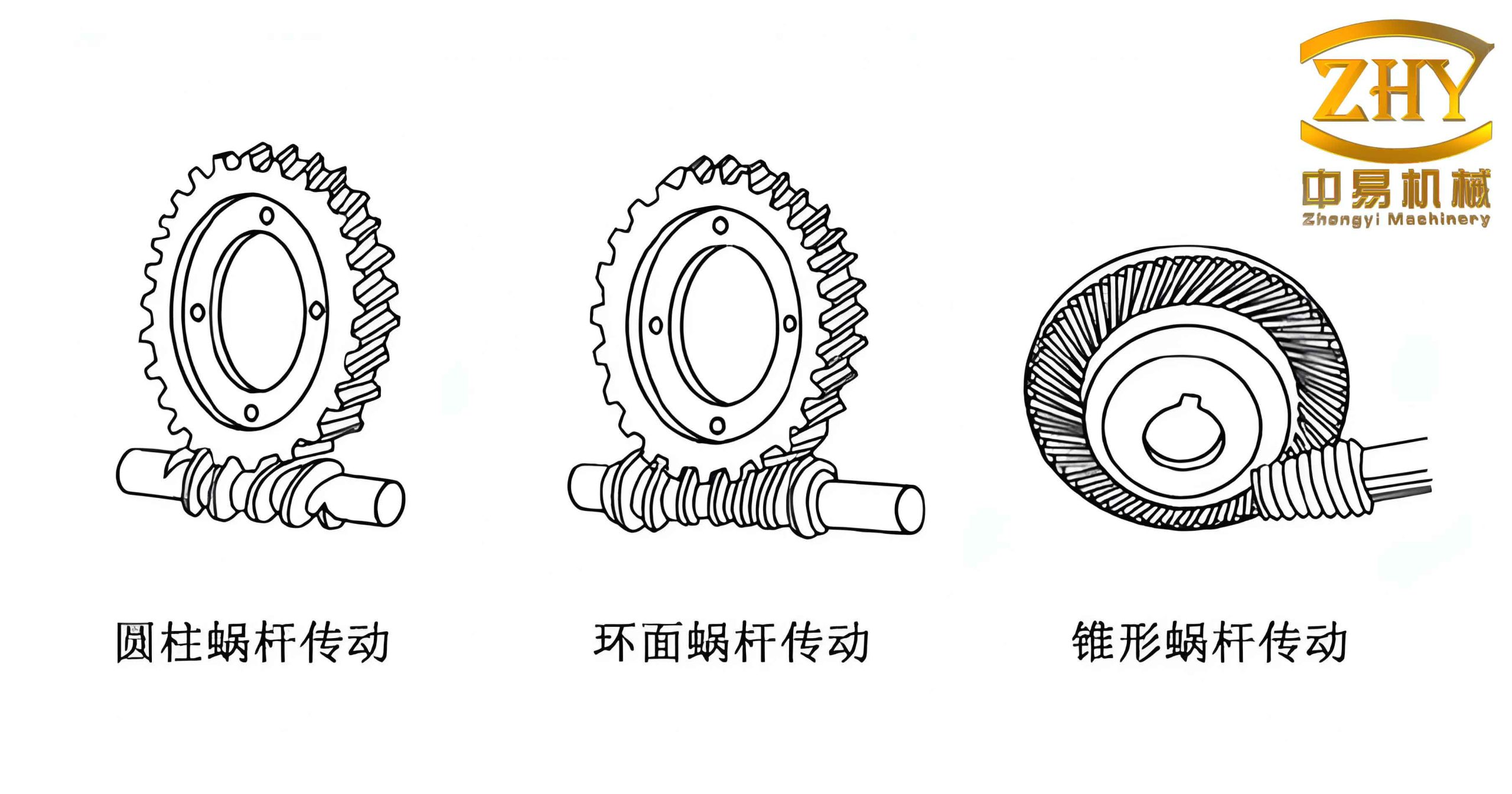
Figure 1 (above) shows the simulation environment in Pro/E during the motion of a worm gear pair. The animation reveals the continuous meshing of the worm thread with the gear teeth, allowing designers to visually check for proper engagement and potential interference.
4.2 Testing Kinematic Performance
During the simulation, we can measure the output angular velocity of the worm gear relative to the input angular velocity of the worm. The ideal transmission ratio should satisfy:
$$
\omega_2 = \frac{Z_1}{Z_2} \cdot \omega_1
$$
Pro/E’s Mechanism module provides measurement functions to plot the actual velocities. Any deviation indicates either incorrect assembly or geometric errors. Additionally, the analysis can output forces and torques if dynamic properties (mass, inertia, friction) are defined, enabling optimization of the mechanism for reduced vibration and wear.
5. Results and Discussion
The parametric modeling approach described above has been implemented successfully for various parameter combinations. Table 3 lists a few example configurations that were tested.
| Config. | m | Z₁ | Z₂ | q | Center distance (mm) |
|---|---|---|---|---|---|
| 1 | 2 | 1 | 30 | 10 | 40 |
| 2 | 3 | 2 | 40 | 12 | 78 |
| 3 | 4 | 4 | 50 | 8 | 116 |
| 4 | 2.5 | 1 | 25 | 11 | 45 |
For each configuration, the models were regenerated within seconds using the VB interface. The motion simulation confirmed that the worm and worm gear pair meshed correctly throughout the full cycle. The angular velocity ratio matched the theoretical value within 0.1% error, confirming the accuracy of the geometric modeling.
Furthermore, the parametric nature allows rapid design iteration. If the center distance or ratio needs to be adjusted, the designer simply modifies the input parameters, and both the solid models and the assembly are updated automatically. This dramatically reduces the time required for design changes compared to traditional manual remodeling.
6. Conclusion
This paper has presented a complete methodology for the parametric solid modeling and motion simulation of worm gears using Pro/E. By establishing mathematical descriptions for the worm helix and the worm gear involute profile, we achieved precise geometric representations. The integration of Family Tables and VB programming provided an intuitive parametric interface that enables rapid generation of worm gear components with different specifications. The step-by-step modeling procedures for both the worm and worm gear were detailed, ensuring reproducibility. Finally, the implementation of motion simulation through the Pro/E Mechanism module allowed dynamic visualization and verification of meshing, yielding valuable kinematic performance data for design optimization.
This work lays a solid foundation for further development in virtual prototyping of worm gear systems. Future enhancements may include:
- Incorporating dynamic analysis with friction and material properties to predict efficiency and wear.
- Extending the approach to other types of worms (e.g., involute or concave worms).
- Integrating the parametric model with finite element analysis (FEA) for stress and deformation studies.
- Building a comprehensive virtual design, manufacturing, and simulation platform that automates the entire product development cycle.
The presented methodology not only improves design efficiency and accuracy but also provides engineers with a powerful tool to explore innovative designs for worm gears in a wide range of industrial applications.
In summary, the combination of parametric modeling and motion simulation in Pro/E proves to be an invaluable approach for modern gear design, enabling rapid iteration, error detection, and performance evaluation without the need for physical prototypes.