
In modern mechanical engineering, screw gears, commonly referred to as worm drives, are pivotal components in numerous applications such as hoists, elevators, and sliding gates. Their ability to provide high reduction ratios and self-locking features makes them indispensable. However, ensuring the reliability and safety of screw gear systems necessitates rigorous design calculations, including contact fatigue strength analysis, bending strength verification, and thermal balance assessments. Traditional manual calculations are time-consuming and prone to errors. In this article, I explore how Microsoft Excel can be leveraged to streamline and enhance the design process for screw gears. By integrating formulas, data validation, and conditional formatting, Excel transforms into a powerful tool for performing complex calculations efficiently. This approach not only improves accuracy but also allows for rapid parameter adjustments, facilitating optimized designs. Below, I detail the methodology, from initial setup to final geometric dimensioning, emphasizing the use of tables and formulas to encapsulate the entire design workflow.
The design of screw gears involves multiple interdependent steps, each requiring precise calculations. To provide a clear overview, I first outline a generalized design flowchart. This flowchart encapsulates key stages such as material selection, stress determination, strength design, efficiency verification, and thermal analysis. Understanding this flow is crucial for effectively implementing the Excel-based solution, as it guides the sequential entry of parameters and formulas. The process begins with inputting known operating conditions and culminates in the computation of geometric dimensions for both the worm and worm wheel. By visualizing this flow, designers can easily navigate the Excel workbook and make informed adjustments. The following description summarizes the flow, which will later be translated into Excel functions and tables.
- Step 1: Input Known Conditions – Power, speeds, lifespan, and shift patterns.
- Step 2: Material Selection and Allowable Stresses – Choose materials for worm and worm wheel, determine basic allowable contact and bending stresses, and apply life factors based on stress cycles.
- Step 3: Contact Strength Design – Calculate required module and pitch diameter based on torque, load factors, and allowable contact stress.
- Step 4: Efficiency Verification – Compute sliding velocity,啮合 efficiency, and overall efficiency to ensure performance.
- Step 5: Bending Strength Check – Verify that the bending stress in the worm wheel teeth is within allowable limits.
- Step 6: Thermal Balance Calculation – Assess heat dissipation to prevent overheating, requiring散热 area comparisons.
- Step 7: Geometric Dimension Calculation – Derive all key dimensions for manufacturing and assembly.
To illustrate the screw gear mechanism, consider the following image, which depicts a typical screw gear assembly. This visual aid helps in understanding the geometry involved in the design calculations.
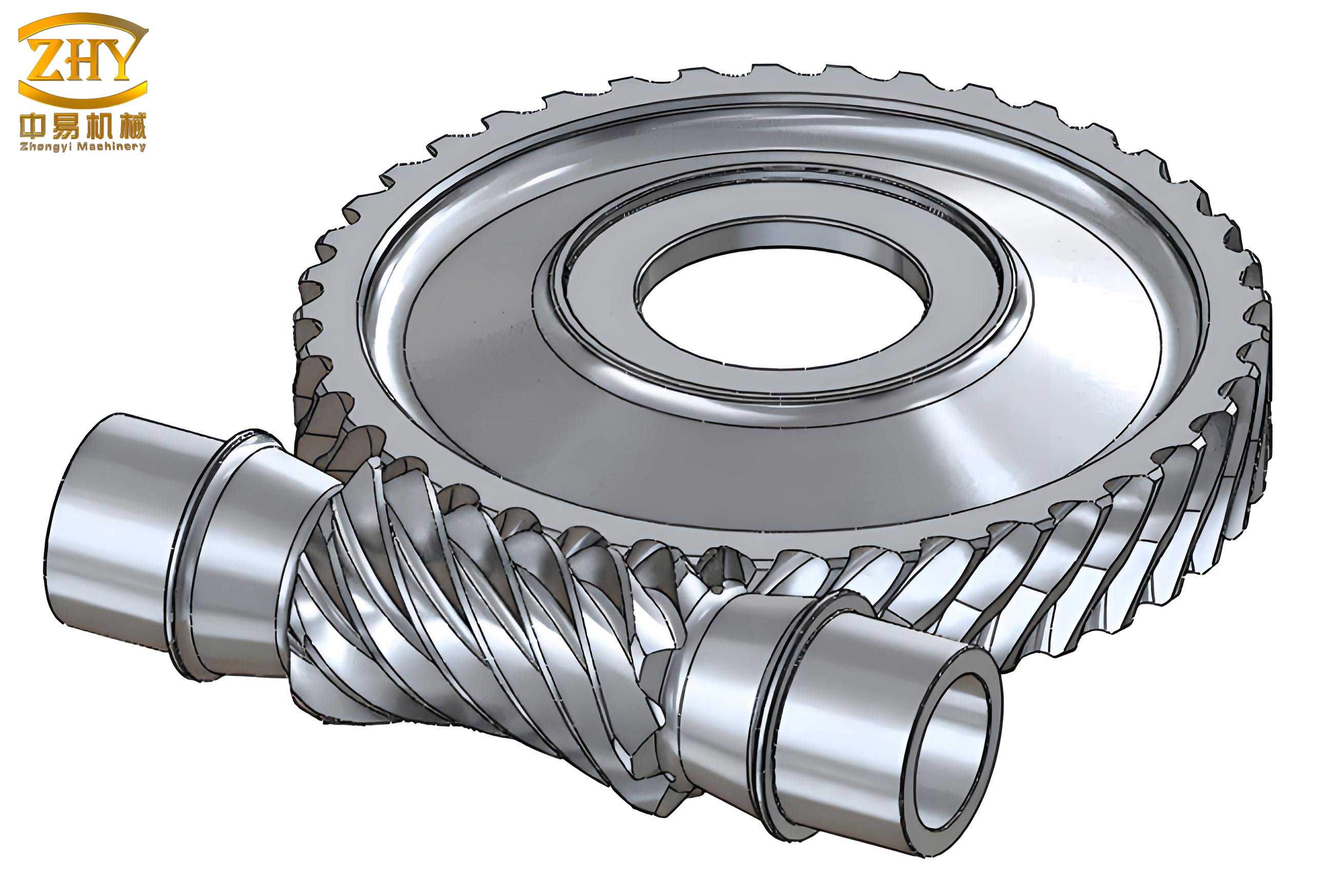
Now, I delve into the practical implementation using Excel. The workbook is structured into sections corresponding to the design steps. Each section utilizes Excel features like data validation for material choices, formulas for calculations, and conditional formatting for alerts. Below, I present key tables and formulas that encapsulate the design logic. Note that all formulas are written in Excel syntax, but for clarity, I also provide LaTeX representations for fundamental engineering equations.
1. Initial Setup and Input Parameters
The first step involves creating an Excel worksheet named “Screw Gear Design Technical File.” The worksheet is formatted for A4 paper, with a titled header. Known conditions are inputted in cells with light blue fill to distinguish them. Table 1 summarizes the initial parameters.
| Parameter | Symbol | Excel Cell | Unit | Example Value |
|---|---|---|---|---|
| Worm Input Power | P | B3 | KW | 5.5 |
| Worm Speed | n1 | B4 | r/min | 1450 |
| Worm Wheel Speed | n2 | B5 | r/min | 72.5 |
| Lifespan | L | B6 | years | 10 |
| Shift Pattern | — | E6 | h | 8 (single shift) |
The transmission ratio is calculated as: $$ i_{12} = \frac{n_1}{n_2} $$ In Excel, this is formula: =B4/B5.
2. Material Selection and Allowable Stresses
Materials for the worm and worm wheel are selected from dropdown lists created using data validation. The allowable stresses depend on material properties and life factors. Table 2 lists common material options for screw gears.
| Component | Material Options | Excel Cell | Notes |
|---|---|---|---|
| Worm Wheel | ZCuSn10Pb1, ZCuSn5Pb5Zn5, ZCuAl9Fe4Ni4 | B8 | Bronze alloys for good wear resistance |
| Worm | 20CrMnTi, 20Cr, 45 high-frequency hardened, 40Cr high-frequency hardened, 45 tempered | B9 | Steel alloys for strength and hardness |
The basic allowable contact stress for bronze worm wheels, [σ0H], is selected from a table based on material and casting method. Similarly, the basic allowable bending stress, [σ0F], is chosen. These are inputted via dropdowns. The life factors are calculated considering stress cycles. The number of stress cycles N is given by: $$ N = 60 \cdot n_2 \cdot j \cdot L_h $$ where j is the number of engagements per revolution (typically j=1), and L_h is the total working hours: $$ L_h = \text{years} \times 300 \times \text{hours per shift} $$ In Excel, =60*B5*D12*G12, with D12 for j and G12 for L_h.
The life factors for contact (KHN) and bending (KFN) are: $$ K_{HN} = \left( \frac{10^7}{N} \right)^{1/8} \quad \text{for } 2.6 \times 10^5 \leq N \leq 25 \times 10^7 $$ $$ K_{FN} = \left( \frac{10^6}{N} \right)^{1/9} \quad \text{for } 1 \times 10^5 \leq N \leq 25 \times 10^7 $$ In Excel, these are =(10^7/D13)^(1/8) and =(10^6/D13)^(1/9), respectively. Table 3 summarizes the stress calculations.
| Parameter | Symbol | Excel Formula | Unit |
|---|---|---|---|
| Basic Allowable Contact Stress | [σ0H] | Dropdown in D10 | MPa |
| Basic Allowable Bending Stress | [σ0F] | Dropdown in D11 | MPa |
| Contact Life Factor | KHN | =IF(AND(D13>=2.6E5, D13<=25E7), (10^7/D13)^(1/8), IF(D13<2.6E5, (10^7/2.6E5)^(1/8), (10^7/25E7)^(1/8))) | — |
| Bending Life Factor | KFN | =IF(AND(D13>=1E5, D13<=25E7), (10^6/D13)^(1/9), IF(D13<1E5, (10^6/1E5)^(1/9), (10^6/25E7)^(1/9))) | — |
| Allowable Contact Stress | [σH] | =KHN * [σ0H] | MPa |
| Allowable Bending Stress | [σF] | =KFN * [σ0F] | MPa |
3. Contact Strength Design
Based on the allowable contact stress, the screw gear design proceeds to determine the module m and pitch diameter d1 of the worm. The design inequality is: $$ m^2 d_1 \geq K \cdot T_2 \cdot \left( \frac{480}{z_2 [\sigma_H]} \right)^2 $$ where K is the load factor (1.1 to 1.4), T2 is the worm wheel torque, and z2 is the number of teeth on the worm wheel. The worm tooth count z1 is chosen based on the transmission ratio; typically, z1 = 1, 2, or 4. Then, z2 = i12 · z1. The worm wheel torque is derived from the input torque and efficiency: $$ T_1 = 9.55 \times 10^6 \frac{P}{n_1} \quad \text{N·mm} $$ $$ T_2 = T_1 \cdot i_{12} \cdot \eta $$ where η is the initial efficiency estimate (e.g., 0.8 for preliminary calculation). In Excel, these are computed as shown in Table 4.
| Parameter | Symbol | Excel Formula | Unit |
|---|---|---|---|
| Transmission Ratio | i12 | =B4/B5 | — |
| Worm Tooth Count | z1 | Dropdown in E23 (e.g., 2) | — |
| Worm Wheel Tooth Count | z2 | =E23*B23 | — |
| Initial Efficiency | η | Dropdown in C25 (e.g., 0.85) | — |
| Worm Torque | T1 | =9550000*B3/B4 | N·mm |
| Worm Wheel Torque | T2 | =G25*B23*C25 | N·mm |
| Load Factor | K | Dropdown in C28 (e.g., 1.2) | — |
| Required m²d1 | m²d1 | =C28*G26*(480/(H23*D20))^2 | mm³ |
From standard tables for screw gears, m and d1 are selected such that m²d1 meets or exceeds the calculated value. This selection is facilitated by a dropdown in Excel referencing a table of standard combinations.
4. Efficiency Verification and Sliding Velocity
The actual efficiency of the screw gear depends on the lead angle γ and friction. The lead angle is: $$ \tan \gamma = \frac{z_1 m}{d_1} $$ In Excel: =E23*H29/J29, where H29 is m and J29 is d1. The sliding velocity vs is critical for friction and heat generation: $$ v_s = \frac{\pi d_1 n_1}{60000 \cos \gamma} \quad \text{m/s} $$ Excel: =PI()*J29*B4/(60000*COS(F30*PI()/180)), with F30 storing γ in degrees. The啮合 efficiency η1 is: $$ \eta_1 = \frac{\tan \gamma}{\tan(\gamma + \rho_v)} $$ where ρv is the equivalent friction angle, selected from a table based on vs and material. The total efficiency η is: $$ \eta = \eta_1 \cdot \eta_2 \cdot \eta_3 $$ with η2η3 accounting for bearing and churning losses (typically 0.95–0.97). Table 5 encapsulates these calculations.
| Parameter | Symbol | Excel Formula | Unit |
|---|---|---|---|
| Lead Angle | γ | =DEGREES(ATAN(C30)) or custom format for degrees | ° |
| Sliding Velocity | vs | =PI()*J29*B4/(60000*COS(RADIANS(F30))) | m/s |
| Equivalent Friction Angle | ρv | Dropdown in C33 (e.g., 1.2° for vs ≤ 2 m/s) | ° |
| 啮合 Efficiency | η1 | =TAN(RADIANS(F30))/TAN(RADIANS(F30)+RADIANS(D33)) | — |
| Total Efficiency | η | =C35*C34 (C35 for η2η3) | — |
Conditional formatting is used to flag if vs exceeds the allowable limit for the selected material.
5. Bending Strength Check
The bending stress in the worm wheel teeth must be verified. The formula is: $$ \sigma_F = \frac{1.53 K T_2 Y_{F2} \cos \gamma}{d_1 z_2 m^2} \quad \text{MPa} $$ where YF2 is the tooth form factor, selected from a table based on z2 and profile. In Excel: =1.53*C28*G26*C38*COS(RADIANS(G30))/(J29*H23*H29^2). A conditional check ensures σF ≤ [σF]. Table 6 summarizes the bending strength parameters.
| Parameter | Symbol | Excel Formula | Unit |
|---|---|---|---|
| Tooth Form Factor | YF2 | Dropdown in C38 (e.g., 2.5 for z2=30) | — |
| Bending Stress | σF | =1.53*C28*G26*C38*COS(RADIANS(G30))/(J29*H23*H29^2) | MPa |
| Allowable Bending Stress | [σF] | Input in I20 from earlier calculation | MPa |
| Check | — | =IF(C39<=I20, “Bending strength sufficient”, “Insufficient, redesign”) | — |
6. Thermal Balance Calculation
Screw gears generate heat due to friction, and continuous operation requires thermal equilibrium to prevent overheating. The heat dissipation area A of the housing must satisfy: $$ A \geq \frac{1000 P (1 – \eta)}{k_s (t_1 – t_0)} \quad \text{m}^2 $$ where ks is the housing heat transfer coefficient (10–17 W/(m²·℃)), t1 is the allowable oil temperature (70–90℃), and t0 is the ambient temperature (typically 20℃). The estimated housing area can be approximated as: $$ A \approx 0.33 \left( \frac{a}{100} \right)^{1.75} \quad \text{m}^2 $$ with a being the center distance: $$ a = \frac{d_1 + m z_2}{2} $$ In Excel, these are computed as shown in Table 7.
| Parameter | Symbol | Excel Formula | Unit |
|---|---|---|---|
| Center Distance | a | =(J29+H29*H23)/2 | mm |
| Required散热 Area | Areq | =1000*B3*(1-C36)/(C41*(H42-C42)) | m² |
| Estimated散热 Area | Aest | =0.33*(C43/100)^1.75 | m² |
| Heat Transfer Coefficient | ks | Dropdown in C41 (e.g., 14) | W/(m²·℃) |
| Temperature Difference | t1 – t0 | Input in H42 and C42 | ℃ |
| Thermal Check | — | =IF(C45>=C44, “散热 area adequate”, “Inadequate, add cooling fins”) | — |
7. Geometric Dimension Calculation
Once the design is validated, the geometric dimensions for manufacturing are computed. Standard parameters include addendum coefficient ha* = 1 and clearance coefficient c* = 0.2. The key dimensions for the worm and worm wheel are listed in Table 8, with formulas derived from screw gear geometry.
| Dimension | Symbol | Excel Formula | Unit |
|---|---|---|---|
| Worm Tip Diameter | da1 | =J29+2*C47*H29 | mm |
| Worm Root Diameter | df1 | =J29-2*(C47+F47)*H29 | mm |
| Worm Axial Pitch | pa1 | =H29*PI() | mm |
| Worm Length | b1 | =(11+0.06*H23)*H29 | mm |
| Worm Wheel Pitch Diameter | d2 | =H29*H23 | mm |
| Worm Wheel Tip Diameter | da2 | =C52+2*C47*H29 | mm |
| Worm Wheel Root Diameter | df2 | =C52-2*(C47+F47)*H29 | mm |
| Worm Wheel Outer Diameter | de2 | =C53+6*H29/(E23+2) | mm |
| Worm Wheel Width | b2 | =0.75*C48 | mm |
These dimensions are automatically calculated in Excel, ensuring consistency and reducing manual errors.
Conclusion
In this comprehensive exploration, I have demonstrated how Excel can be effectively utilized for the design of screw gears. By structuring the workbook with clear sections, data validation, and embedded formulas, the entire design process—from material selection to geometric dimensioning—is streamlined. The use of tables and conditional formatting enhances usability, allowing designers to quickly assess validity and make adjustments. This Excel-based approach not only improves calculation efficiency and reliability but also serves as a reusable template for future screw gear projects. The integration of engineering principles with spreadsheet capabilities exemplifies how digital tools can transform traditional mechanical design, making it more accessible and robust. As screw gears continue to be vital in various machinery, adopting such methodologies will undoubtedly contribute to safer and more efficient engineering practices.
Throughout this article, I have emphasized the keyword ‘screw gear’ to highlight its relevance in mechanical transmissions. The techniques described here are applicable to a wide range of screw gear configurations, underscoring the versatility of Excel as a design aid. By leveraging these strategies, engineers can achieve precise and reliable screw gear designs with minimal effort, paving the way for innovation in power transmission systems.