
In the era of intelligent manufacturing, the fusion of traditional mechanical design principles with new-generation information technologies is paramount. As a foundational mechanical component, the helical gear is prized for its smooth, quiet operation and high load-bearing capacity, making it indispensable in high-speed and heavy-duty transmissions. The journey from design to flawless production hinges on high-fidelity digital models, which are crucial for simulation, manufacturing, and increasingly, for training AI-powered defect detection systems. Therefore, mastering efficient and accurate three-dimensional modeling of helical gears using Computer-Aided Design (CAD) software is a critical skill for modern engineers. This article delves into the geometric intricacies of helical involute gears and provides a comprehensive, comparative analysis of modeling methodologies across four prominent CAD platforms: Siemens NX, Dassault Systèmes SolidWorks, ZWSOFT ZW3D, and Autodesk AutoCAD.
Geometric Foundation of Helical Involute Gears
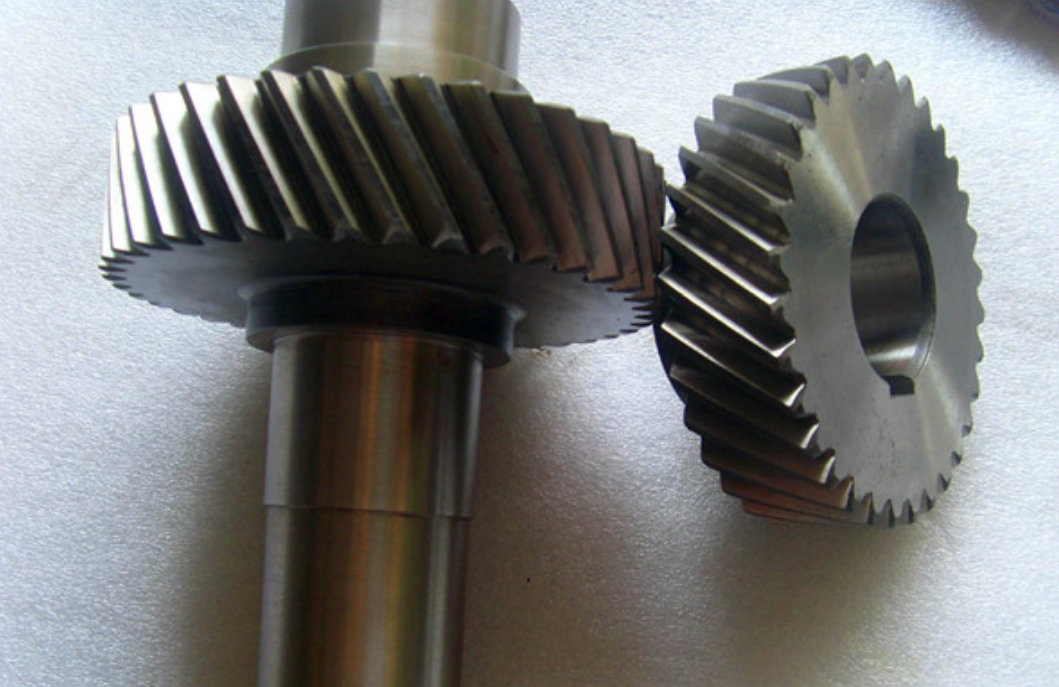
Understanding the unique geometry of a helical gear is essential before attempting any CAD modeling. Unlike spur gears, the teeth of a helical gear are cut at an angle to the gear axis. This helix angle, denoted by $\beta$, is the defining feature that grants its superior performance. However, this complexity introduces a distinction between normal and transverse (or axial) planes.
- Normal Plane ($\perp$ to tooth): Parameters here are standard and often match tooling specifications. Key normal parameters include:
- Normal Module, $m_n$
- Normal Pressure Angle, $\alpha_n$
- Normal Tooth Thickness
- Transverse Plane ($\perp$ to gear axis): This is the plane of rotation. Due to the helix, dimensions here differ. Critical transverse parameters are derived from normal parameters using the helix angle:
- Transverse Module: $m_t = \frac{m_n}{\cos(\beta)}$
- Transverse Pressure Angle: $\alpha_t = \arctan\left(\frac{\tan(\alpha_n)}{\cos(\beta)}\right)$
The primary diameters for a standard helical gear are calculated in the transverse plane using the transverse module $m_t$ and the number of teeth $z$:
- Pitch/Reference Diameter: $d = m_t \cdot z = \frac{m_n \cdot z}{\cos(\beta)}$
- Tip Diameter: $d_a = d + 2 \cdot m_n \cdot (h_{a}^*)$ where $h_{a}^*$ is the addendum coefficient.
- Root Diameter: $d_f = d – 2 \cdot m_n \cdot (h_{a}^* + c^*)$ where $c^*$ is the bottom clearance coefficient.
- Base Diameter (for involute profile): $d_b = d \cdot \cos(\alpha_t)$
The fundamental curve defining the tooth profile is the involute. Its parametric equations in the transverse plane, relative to the base circle radius $r_b = d_b / 2$, are given by:
$$ x(t) = r_b (\cos(t + \theta) + t \sin(t + \theta)) $$
$$ y(t) = r_b (\sin(t + \theta) – t \cos(t + \theta)) $$
Here, $t$ is the roll angle parameter (in radians), and $\theta$ is a phase shift often applied to center a tooth symmetrically on an axis. For a gear with $z$ teeth, a common rotation is $\theta = \frac{\pi}{2z} – \text{inv}(\alpha_t)$, where $\text{inv}(\alpha_t) = \tan(\alpha_t) – \alpha_t$ is the involute function.
The three-dimensional form of the helical gear tooth is created by sweeping this 2D involute profile along a helical path. The helix is defined by the pitch diameter $d$ and the helix angle $\beta$. The lead or axial pitch $P_z$ (the axial distance for one full revolution of the helix) is:
$$ P_z = \pi \cdot d \cdot \cot(\beta) $$
In CAD, a helix is typically defined by its pitch ($P_z / z$ per tooth) or directly by height and number of turns.
Comparative CAD Modeling Strategies for Helical Gears
The choice of CAD software significantly influences the modeling workflow for complex parts like helical gears. Below, we explore and contrast the primary methodologies in four major CAD environments.
1. Siemens NX: Power and Precision
Siemens NX, a high-end integrated CAD/CAM/CAE system, offers robust, production-ready modeling capabilities for helical gears. Its primary advantage lies in specialized toolkits and powerful parametric control.
Method A: The GC Toolbox (Fastest Method)
The GC Toolbox is a dedicated module within NX tailored to Chinese GB standards, which streamlines the creation of standard mechanical components. Creating a helical gear becomes a matter of data entry:
- Navigate to the GC Toolbox tab and select Gear Modeling -> Create Helical Gear.
- Input key parameters in a dedicated dialog box:
- Type: Helical
- Normal Module ($m_n$), Number of Teeth ($z$)
- Face Width, Normal Pressure Angle ($\alpha_n$)
- Helix Angle ($\beta$) and Hand (Left/Right)
- Click OK. NX automatically generates a fully defined, precise 3D model of the helical gear.
This method is exceptionally efficient for standard helical gears, eliminating the need to manually draw profiles or define sweeps.
Method B: Parametric Expression-Based Modeling (Most Flexible)
For non-standard or highly customized helical gears, or for educational understanding, the expression-driven method is preferred.
- Define Parameters: Open the Expressions editor. Create variables for all gear data ($m_n$, $z$, $\beta$, $\alpha_n$, $h_a^*$, $c^*$). Calculate derived parameters like $m_t$, $\alpha_t$, $d$, $d_b$, $r_b$ using formulas.
- Create the Involute Curve: In the expressions editor, define the parametric equations for the involute (with centering rotation $\theta$), e.g.,
xt = rb * (cos(t + theta) + t * sin(t + theta)). Use the Law Curve tool to generate the curve from these expressions. - Form the Tooth Profile Sketch: In a sketch on the transverse plane, draw the tip, root, and base circles. Include the generated involute curve. Mirror it about the tooth centerline, trim with the root circle, and close the profile to form a single tooth space or tooth entity.
- Create the Helical Path: Use the Helix tool or define a helix curve via expressions using the pitch diameter and lead formula.
- Sweep and Pattern:
- Extrude the root circle cylinder to the face width.
- Use the Sweep command: Section = tooth profile, Guide = helix. Set positioning to follow the path. For a solid tooth, use Boolean Union with the root cylinder.
- Use Pattern Feature (circular) with $z$ instances to create all teeth.
This method, while more involved, provides complete control and is the foundation for programmatic gear generation.
2. Dassault Systèmes SolidWorks: Intuitive and Engineer-Friendly
SolidWorks excels in user-friendliness and robust part modeling for mechanical design. Its approach to modeling helical gears is logical and leverages design tables and equation-driven curves.
Primary Method: Equation-Driven Curve and Cut-Sweep
- Set Up Global Variables: Use the Equations tool to define all gear parameters as global variables. This centralizes control (e.g.,
"mn"=2mm,"Z"=63,"Beta"=12deg). - Create the Gear Blank: Model the central hub, web, lightening holes, and keyway using standard extrude and cut features.
- Sketch the Tooth Space on the Front Face:
- Draw the tip, root, and base circles.
- Use Equation Driven Curve -> Parametric. Input the involute equations, referencing the global variables (e.g., for Xt:
=rb*(sin(t+theta)-t*cos(t+theta))). - Complete the tooth space profile by mirroring and trimming.
- Define the Helix: On the pitch circle, use Helix/Spiral with definition Height and Pitch. Height is the face width. Pitch is calculated as $P_z$.
- Create the Gear Teeth via Cut-Sweep:
- Use the Cut-Sweep command. The Profile is the tooth space sketch. The Path is the helix.
- Apply a root fillet in the sweep profile or as a separate feature afterward.
- Circular Pattern: Use Circular Pattern on the cut-sweep feature (and fillet), selecting the face width as the axis and $z$ for the number of instances. This subtractively creates all tooth spaces, leaving behind the solid teeth of the helical gear.
SolidWorks’ strength is the seamless integration of equations, features, and patterning, making the process highly visual and manageable.
3. ZWSOFT ZW3D: Agile Hybrid Modeling
ZW3D, featuring a proprietary kernel, is a rising CAD/CAM solution known for its hybrid modeling and strong data interoperability. Its workflow for helical gears is direct and leverages built-in curve libraries.
Primary Method: Built-in Equation Curves and Boolean Subtraction
- Model the Gear Blank: Create the core gear body (hub, web, holes) using sequential sketch-extrude-cut operations.
- Generate the Involute Profile via Library:
- In a sketch, draw the base and pitch circles.
- Use the Equation Curve command and select the pre-defined “Involute of a circle” template. Modify the template’s parameters directly in the dialog box to match your gear’s base diameter and angular range.
- Complete a single tooth space profile in the sketch.
- Create the Helix via Library: Use the Equation Curve command again, selecting a “Helix” template. Modify the radius (pitch radius), height (face width), and number of turns appropriately.
- Sweep a Single Tooth Space Solid: Use the Sweep command. Profile = tooth space sketch, Path = helix curve. This creates a solid “cutting tool” in the shape of one helical tooth gap.
- Pattern and Boolean Subtract:
- Use Pattern Feature (circular) to create $z$ instances of the swept solid around the gear axis.
- Finally, use a Boolean Subtract operation. The target body is the gear blank. The tool bodies are the array of $z$ helical tooth-space solids. Executing this subtraction yields the final helical gear model.
ZW3D’s approach is pragmatic, utilizing powerful Boolean operations after patterning, which can be computationally efficient for complex patterns.
4. Autodesk AutoCAD: The Geometric Drafting Approach
While not a parametric feature-based modeler like the others, AutoCAD’s 3D tools can construct helical gears through fundamental geometric construction, ideal for visualization or when other software is unavailable.
Primary Method: Geometric Construction of the Involute and Sweep
- Work in 3D Modeling Space: Start a drawing using a 3D template like acadiso3D.dwt and set the workspace to 3D Modeling.
- Construct the Involute Geometrically: On the XY plane (transverse plane):
- Draw the base circle.
- Divide the base circle into a large number of equal segments (using DIVIDE).
- For each division point: Draw the tangent line to the base circle. Along this tangent, mark off a length equal to the arc length from the starting point to the current division point. This series of points defines the involute locus. Connect them with a SPLINE.
- Complete the Full Tooth Profile: Mirror the involute to form one side of a tooth, draw the tip and root arcs, and trim to create a closed 2D profile for one tooth. Use ARRAY (polar) to create $z$ copies around the circle to form the complete transverse gear profile.
- Extrude and Sweep:
- Option 1 (Simpler): Use EXTRUDE on the closed gear profile with a Twist angle. The total twist angle = Face Width $\times \tan(\beta) / (d/2)$ in radians. This creates a twisted solid approximating the helical gear.
- Option 2 (More Accurate): Create a helix path (using HELIX command) based on pitch diameter and height. Use SWEEP on a single tooth profile along this helix path to create one 3D tooth, then array it. This is more complex but geometrically precise.
AutoCAD requires manual, step-by-step construction but reinforces the underlying geometric principles of the helical involute gear.
Synthesis and Software Selection Guidance
Modeling a helical gear is a quintessential task that tests a CAD system’s capabilities in parametric design, curve handling, and feature patterning. The following table synthesizes the core findings from our exploration of the four software packages.
| Modeling Software | Nature & Primary Use | Key Modeling Method for Helical Gears | Modeling Experience & Strengths |
|---|---|---|---|
| Siemens NX | High-end integrated CAD/CAM/CAE system for complex product development. | 1. GC Toolbox for instant generation. 2. Full parametric expression-based modeling with law curves and sweeps. |
Unmatched power and precision. Dedicated toolboxes (GC) offer incredible speed for standard parts. Parametric control is extremely deep, suitable for enterprise-level, knowledge-driven design. |
| Dassault Systèmes SolidWorks | Mid-range, feature-based mechanical design software dominant in general industry. | Equation-driven curves combined with cut-sweep and circular patterning. | Highly intuitive and visual workflow. Excellent integration of equations, features, and design tables. Large ecosystem and community support. Ideal for detailed mechanical part and assembly design. |
| ZWSOFT ZW3D | Hybrid modeling CAD/CAM software with a strong focus on data interoperability and machining. | Utilizing built-in equation curve libraries (involute, helix) followed by sweep, patterning, and Boolean subtraction. | Streamlined and direct command flow. Hybrid modeling excels at editing imported geometry. The “3D data collaboration” focus is a key advantage in diversified toolchain environments. |
| Autodesk AutoCAD | Industry-standard drafting tool with capable 3D modeling features, rooted in geometric precision. | Fundamental geometric construction of the involute profile, followed by extrusion with twist or sweep along a helix. | Teaches foundational geometry. Superior 2D drafting and detailing. High customizability via LISP/.NET APIs. The 3D modeling process is less fluid and parametric compared to dedicated solid modelers. |
Formula-Based Summary of Critical Calculations:
Regardless of the software chosen, accurate modeling of helical gears relies on these essential calculations derived from basic input parameters ($m_n$, $z$, $\beta$, $\alpha_n$):
- Transverse Module: $$m_t = \frac{m_n}{\cos(\beta)}$$
- Transverse Pressure Angle: $$\alpha_t = \arctan\left(\frac{\tan(\alpha_n)}{\cos(\beta)}\right)$$
- Reference Diameter: $$d = m_t \cdot z = \frac{m_n \cdot z}{\cos(\beta)}$$
- Base Diameter: $$d_b = d \cdot \cos(\alpha_t)$$
- Lead of Helix: $$P_z = \pi \cdot d \cdot \cot(\beta)$$
- Involute Function (for phase shift): $$\text{inv}(\alpha_t) = \tan(\alpha_t) – \alpha_t$$
Conclusion and Practical Recommendations
The successful 3D modeling of helical involute gears is a multi-faceted process blending theoretical geometry with practical software proficiency. All four examined CAD platforms—Siemens NX, SolidWorks, ZW3D, and AutoCAD—are capable of producing dimensionally accurate models suitable for engineering purposes, including serving as the digital foundation for advanced applications like defect detection systems in smart manufacturing.
The choice of tool, however, should be strategic and align with the broader context of the design work:
- For advanced, integrated product development involving complex surfaces, rigorous simulation, and direct CNC programming, Siemens NX is the premier choice. Its GC Toolbox and deep parametric capabilities make it exceptionally efficient and powerful.
- For mainstream mechanical design, product development, and detailed engineering drawings, SolidWorks offers the best balance of intuitive operation, powerful parametric features, and a vast support network. Its workflow for components like helical gears is logical and highly efficient.
- For environments prioritizing cost-effectiveness, strong compatibility with diverse file formats, and integrated manufacturing (CAM), ZW3D presents a compelling solution. Its hybrid modeling and straightforward approach to features like gear generation are significant advantages.
- For legacy environments centered on 2D drafting, for creating detailed drawing documentation, or for educational purposes where understanding first principles is key, AutoCAD remains a valid and powerful tool. Its 3D modeling of a helical gear is an excellent exercise in applied geometry.
Ultimately, mastering the modeling of helical gears is less about the specific clicks in one software and more about understanding the unifying geometric principles—the interplay between normal and transverse planes, the mathematics of the involute curve, and the kinematics of the helical sweep. This foundational knowledge empowers the designer to efficiently leverage the unique strengths of any modern CAD platform to bring high-performance helical gear designs from concept to digital reality.