
In mechanical engineering, gear transmission systems are pivotal due to their high efficiency and reliability. Among various gear types, the helical gear stands out for its smooth operation and reduced noise, making it ideal for high-speed and heavy-load applications. As an engineer with extensive experience in automotive transmissions, I have frequently utilized Pro/E Wildfire for designing helical gears. This software offers robust parametric modeling capabilities, allowing for precise and flexible gear design. In this article, I will share a comprehensive method for modeling involute helical gears using Pro/E Wildfire, incorporating equations, tables, and step-by-step instructions to ensure clarity and practicality. Throughout, I will emphasize the unique aspects of helical gear design, as these components are critical in modern machinery.
The helical gear differs from spur gears in that its teeth are cut at an angle to the axis of rotation, known as the helix angle. This design enables gradual engagement of teeth, reducing impact loads and vibrations. However, modeling helical gears in 3D CAD software like Pro/E requires a thorough understanding of involute geometry and parametric relationships. I will start by explaining the fundamental parameters of helical gears, then delve into the modeling process, and finally discuss advanced features and optimizations. By the end, you should be able to create accurate helical gear models that can be easily modified for different applications.
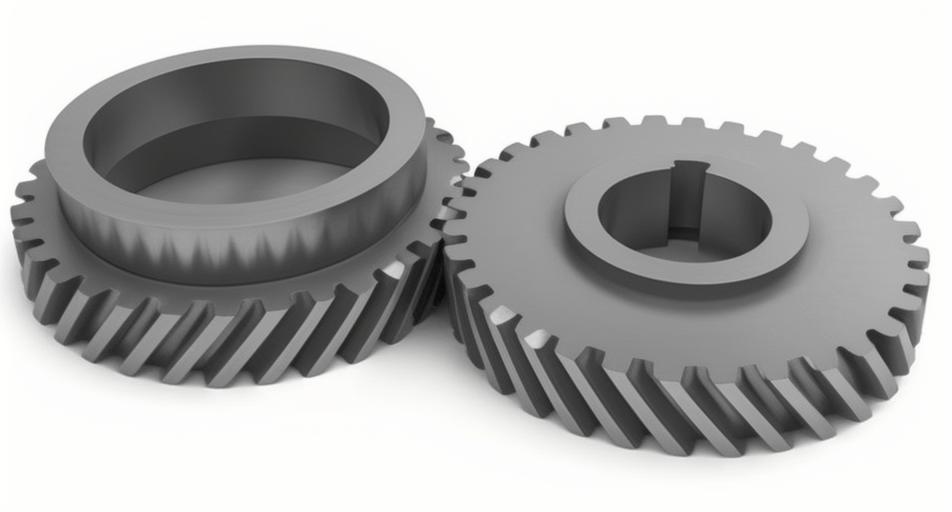
Before diving into the software, let’s review the key geometric principles of involute helical gears. The involute curve is essential for gear tooth profiles, as it ensures constant velocity ratio and smooth meshing. For a helical gear, the involute is defined in a plane normal to the tooth direction, but due to the helix angle, it must be projected onto the gear’s cylindrical surface. The basic parameters include: normal module (Mn), number of teeth (Z), pressure angle (α), helix angle (β), addendum coefficient, dedendum coefficient, and profile shift coefficient (x). These parameters interrelate through mathematical formulas, which I will express using LaTeX for clarity.
The pitch diameter (D) of a helical gear is calculated as:
$$D = \frac{M_n \cdot Z}{\cos(\beta)}$$
This accounts for the helix angle, which increases the effective circumference compared to a spur gear. The base diameter (Db), crucial for generating the involute, is:
$$D_b = D \cdot \cos(\alpha)$$
Other diameters, such as the addendum diameter (Da) and dedendum diameter (Df), depend on the tooth height factors. Typically, for standard helical gears, Da = D + 2 * Mn and Df = D – 2.5 * Mn, but profile shift can modify these. I often use the following table to summarize the parameters for quick reference:
| Parameter | Symbol | Formula or Value | Description |
|---|---|---|---|
| Normal Module | Mn | Input value (e.g., 3.7 mm) | Defines tooth size in normal plane |
| Number of Teeth | Z | Input value (e.g., 30) | Total teeth on the helical gear |
| Pressure Angle | α | Input value (e.g., 22.5°) | Angle between tooth profile and radial line |
| Helix Angle | β | Input value (e.g., 22° right-hand) | Angle of tooth inclination relative to axis |
| Profile Shift Coefficient | x | Input value (e.g., +0.5776) | Adjusts tooth thickness and strength |
| Pitch Diameter | D | $$D = \frac{M_n \cdot Z}{\cos(\beta)}$$ | Reference diameter for meshing |
| Base Diameter | Db | $$D_b = D \cdot \cos(\alpha)$$ | Diameter from which involute is generated |
| Addendum Diameter | Da | $$D_a = D + 2 \cdot M_n \cdot (1 + x)$$ | Outer diameter of helical gear |
| Dedendum Diameter | Df | $$D_f = D – 2 \cdot M_n \cdot (1.25 – x)$$ | Root diameter of helical gear |
| Face Width | B | Input value (e.g., 20 mm) | Axial length of helical gear |
With these fundamentals in mind, I proceed to the Pro/E Wildfire environment. The software’s parametric design approach allows me to define these parameters as variables, enabling easy updates. I start by creating a new part file and setting up parameters via the “Tools” menu. In Pro/E, parameters can be numeric or string types; for helical gears, I use numeric parameters for all geometric values. For instance, I define Mn = 3.7, Z = 30, α = 22.5, β = 22, x = 0.5776, and B = 20. Then, I add relations to compute dependent parameters like D and Db. This step ensures that any change in input automatically updates the entire model, a feature I find invaluable for iterative design.
Next, I create the gear blank by sketching four concentric circles on a datum plane, typically the FRONT plane. These circles represent the dedendum circle, base circle, pitch circle, and addendum circle. I assign dimensions to these circles but drive them through relations. For example, for the base circle diameter, I input a value but then add a relation: sd0 = Df, sd1 = Db, sd2 = D, sd3 = Da, where sd# are the dimension symbols in Pro/E. This links the sketches to the parameters, making the model fully parametric. The helical gear’s tooth profile relies on the involute curve, which I generate using the “Curve from Equation” feature. Pro/E uses a parameter t that ranges from 0 to 1, and I define the involute in Cartesian coordinates as follows:
$$x = \frac{D_b}{2} \cdot (\cos(t \cdot \theta) + t \cdot \theta \cdot \sin(t \cdot \theta))$$
$$y = \frac{D_b}{2} \cdot (\sin(t \cdot \theta) – t \cdot \theta \cdot \cos(t \cdot \theta))$$
$$z = 0$$
Here, θ is the roll angle, often set to 90 degrees for a full involute segment. In practice, I adjust θ based on the gear’s tooth space. This equation produces an involute curve in the sketch plane, but for a helical gear, it must be wrapped around the cylinder. To achieve this, I use a projection technique. First, I create a helical path that represents the tooth’s twist along the face width. This is done by sketching a line at the helix angle on a datum plane, then projecting it onto the pitch cylinder surface. In Pro/E, I extrude the pitch circle as a surface, then use the “Project” command to project the line onto this surface, resulting in a 3D curve that defines the tooth’s helical path.
The core of modeling a helical gear lies in the “Sweep Blend” feature, which allows me to sweep a varying cross-section along a trajectory. I set the trajectory as the projected helical curve from the previous step. For cross-sections, I need two profiles: one at each end of the tooth, accounting for the helix twist. I create these profiles by copying the initial sketch of the tooth space (which includes the involute and root fillet) and translating and rotating it appropriately. The translation distance equals the face width B, and the rotation angle is derived from the helix geometry. Specifically, the rotation angle (φ) is calculated as:
$$\phi = \arcsin\left(\frac{2 \cdot B \cdot \tan(\beta)}{D}\right)$$
This ensures that the tooth profiles align correctly along the helix. In Pro/E, I use the “Copy” and “Paste Special” features with “Move” options to perform these transformations. Once both profiles are ready, I initiate the Sweep Blend, select the helical trajectory, and choose the two profiles as sections. It’s crucial to match the start points of the sections to avoid twisting errors. After completing the sweep, I have a single tooth space on the helical gear. Then, I use the “Pattern” feature to array this tooth space around the axis, with the number of instances equal to Z and the angular increment set to 360/Z degrees. This completes the basic helical gear model.
To enhance the model, I add features like a central bore, keyway, chamfers, and lubrication holes. These are standard mechanical elements that I create using extrude, cut, and hole commands. I also apply relations to these features to maintain parametric control. For instance, the bore diameter might be linked to the shaft size, which can be defined as a parameter. This holistic approach ensures that the entire helical gear assembly is adaptable to design changes. Below, I summarize the key steps in a table for quick reference:
| Step | Action in Pro/E Wildfire | Key Parameters and Formulas | Purpose |
|---|---|---|---|
| 1 | Define parameters via Tools > Parameters | Mn, Z, α, β, x, B | Set initial helical gear specifications |
| 2 | Add relations for dependent parameters | $$D = \frac{M_n \cdot Z}{\cos(\beta)}$$, $$D_b = D \cdot \cos(\alpha)$$ | Automate calculations for diameters |
| 3 | Sketch concentric circles on datum plane | sd0 = Df, sd1 = Db, sd2 = D, sd3 = Da | Create gear blank with parametric circles |
| 4 | Generate involute curve using Curve from Equation | $$x = \frac{D_b}{2} \cdot (\cos(t \cdot \theta) + t \cdot \theta \cdot \sin(t \cdot \theta))$$, etc. | Define tooth profile geometry |
| 5 | Create helical trajectory by projecting a line | Line angle = β, projected onto pitch cylinder | Establish tooth twist path for helical gear |
| 6 | Copy and transform tooth profile sketches | Translate by B, rotate by $$\phi = \arcsin\left(\frac{2 \cdot B \cdot \tan(\beta)}{D}\right)$$ | Prepare cross-sections for sweep blend |
| 7 | Apply Sweep Blend feature with trajectory and sections | Select helical curve and two profiles | Form a single tooth space on helical gear |
| 8 | Pattern the tooth space around axis | Number = Z, angle increment = 360/Z | Complete full set of teeth for helical gear |
| 9 | Add additional features (bore, keyway, etc.) | Link dimensions to parameters via relations | Customize helical gear for assembly |
In my experience, designing helical gears in Pro/E Wildfire offers several advantages. The parametric nature allows for rapid prototyping and optimization. For example, if I need to adjust the helix angle to reduce noise, I simply change β in the parameters, and the entire model updates accordingly. This is particularly useful for helical gears used in automotive transmissions, where performance requirements often vary. Additionally, I can simulate meshing with other gears using Pro/E’s assembly module, checking for interferences and contact patterns. I often export the model to FEA software for stress analysis, ensuring the helical gear can withstand operational loads.
Another aspect I emphasize is the importance of accuracy in involute generation. Small errors in the curve can lead to poor meshing and increased wear. Therefore, I always verify the involute equation and ensure it matches standard gear design handbooks. For helical gears, the normal plane involute is key, but the transverse plane (perpendicular to the axis) also matters. The transverse pressure angle (αt) is related to the normal pressure angle by:
$$\tan(\alpha_t) = \frac{\tan(\alpha)}{\cos(\beta)}$$
This formula highlights how the helix angle affects the tooth geometry. I incorporate such relationships into my Pro/E models using relations, making the helical gear design more robust. Moreover, I consider manufacturing constraints; for instance, helix angles above 45 degrees are uncommon due to machining challenges, so I typically keep β between 15° and 30° for practical helical gears.
Beyond basic modeling, I explore advanced features like modifying tooth root fillets for stress reduction or adding crowning to improve load distribution. In Pro/E, I use variable section sweeps or style surfaces for these enhancements. For example, to create a crowned helical gear, I define a trajectory with a slight arc and sweep the tooth profile along it. This requires careful parameterization to maintain gear tooth consistency. I also use family tables in Pro/E to create multiple versions of a helical gear (e.g., different numbers of teeth or face widths) from a single master model, saving time in large projects.
Throughout this process, I repeatedly encounter the term “helical gear” because its design nuances are central to the discussion. Whether discussing parameters like helix angle or features like sweep blending, the helical gear’s unique characteristics demand attention. For instance, the helical gear’s contact ratio is higher than that of spur gears, leading to smoother operation. The contact ratio (ε) can be approximated as:
$$\epsilon = \frac{\sqrt{D_a^2 – D_b^2} + \sqrt{d_a^2 – d_b^2} – C \cdot \sin(\alpha_t)}{p_t \cdot \cos(\beta)}$$
where da and db are the addendum and base diameters of the mating gear, C is the center distance, and pt is the transverse pitch. This formula underscores the complexity of helical gear design, but Pro/E helps manage it through parametric tools.
In conclusion, modeling involute helical gears in Pro/E Wildfire is a systematic process that leverages parametric design, equation-driven curves, and advanced features like sweep blend. I have detailed the steps from parameter definition to patterning, emphasizing the use of relations for flexibility. By incorporating tables and formulas, I aim to provide a clear reference for engineers. The helical gear, with its angled teeth, offers superior performance in many applications, and mastering its 3D modeling is essential for modern mechanical design. As software evolves, I anticipate even more integrated tools for helical gear analysis and optimization, but the fundamentals shared here will remain relevant. I encourage practicing these methods to gain proficiency and explore further innovations in helical gear technology.
To reinforce the concepts, let’s consider a practical example: designing a helical gear for a wind turbine gearbox. The requirements might include high torque capacity and low noise. I would start by setting parameters such as Mn = 5 mm, Z = 40, β = 25°, and B = 50 mm. Using the formulas above, I compute D ≈ 220.94 mm and Db ≈ 207.21 mm (assuming α = 20°). Then, in Pro/E, I follow the steps outlined, paying extra attention to the root fillet to minimize stress concentrations. I might also perform a virtual prototyping simulation to validate the design. This iterative approach ensures that the helical gear meets all specifications while leveraging Pro/E’s capabilities.
Finally, I reflect on the broader implications. The helical gear is a cornerstone of mechanical transmission systems, and its accurate modeling contributes to efficient and reliable machinery. By sharing this knowledge, I hope to empower other engineers to tackle complex gear design challenges with confidence. Whether for automotive, aerospace, or industrial applications, the principles of helical gear modeling in Pro/E Wildfire provide a solid foundation for innovation and excellence in engineering.