
In the realm of mechanical engineering, cylindrical gears are among the most critical components for power transmission due to their efficiency, durability, and precise motion control. As a mechanical engineer, I often encounter the need for accurate digital models of cylindrical gears for finite element analysis, motion simulation, and assembly design. However, existing modeling techniques in software like SolidWorks can be limited by inaccuracies, dependency on external plugins, or inefficiencies in parametric updates. In this article, I will present an optimized method for precise parametric modeling of cylindrical spur gears using SolidWorks’ built-in tools, focusing on involute curve generation, parameterization, and feature compression to enhance accuracy and workflow efficiency. This approach ensures that the resulting models of cylindrical gears are highly accurate, symmetric, and adaptable to various design scenarios, all while minimizing the use of external software.
The importance of cylindrical gears in modern machinery cannot be overstated. They are widely used in automotive systems, industrial equipment, and robotics for their ability to transmit power smoothly and reliably. Accurate modeling of these cylindrical gears is essential for performance analysis, such as stress distribution and wear prediction. In my experience, many engineers rely on approximate methods or third-party plugins, which can introduce errors or complicate design iterations. My goal is to leverage SolidWorks’ equations and curve-driven features to create a robust parametric model that addresses these shortcomings. By the end of this discussion, you will understand how to implement this optimized method for cylindrical gears, enabling rapid redesign and high-fidelity simulations.
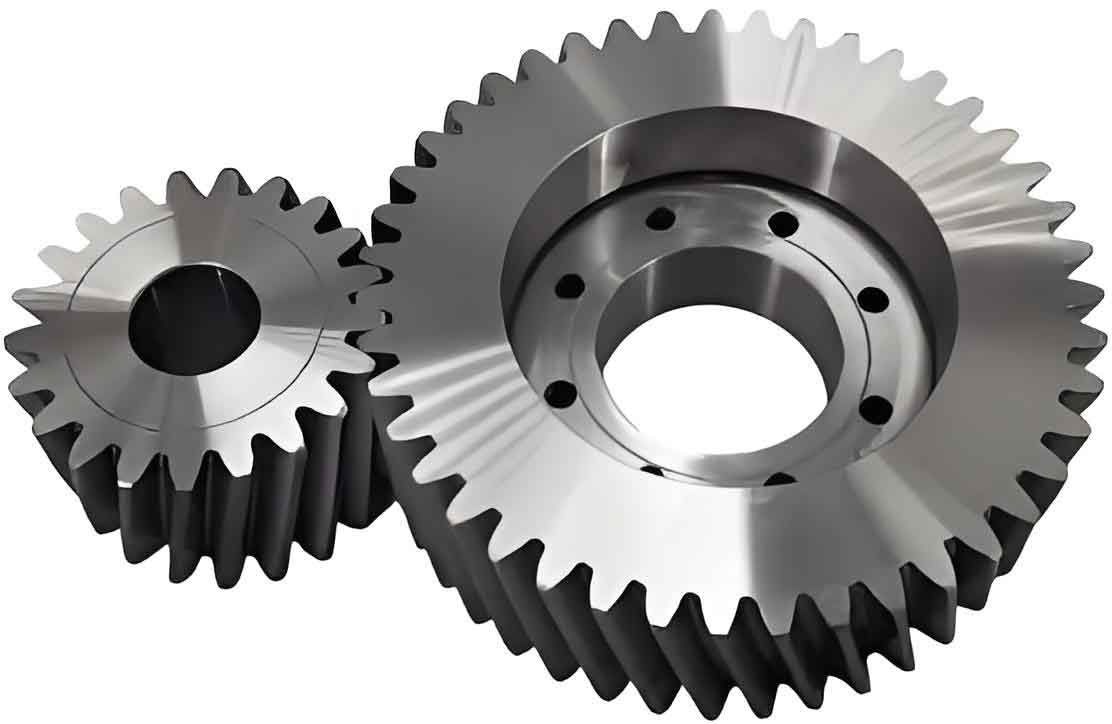
To begin, let’s delve into the fundamental geometry of cylindrical gears. The tooth profile of a cylindrical spur gear is based on an involute curve, which ensures smooth engagement and constant velocity ratio. The involute is defined as the trajectory traced by a point on a straight line that rolls without slipping on a base circle. This geometric principle underpins the precise modeling of cylindrical gears. The standard parametric equations for an involute curve in Cartesian coordinates are derived from this rolling motion. For a base circle with diameter $D_b$, the equations are given by:
$$ x = \frac{D_b}{2} (\theta \sin \theta + \cos \theta) $$
$$ y = \frac{D_b}{2} (\sin \theta – \theta \cos \theta) $$
where $\theta$ is the roll angle in radians. These equations generate the involute shape, but as I have observed, they often produce a tooth profile that is not symmetric about the coordinate axes. This asymmetry can lead to alignment issues during gear assembly, especially when positioning cylindrical gears in complex mechanisms. Therefore, an optimization is necessary to rotate the involute curve so that the gear model becomes symmetric about the x-axis, simplifying subsequent design steps.
The rotation of the involute curve involves coordinate transformation. By applying a rotation matrix to the original equations, we can adjust the curve by an angle $\beta$. This angle $\beta$ is calculated based on gear parameters to ensure symmetry. For a cylindrical gear with pressure angle $\alpha$ and tooth count $Z$, the rotation angle $\beta$ in radians is derived from the gear geometry. The derivation starts with the relationship between the roll angle $\theta$ and pressure angle $\alpha$:
$$ \theta = \tan \alpha $$
This is in radians, but for calculation purposes, it’s often converted to degrees. The half-angle between teeth, $\gamma$, is given by:
$$ \gamma = \frac{90}{Z} \text{ (in degrees)} $$
Thus, the rotation angle $\beta$ in degrees is:
$$ \beta = \alpha + \gamma – \theta \times \frac{180}{\pi} $$
To use this in SolidWorks, which requires radians, we convert it:
$$ \beta = \left( \alpha + \frac{90}{Z} – \tan \alpha \times \frac{180}{\pi} \right) \times \frac{\pi}{180} $$
Applying this rotation to the original involute equations using the rotation matrix formulas:
$$ x’ = x \cos \beta – y \sin \beta $$
$$ y’ = x \sin \beta + y \cos \beta $$
where $(x, y)$ are the original coordinates from the basic involute equations. Substituting these, we obtain the optimized involute equations for cylindrical gears:
$$ x’ = \left[ \frac{D_b}{2} (\theta \sin \theta + \cos \theta) \right] \cos \beta – \left[ \frac{D_b}{2} (\sin \theta – \theta \cos \theta) \right] \sin \beta $$
$$ y’ = \left[ \frac{D_b}{2} (\theta \sin \theta + \cos \theta) \right] \sin \beta + \left[ \frac{D_b}{2} (\sin \theta – \theta \cos \theta) \right] \cos \beta $$
These equations ensure that the tooth profile of the cylindrical gear is symmetric about the x-axis, facilitating easier assembly and analysis. In my implementation, I use these optimized equations directly in SolidWorks’ equation-driven curve tool to generate precise involute curves for cylindrical gears.
Now, let’s move to the parametric modeling process for cylindrical gears in SolidWorks. This involves setting up global variables, creating sketches, and building the 3D model with features that update automatically based on parameter changes. The key parameters for standard cylindrical gears are listed in the table below, which I use as a reference throughout the design.
| Parameter | Symbol | Formula | Description |
|---|---|---|---|
| Module | $m$ | Input value | Defines the size of the cylindrical gear teeth |
| Number of Teeth | $Z$ | Input value | Total teeth count on the cylindrical gear |
| Pressure Angle | $\alpha$ | Input value (e.g., 20°) | Angle defining the tooth shape |
| Addendum Coefficient | $h_a^*$ | Input value (e.g., 1.0) | Factor for tooth addendum height |
| Dedendum Coefficient | $c^*$ | Input value (e.g., 0.25) | Factor for tooth dedendum height |
| Face Width | $B$ | Input value | Thickness of the cylindrical gear |
| Pitch Diameter | $d$ | $d = m Z$ | Diameter at the pitch circle |
| Base Diameter | $D_b$ | $D_b = d \cos \alpha$ | Diameter of the base circle |
| Addendum Diameter | $D_a$ | $D_a = d + 2 h_a^* m$ | Diameter at the tooth tips |
| Dedendum Diameter | $D_f$ | $D_f = d – 2 m (h_a^* + c^*)$ | Diameter at the tooth roots |
In SolidWorks, I start by creating global variables through the “Equations” manager. This allows me to define all the parameters and their relationships. For instance, I set $m = 2$, $Z = 50$, $\alpha = 20^\circ$, $h_a^* = 1.0$, $c^* = 0.25$, and $B = 20$ mm as initial values. The formulas for derived dimensions like $d$, $D_b$, $D_a$, and $D_f$ are linked to these variables, ensuring that any change in $m$ or $Z$ automatically updates the entire model of the cylindrical gear. This parametric approach saves time and reduces errors when designing multiple variants of cylindrical gears for different applications.
Next, I create sketches for the gear profiles. I draw concentric circles for the addendum, pitch, dedendum, and base circles on a sketch plane, using the global variables to dimension them. For example, the addendum circle diameter is set to “=Da” from the global variables. Then, I use the “Equation-Driven Curve” tool to generate the optimized involute curve. I input the parametric equations for $x’$ and $y’$ as defined earlier, with $t$ representing $\theta$ and ranging from $0$ to $\pi$ to cover the necessary involute segment. This curve is fully defined and fixed in the sketch to prevent unwanted movements.
With the sketches complete, I proceed to build the 3D model of the cylindrical gear. I extrude the addendum circle to create the gear blank, using the face width $B$ as the extrusion depth. Then, I sketch the tooth profile by converting the involute curve and relevant circles into entities. I trim and close the profile to form a single tooth space, then use the “Extrude-Cut” feature to remove material from the blank. To ensure symmetry, I mirror this cut about the x-axis plane. Finally, I apply a fillet to the tooth root with a radius defined by $r = m \times 0.38$, which is a standard practice to reduce stress concentrations in cylindrical gears. The tooth profile is then replicated around the gear using a circular pattern with the number of instances set to $Z$, linking it to the global variable. This results in a complete cylindrical gear model that updates parametrically.
However, a challenge arises when modeling cylindrical gears with a low tooth count. Specifically, when the base circle diameter $D_b$ is larger than the dedendum diameter $D_f$, which occurs for $Z \leq 41$ (calculated from $D_f \leq D_b$), the involute curve starts outside the dedendum circle. If I simply change the tooth count in the global variables, the model fails to rebuild because the sketches become invalid. To handle this, I implement feature compression using IF functions in SolidWorks equations. This allows me to use a single model file for cylindrical gears with any tooth count, enhancing versatility.
The IF function in SolidWorks follows the syntax: variable = IF(expression, value_if_true, value_if_false). For feature compression, I apply it to control the suppression state of features. For example, for the initial tooth-cut feature designed for $Z > 41$, I add an equation in the “Equations” manager under the “Features” section:
FeatureState = IF(Z > 41, "suppressed", "unsuppressed")
This compresses the feature when $Z > 41$ and unsuppresses it otherwise. Similarly, I create an alternative tooth-cut feature for $Z \leq 41$, where I adjust the sketch to handle the involute starting point by adding a tangent line from the involute to the dedendum circle. I then apply a reciprocal IF function to this feature:
FeatureState = IF(Z > 41, "unsuppressed", "suppressed")
This ensures that only the appropriate feature is active based on the tooth count. The table below summarizes the feature compression logic for cylindrical gears:
| Tooth Count Range | Feature for $Z > 41$ | Feature for $Z \leq 41$ | Action |
|---|---|---|---|
| $Z > 41$ | Active | Compressed | Uses standard involute from base circle |
| $Z \leq 41$ | Compressed | Active | Uses modified sketch with tangent line |
By integrating this conditional logic, I can modify the global variable $Z$ from 50 to 30, for instance, and the model rebuilds successfully by switching between features. This eliminates the need for multiple files or manual adjustments, streamlining the design process for cylindrical gears with varying specifications.
To further illustrate the parametric relationships, let’s consider the mathematical foundations. The design of cylindrical gears relies on precise calculations to ensure proper meshing and performance. The module $m$ is a key parameter that scales the gear size. For two cylindrical gears in mesh, the center distance $a$ is given by:
$$ a = \frac{m (Z_1 + Z_2)}{2} $$
where $Z_1$ and $Z_2$ are the tooth counts of the mating cylindrical gears. This formula highlights the importance of parametric control, as changes in $m$ or $Z$ affect the assembly dimensions. Additionally, the contact ratio $C_r$, which measures the smoothness of engagement, is calculated as:
$$ C_r = \frac{\sqrt{D_{a1}^2 – D_{b1}^2} + \sqrt{D_{a2}^2 – D_{b2}^2} – a \sin \alpha}{\pi m \cos \alpha} $$
where subscripts 1 and 2 refer to the two cylindrical gears. A higher contact ratio indicates better load distribution and quieter operation. By incorporating such formulas into the global variables, I can create dynamic models that not only represent geometry but also validate performance metrics. In SolidWorks, I can add these as custom properties or equations to automate analysis for cylindrical gears.
Moreover, the parametric modeling approach extends to material properties and finite element analysis (FEA). For instance, after creating the cylindrical gear model, I can assign material properties like steel or plastic through SolidWorks’ material library. The global variables can be linked to FEA parameters, such as load conditions based on torque transmission. The torque $T$ transmitted by a cylindrical gear is related to the tangential force $F_t$ at the pitch circle:
$$ F_t = \frac{2T}{d} $$
This force can be used in simulation studies to evaluate stress and deformation. By using parametric models, I can quickly iterate designs by adjusting $m$ or $B$ and rerun simulations to optimize the cylindrical gear for weight, strength, or cost. This iterative process is crucial in industries like automotive or aerospace, where cylindrical gears must meet stringent standards.
In terms of practical implementation, I recommend saving the optimized cylindrical gear model as a template file in SolidWorks. This template includes all global variables, equations, sketches, and features with conditional compression. When starting a new design, engineers can open this template, modify the parameters like module and tooth count, and instantly generate a custom cylindrical gear. This reduces modeling time from hours to minutes, especially when dealing with families of cylindrical gears for a product line. Additionally, the template ensures consistency across projects, as all cylindrical gears are derived from the same precise methodology.
To enhance the utility of this parametric model, I often integrate it with SolidWorks’ configurations and design tables. Configurations allow me to create multiple versions of the cylindrical gear within a single file, such as different tooth counts or face widths, without rebuilding from scratch. Design tables, which are Excel spreadsheets linked to SolidWorks, enable batch editing of parameters. For example, I can define a table with rows for various cylindrical gears:
| Configuration | Module $m$ (mm) | Teeth $Z$ | Face Width $B$ (mm) | Pressure Angle $\alpha$ (°) |
|---|---|---|---|---|
| Gear_20T | 2 | 20 | 15 | 20 |
| Gear_30T | 2 | 30 | 20 | 20 |
| Gear_50T | 3 | 50 | 25 | 20 |
| Gear_100T | 1.5 | 100 | 30 | 14.5 |
By linking these parameters to the global variables, I can generate an entire series of cylindrical gears with a few clicks. This is particularly useful for standardization in manufacturing, where companies produce cylindrical gears in various sizes for different machinery. The parametric model adapts to each configuration, maintaining accuracy and symmetry throughout.
Another advantage of this optimized method is its compatibility with additive manufacturing and CNC machining. Once the cylindrical gear model is finalized, I can export it to STL or STEP formats for 3D printing or CAM programming. The precise involute profile ensures that manufactured cylindrical gears have minimal backlash and noise. In prototyping, I have used this approach to create functional cylindrical gears for testing in gearboxes, validating the design before mass production. The ability to quickly adjust parameters like tooth count or pressure angle allows for rapid iteration based on test results, reducing development cycles.
From a theoretical perspective, the involute curve’s properties are ideal for cylindrical gears because it provides conjugate action, meaning that the gears maintain a constant angular velocity ratio during meshing. This is derived from the fundamental law of gearing, which states that the common normal at the point of contact must always pass through a fixed point on the line of centers. The involute satisfies this condition, making it the standard for cylindrical gears. The parametric equations I use ensure that this condition is met digitally, leading to accurate simulations of motion and force transmission. For cylindrical gears in high-speed applications, such as in turbines or compressors, this accuracy is critical to avoid vibrations and premature failure.
Furthermore, the optimization of the involute equations for symmetry has broader implications. In assembly design, symmetric cylindrical gears simplify mating and alignment, as they can be positioned relative to standard planes without additional rotations. This reduces the risk of errors in automated assembly lines. In FEA, symmetric models often require less computational resources due to the ability to apply symmetry boundary conditions. For instance, when analyzing stress in a cylindrical gear tooth, I can model only a sector of the gear and use symmetry to extrapolate results, speeding up simulations. This efficiency is valuable in iterative design processes where multiple analyses are performed.
To summarize the modeling steps, I have created a flowchart-like sequence for designing cylindrical gears in SolidWorks:
- Define global variables for all gear parameters (e.g., $m$, $Z$, $\alpha$).
- Calculate derived dimensions (e.g., $D_b$, $D_a$, $D_f$) using equations linked to global variables.
- Draw circles for addendum, pitch, dedendum, and base circles in a sketch, dimensioning them with global variables.
- Generate the optimized involute curve using the equation-driven curve tool with the rotated equations.
- Create the gear blank by extruding the addendum circle with thickness $B$.
- Sketch the tooth profile by referencing the involute and circles, then cut-extrude it for $Z > 41$, or use a modified sketch for $Z \leq 41$.
- Apply fillets to tooth roots and mirror features as needed for symmetry.
- Pattern the tooth cut around the gear using a circular pattern with instance count $Z$.
- Implement feature compression with IF functions to handle different tooth count ranges.
- Validate the model by checking dimensions and performing motion studies or FEA as required.
This sequence ensures that every cylindrical gear model is precise, parametric, and adaptable. By following it, engineers can avoid common pitfalls like inaccurate tooth profiles or rebuild errors. In my practice, I have applied this method to design cylindrical gears for conveyor systems, where precise motion control is essential. The parametric updates allowed me to quickly adjust gear sizes based on changing load requirements, saving significant design time.
In conclusion, the optimized parametric modeling method for cylindrical gears in SolidWorks offers substantial benefits over traditional approaches. By using equation-driven curves and global variables, I achieve high accuracy in the involute tooth profile, which is crucial for performance analysis. The rotation of the involute ensures symmetry, simplifying assembly and simulation. The integration of IF functions for feature compression enables a single model file to accommodate cylindrical gears with any tooth count, enhancing flexibility and efficiency. This method reduces dependency on external plugins, streamlining the workflow and minimizing errors. As cylindrical gears continue to be vital components in mechanical systems, this parametric approach empowers engineers to create robust designs that meet evolving demands. I encourage adoption of this technique to improve the design and analysis of cylindrical gears across industries, from automotive to robotics, ensuring reliability and innovation in gear technology.