
In the field of mechanical engineering, particularly for heavy-duty equipment such as those used in coal mining, the performance and longevity of transmission systems are critically dependent on the quality of their components. Among these, the helical gear stands out due to its ability to provide smoother and quieter operation compared to spur gears, along with higher load-carrying capacity. As an engineer focused on precision design and simulation, I have often encountered the challenge of creating accurate three-dimensional models of helical gears for finite element analysis (FEA) and computational dynamics. This article delves into the theoretical foundations and practical steps for building a parameterized model of a helical gear using CREO software. The goal is to establish a robust methodology that allows for rapid iteration and simulation-ready geometries, ensuring that the helical gear’s complex tooth profile is faithfully represented.
The complexity of a helical gear arises from its teeth being cut at an angle to the axis of rotation, forming a helix. This geometry means that the tooth shape varies along the gear’s width, making exact modeling more involved than for spur gears. To achieve an accurate representation, one must consider both the helical path and the tooth profile in the normal plane—the plane perpendicular to the tooth’s spiral direction. In this work, I will derive the necessary equations, demonstrate their implementation in CREO, and highlight how parameterization facilitates design flexibility. The focus will be on the helical gear used in a specific coal mining equipment application, but the principles are universally applicable.
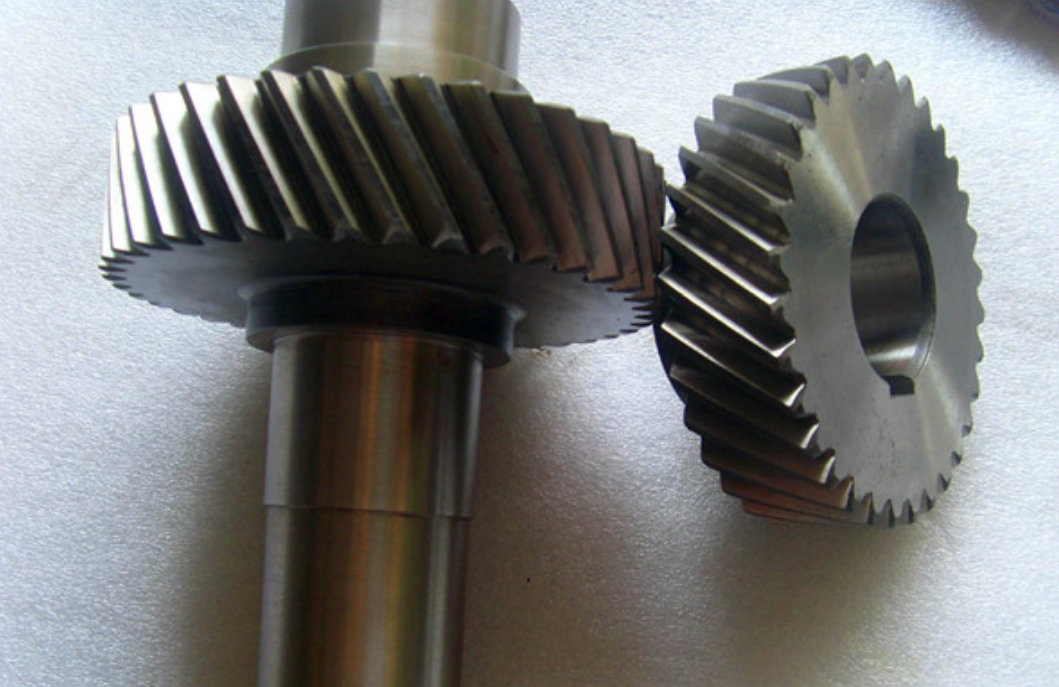
To begin, let’s explore the theoretical underpinnings of helical gear geometry. Unlike spur gears, where the tooth trace is straight and parallel to the axis, a helical gear has a tooth trace that follows a helical path around the cylindrical body. This helix introduces a key parameter: the helix angle, denoted as $\beta$. The helix angle is defined on the pitch cylinder, and it influences many aspects of the gear’s performance, including contact ratio and axial thrust. When modeling a helical gear, we must account for two distinct tooth profiles: the transverse profile (in the plane perpendicular to the gear axis) and the normal profile (in the plane perpendicular to the helix). Since manufacturing tools typically cut teeth in the normal plane, the normal profile is often used as the basis for accurate modeling.
The first step in modeling a helical gear is to mathematically describe the helix. Consider a helical gear with a pitch diameter $d$, face width $b$, and helix angle $\beta$. If we unwrap the pitch cylinder, the helix appears as a straight line on the developed surface, forming a right triangle with the cylinder’s circumference and the lead of the helix. In a cylindrical coordinate system $(r, \theta, z)$, with the origin placed at a convenient point along the gear axis, the parametric equations for the helix on the pitch cylinder can be expressed as follows, where $t$ is a parameter ranging from 0 to 1, and $a$ is an offset related to the coordinate system setup:
$$ r = \frac{d}{2} $$
$$ \theta = \frac{360 \cdot t \cdot (b + a) \cdot \tan \beta}{\pi d} $$
$$ z = (b + a) \cdot t $$
These equations define the path that the tooth follows along the gear’s width. For our purposes, we can simplify by setting $a = 0$ when the origin is at one end of the gear, but the general form allows flexibility. The helix angle $\beta$ is crucial here; it determines the steepness of the spiral. A larger $\beta$ increases the helical overlap, enhancing smoothness but also axial forces. In practice, helix angles for helical gears typically range from 15° to 30°, but for heavy-duty applications like mining equipment, values around 8° to 20° are common to balance performance and durability.
Next, we turn to the tooth profile itself. Because the teeth are helical, the normal plane cross-section differs from the transverse plane. To derive the normal profile, we use the concept of an equivalent spur gear, often called the “virtual” or “formative” gear. This equivalent gear has a pitch circle diameter that corresponds to the curvature of the helix in the normal plane. Specifically, if we take a point on the helix and slice the gear with a plane perpendicular to the helix at that point, the resulting section is an ellipse. The radius of curvature of this ellipse at that point becomes the pitch radius of the equivalent spur gear.
Let $d_t$ be the transverse pitch diameter, related to the normal module $m_n$ and number of teeth $z$ by $d_t = \frac{m_n z}{\cos \beta}$. The pitch diameter of the equivalent spur gear, $d_v$, is given by:
$$ d_v = \frac{d_t}{\cos^2 \beta} $$
This equation arises from the geometry of the ellipse. Similarly, the pressure angle in the transverse plane, $\alpha_t$, is related to the normal pressure angle $\alpha_n$ by $\tan \alpha_t = \frac{\tan \alpha_n}{\cos \beta}$. For the equivalent spur gear, we use the normal pressure angle $\alpha_n$, typically 20° or 25°. The base circle diameter of the equivalent spur gear, $d_{bv}$, is then:
$$ d_{bv} = d_v \cdot \cos \alpha_n $$
The addendum and dedendum heights for the equivalent gear are the same as those for the helical gear in the normal plane, usually $h_a = m_n$ and $h_f = 1.25 m_n$ for standard full-depth teeth. Thus, the tip diameter $d_{av}$ and root diameter $d_{fv}$ of the equivalent spur gear are:
$$ d_{av} = d_v + 2h_a $$
$$ d_{fv} = d_v – 2h_f $$
With these parameters defined, we can now describe the tooth profile using the involute curve. The involute is the curve traced by a point on a taut string as it unwinds from a circle. For the equivalent spur gear, the involute profile in the normal plane can be expressed parametrically. Let $\theta$ be the roll angle parameter. Then, the coordinates $(x, y)$ on the involute, relative to the gear center, are:
$$ x = r_b \cos \theta + r_b \theta \sin \theta $$
$$ y = r_b \sin \theta – r_b \theta \cos \theta $$
$$ z = 0 \text{ (in the normal plane)} $$
where $r_b = \frac{d_{bv}}{2}$ is the base radius of the equivalent spur gear. This equation generates one side of the tooth profile. The other side is a mirror image, rotated by the tooth thickness angle. For a standard gear, the tooth thickness on the pitch circle is half the circular pitch. The angular spacing between teeth on the equivalent gear is $\frac{2\pi}{z_v}$, where $z_v = \frac{d_v}{m_n}$ is the virtual number of teeth.
To summarize the key parameters for a helical gear, the following table provides a concise reference. This table includes both normal and transverse plane parameters, which are essential for accurate modeling.
| Parameter | Symbol | Formula | Example Value |
|---|---|---|---|
| Normal Module | $m_n$ | Given | 2.5 mm |
| Number of Teeth | $z$ | Given | 50 |
| Helix Angle | $\beta$ | Given | 8.5° |
| Normal Pressure Angle | $\alpha_n$ | Given | 20° |
| Face Width | $b$ | Given | 50 mm |
| Transverse Pitch Diameter | $d_t$ | $\frac{m_n z}{\cos \beta}$ | $\approx 126.82$ mm |
| Equivalent Pitch Diameter | $d_v$ | $\frac{d_t}{\cos^2 \beta}$ | $\approx 129.57$ mm |
| Virtual Number of Teeth | $z_v$ | $\frac{d_v}{m_n}$ | $\approx 51.83$ |
| Base Diameter (Equivalent) | $d_{bv}$ | $d_v \cos \alpha_n$ | $\approx 121.76$ mm |
| Tip Diameter (Equivalent) | $d_{av}$ | $d_v + 2m_n$ | $\approx 134.57$ mm |
| Root Diameter (Equivalent) | $d_{fv}$ | $d_v – 2.5m_n$ | $\approx 123.07$ mm |
Now, let’s move to the practical implementation in CREO. CREO Parametric is a powerful CAD software that supports parametric and associative design. To model a helical gear, we leverage its ability to create curves from equations and perform sweeps along trajectories. The process can be broken down into several steps, which I will describe in detail.
First, we set up the coordinate system for the helix. In CREO, I typically create a datum coordinate system at one end of the gear axis, aligning the z-axis with the gear axis. Then, I use the “Curve from Equation” tool under the “Model” tab. Selecting this coordinate system and choosing cylindrical coordinates, I input the helix equations. For instance, using the parameter $t$ from 0 to 1, the equations in CREO’s equation editor would look like:
$$ r = d/2 $$
$$ theta = t * b * tan(\beta) * 180 / (pi * r) $$
$$ z = t * b $$
Note that CREO uses degrees for angles, so we convert accordingly. This creates a helical curve along the pitch cylinder. It’s important to ensure that the helix angle is correctly interpreted; sometimes, we need to adjust for the lead direction (right-hand or left-hand helix). For our example helical gear, we assume a right-hand helix.
Second, we need to create the normal plane tooth profile at specific points along this helix. The most efficient method is to select three points: one at each end and one in the middle of the helix. For each point, we define a datum plane perpendicular to the helix at that point. This can be done using the “Datum Plane” tool, selecting the helix curve and the point to set the plane normal to the curve. Then, we sketch the tooth profile on this plane.
To sketch the profile, we first draw the four key circles: tip circle, pitch circle, base circle, and root circle, using the equivalent gear diameters calculated earlier. Then, we generate the involute curve. In CREO, we can use a parametric sketch or again use “Curve from Equation” in a Cartesian coordinate system aligned with the normal plane. For the involute, the equations in a sketch coordinate system with origin at the gear center would be:
$$ x = r_b * (cos(theta) + theta * sin(theta)) $$
$$ y = r_b * (sin(theta) – theta * cos(theta)) $$
where $theta$ is a sketch parameter ranging from 0 to an appropriate value to generate the full tooth flank. We then mirror this curve to create the opposite flank, ensuring the tooth thickness is correct. The angular position of the tooth must align with the helix point; typically, we rotate the profile so that the pitch point lies on the helix.
Third, with three profiles created at different points along the helix, we can now create a single tooth using a swept blend feature. In CREO, the “Sweep” tool allows us to sweep a section along a trajectory, but since the profile changes along the path, we use “Swept Blend” which permits multiple sections. We select the helix as the trajectory, and then select the three profiles as sections at corresponding points. CREO will interpolate between these sections, creating a smooth helical tooth. This method ensures that the tooth profile correctly follows the helical path, maintaining the normal involute shape at every cross-section.
Once a single tooth is created, we can pattern it around the gear axis. Using the “Pattern” tool with an axis pattern, we specify the number of teeth (e.g., 50) and the angular increment (360/50 degrees). This generates the full set of teeth. Finally, we add the gear body—a cylinder for the gear blank—and subtract any keyways or bores as needed. The result is a precise 3D model of the helical gear.
To illustrate the steps involved, here is a table summarizing the CREO modeling workflow for a helical gear:
| Step | Action in CREO | Key Parameters/Equations | Notes |
|---|---|---|---|
| 1. Setup | Create datum coordinate system and parameters | Define $m_n$, $z$, $\beta$, $\alpha_n$, $b$ | Use parameters table for easy modification |
| 2. Helix Curve | Insert > Model Datum > Curve > From Equation | $$ r = d/2; \theta = t \cdot b \cdot \tan \beta \cdot 180/(\pi r); z = t \cdot b $$ | Ensure correct helix hand; $t$ from 0 to 1 |
| 3. Normal Planes | Create datum planes perpendicular to helix at points | Select helix and point; set plane normal | Use points at $t=0$, $t=0.5$, $t=1$ for three sections |
| 4. Tooth Profiles | Sketch on each datum plane: circles and involutes | $$ d_v, d_{av}, d_{fv}, d_{bv} $$; involute equations in sketch | Mirror involute for symmetric tooth; align pitch point |
| 5. Swept Blend | Model > Shapes > Swept Blend | Select helix as trajectory, three profiles as sections | Ensure smooth transition; set alignment options |
| 6. Patterning | Select tooth > Pattern > Axis Pattern | Number of instances = $z$; angle = $360/z$ | Check for interference; may need to adjust if teeth overlap |
| 7. Finishing | Add gear body, cuts, fillets, etc. | Extrude cylinder for blank; subtract central hole | Apply material properties for simulation readiness |
The power of this approach lies in its parameterization. By defining the helical gear parameters as variables in CREO’s parameters table, we can easily modify the design. For example, if we want to change the helix angle or module, we simply update the parameter values and regenerate the model. This is invaluable for iterative design and optimization studies. In my experience, this method reduces modeling time from hours to minutes when exploring different helical gear configurations.
Moreover, the accuracy of this model is sufficient for advanced simulations. When exported to FEA software like ANSYS or ABAQUS, the helical gear mesh captures true tooth contact patterns and stress distributions. This is crucial for predicting fatigue life, noise, and vibration in heavy-duty applications. For instance, in coal mining machinery, helical gears are subject to cyclic loads and harsh environments; an accurate model helps in selecting appropriate materials and heat treatments.
To further elaborate on the helical gear’s advantages, let’s compare it with spur gears through some key equations. The contact ratio for a helical gear, $m_c$, is higher due to the helical overlap. It can be approximated as:
$$ m_c = m_{c,t} + \frac{b \tan \beta}{p_t} $$
where $m_{c,t}$ is the transverse contact ratio, $b$ is the face width, $\beta$ is the helix angle, and $p_t$ is the transverse circular pitch. This increased contact ratio leads to smoother torque transmission and lower noise—a critical factor in mining equipment where operator comfort and environmental regulations are concerns. Additionally, the helical gear’s load capacity is enhanced because multiple teeth share the load at any instant.
Another important aspect is the axial force generated by helical gears. This force, $F_a$, is given by:
$$ F_a = F_t \tan \beta $$
where $F_t$ is the tangential force. This axial thrust must be accommodated by bearings, which influences the overall design of the transmission system. In our parameterized model, we can easily adjust $\beta$ to balance between smooth operation and axial load.
For completeness, I’ll provide the full set of design equations for a helical gear in both normal and transverse planes. This table can serve as a quick reference for engineers.
| Parameter | Normal Plane | Transverse Plane |
|---|---|---|
| Module | $m_n$ (given) | $m_t = \frac{m_n}{\cos \beta}$ |
| Pressure Angle | $\alpha_n$ (given) | $\alpha_t = \arctan\left(\frac{\tan \alpha_n}{\cos \beta}\right)$ |
| Pitch Diameter | — | $d_t = \frac{m_n z}{\cos \beta}$ |
| Base Diameter | — | $d_{b,t} = d_t \cos \alpha_t$ |
| Addendum | $h_a = m_n$ | $h_{a,t} = m_t$ |
| Dedendum | $h_f = 1.25 m_n$ | $h_{f,t} = 1.25 m_t$ |
| Circular Pitch | $p_n = \pi m_n$ | $p_t = \pi m_t$ |
| Tooth Thickness | $s_n = \frac{p_n}{2}$ | $s_t = \frac{p_t}{2}$ |
In practice, the helical gear design often involves additional considerations such as profile shift to avoid undercut or to adjust center distance. Profile shift coefficients $x_n$ in the normal plane can be incorporated by modifying the addendum and dedendum. For example, the tip diameter becomes $d_a = d_t + 2m_n(1 + x_n)$. In our parameterized model, we can add $x_n$ as a variable and update the equations accordingly.
Now, returning to the CREO implementation, I’d like to share some tips for ensuring robustness. When creating the swept blend, it’s essential to align the profiles correctly. Each profile sketch should have a coordinate system that CREO uses for alignment. I typically place a sketch coordinate system at the center of the gear, with x-axis pointing radially through the pitch point. This ensures that as the profile sweeps along the helix, it maintains the correct orientation relative to the gear axis. Also, for gears with high helix angles, the swept blend might require more sections to avoid twisting; adding intermediate sections at, say, $t=0.25$ and $t=0.75$, can improve accuracy.
Furthermore, for simulation purposes, we might need to simplify the model by suppressing fillets or chamfers to reduce mesh complexity. However, for stress analysis, root fillets are critical as they are high-stress regions. Our parameterized model can include fillets as features that can be toggled on or off. In CREO, we can add a round feature at the tooth root with a radius of, for example, $0.38 m_n$, which is a common value.
To demonstrate the flexibility of parameterization, consider a scenario where we want to optimize the helical gear for weight reduction. We can create a family table in CREO with variations in face width $b$, helix angle $\beta$, and module $m_n$. Then, we can export each variant for FEA to assess stress and deflection. This iterative process is streamlined by the parametric design.
In conclusion, the accurate modeling of helical gears is fundamental for the design and analysis of modern transmission systems, especially in demanding applications like coal mining equipment. Through a solid theoretical foundation—encompassing helix geometry, equivalent spur gear concepts, and involute tooth profiles—we can create precise 3D models in CAD software such as CREO. The step-by-step methodology involving helical curve generation, normal plane profiling, swept blending, and patterning yields a parameterized model that is both accurate and adaptable. This parameterization not only speeds up design iterations but also ensures that the helical gear models are simulation-ready, facilitating deeper insights into performance characteristics like contact patterns, stress distributions, and dynamic behavior. As engineering demands evolve, such parametric approaches will continue to be invaluable in developing reliable and efficient helical gear systems.
Finally, I encourage engineers to explore further enhancements, such as incorporating backlash adjustments, crowning for misalignment compensation, or non-standard tooth profiles for specialized applications. The principles outlined here provide a strong starting point for mastering helical gear design in a digital environment. With the growing emphasis on predictive engineering, having an accurate helical gear model is no longer a luxury but a necessity for innovation and reliability in mechanical systems.