
In modern mechanical engineering, the application of screw gears for transmitting motion and power between non-parallel shafts is widespread due to their compact design and high reduction ratios. However, the complex geometry of screw gears, particularly in worm and worm gear systems, poses significant challenges in traditional design and manufacturing processes. These challenges include tedious drafting, low efficiency, and high error rates. With the rapid advancement of CAD technology, virtual manufacturing, and virtual reality, three-dimensional parametric modeling has become increasingly prevalent. Using advanced 3D CAD software, precise modeling of intricate components like screw gears is now achievable. This article explores the implementation of parametric design and motion simulation for screw gears based on Pro/ENGINEER (Pro/E), highlighting how these techniques enhance design accuracy, speed, and optimization capabilities. By leveraging Pro/E’s robust features, I demonstrate a method for creating accurate 3D models and simulating the dynamic behavior of screw gear mechanisms, which can serve as a foundation for virtual design, manufacturing, and analysis platforms.
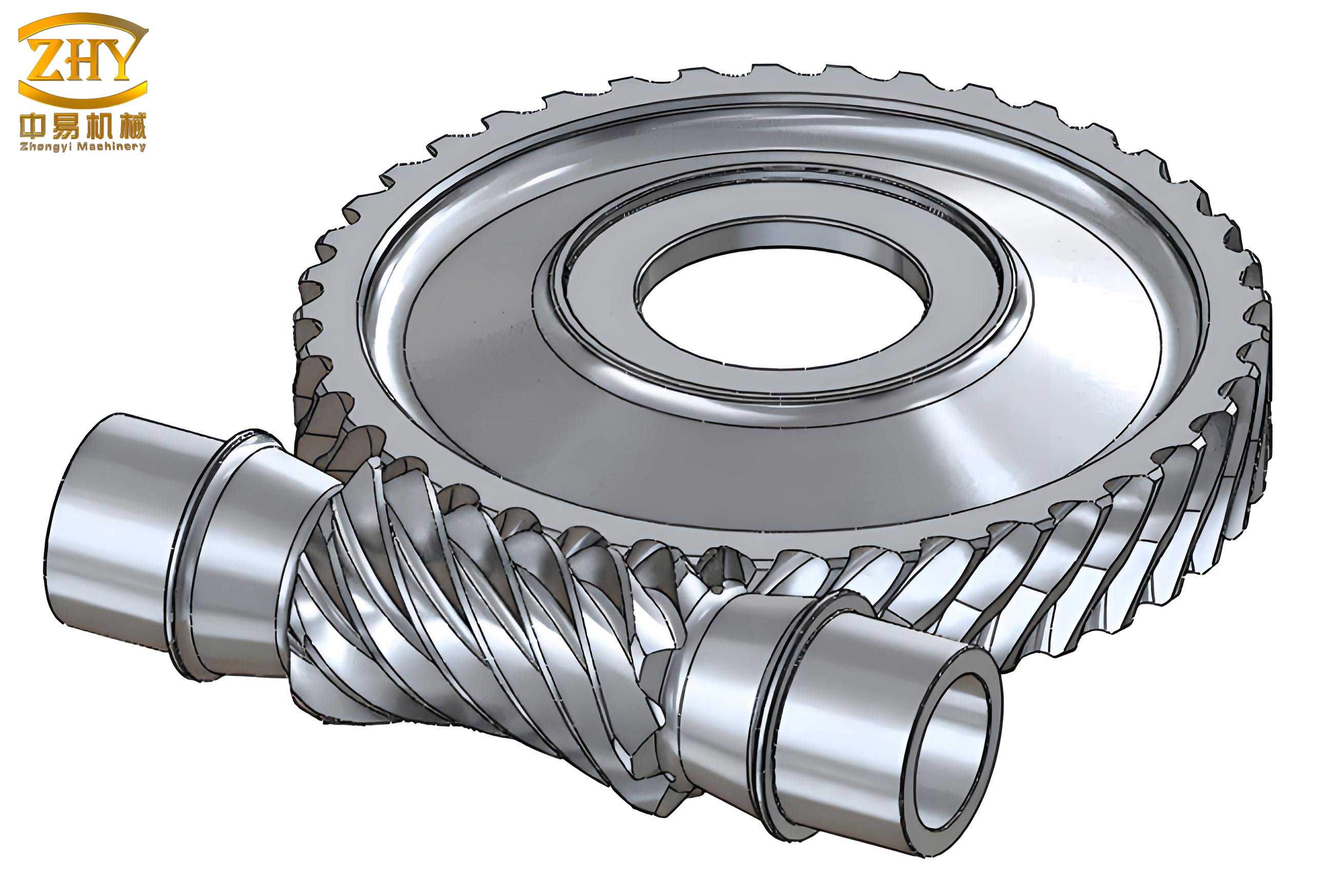
The core of accurate screw gear design lies in a detailed mathematical description of their geometry. For screw gears, such as the Archimedean worm, which is commonly used in worm drives, the helical surface is generated similarly to a thread, formed by sweeping a trapezoidal cross-section along a three-dimensional helical path. This mathematical foundation is crucial for parametric modeling, as it allows for the precise definition of dimensions and relationships. The helical curve, which guides the sweep, can be expressed using parametric equations. Let the parameter \( t \) range from 0 to 1, representing the progression along the helix. The coordinates \( (X, Y, Z) \) of the helix are given by:
$$ X = \frac{q \cdot m}{2} \sin(n \cdot t \cdot 360) $$
$$ Y = \frac{q \cdot m}{2} \cos(n \cdot t \cdot 360) $$
$$ Z = n \cdot \pi \cdot m \cdot Z_1 \cdot t $$
Here, \( m \) is the module, \( Z_1 \) is the number of starts on the screw gear (worm), \( q \) is the diameter factor of the screw gear, and \( n \) is the number of helical turns. The trapezoidal cross-section, which defines the tooth profile of the screw gear, has four vertices whose coordinates can be derived based on the module and pressure angle \( \theta \). For instance, the vertices in a local coordinate system can be represented as:
$$ X_1 = \frac{\pi \cdot m}{2} – 1.2m \cdot \tan\theta; \quad Y_1 = \frac{m \cdot q}{2} – 1.2m $$
$$ X_2 = \frac{\pi \cdot m}{2} + m \cdot \tan\theta; \quad Y_2 = \frac{m \cdot q}{2} + m $$
$$ X_3 = -\left(\frac{\pi \cdot m}{2} + m \cdot \tan\theta\right); \quad Y_3 = \frac{m \cdot q}{2} + m $$
$$ X_4 = -\left(\frac{\pi \cdot m}{2} – 1.2m \cdot \tan\theta\right); \quad Y_4 = \frac{m \cdot q}{2} – 1.2m $$
For the mating gear in a screw gear pair, often referred to as the worm gear, the tooth profile approximates an involute curve. This can be modeled by first generating a single tooth cross-section using an involute equation and then replicating it around the gear’s axis. The involute curve in a Cartesian coordinate system is defined by:
$$ \theta = t \cdot 45 $$
$$ R = \frac{m \cdot Z_2 \cdot \cos\theta}{2} $$
$$ X = R \cdot \cos\theta + R \cdot \sin\theta \cdot \theta \cdot \frac{\pi}{180} $$
$$ Y = R \cdot \sin\theta – R \cdot \cos\theta \cdot \theta \cdot \frac{\pi}{180} $$
$$ Z = 0 $$
In this equation, \( Z_2 \) is the number of teeth on the worm gear, and \( \theta \) here represents the pressure angle parameterized through \( t \). These mathematical models form the basis for creating precise 3D entities in CAD software. To summarize the key parameters involved in screw gear design, the following table provides an overview:
| Parameter | Symbol | Description |
|---|---|---|
| Module | \( m \) | Basic size parameter defining tooth proportions |
| Number of Starts (Worm) | \( Z_1 \) | Number of helical threads on the screw gear |
| Number of Teeth (Gear) | \( Z_2 \) | Number of teeth on the mating worm gear |
| Diameter Factor | \( q \) | Ratio of pitch diameter to module for the screw gear |
| Pressure Angle | \( \theta \) | Angle defining the tooth profile slope |
| Helical Turns | \( n \) | Number of complete helical rotations |
These equations and parameters enable the generation of accurate digital models, which are essential for subsequent analysis and simulation. The parametric nature allows for easy modification, facilitating design iterations and optimization.
Pro/ENGINEER is a powerful CAD/CAM system that employs parametric, feature-based solid modeling. Its intelligent feature-based approach allows engineers to create models that can be easily modified by adjusting, inserting, deleting, or redefining features without violating geometric constraints. The parametric design capability enables the use of mathematical relationships to link dimensions, so that changes in one parameter automatically update the entire model. This reduces manual effort and minimizes errors. For screw gear design, I leverage Pro/E’s secondary development tools to automate the modeling process. Key tools include Family Tables, User-Defined Features (UDF), Pro/Program, and Pro/Toolkit. In my approach, I first create a template model with defined features and parameters. Then, I establish a Family Table that includes critical screw gear parameters such as module, number of starts, gear teeth count, and diameter factor. By using a programming interface like Visual Basic (VB), I develop a dialog box for parameter input, which interacts with the Family Table to generate new screw gear variants efficiently. This parametric modeling system streamlines design workflows, allowing rapid generation of customized screw gear components based on specific requirements.
The implementation of parametric modeling for screw gears involves several steps to ensure accuracy and flexibility. Below is a detailed breakdown of the process for both the screw gear (worm) and the worm gear. For the screw gear, the 3D modeling sequence typically includes: First, I create a cylindrical segment representing the worm’s body without teeth. Next, I extrude a cylinder with a diameter equal to the screw gear’s tip diameter to form the tooth-bearing section. Using the equation-driven curve feature in Pro/E, I plot the helical path based on the mathematical equations provided earlier. Then, I sketch the trapezoidal cross-section for the tooth profile, aligning it with the helix. Through a sweep operation, I generate the helical tooth by sweeping the cross-section along the helix. Finally, I add other features such as shafts or flanges to complete the screw gear model. For the worm gear, the steps are: Begin by drawing reference curves for the tip circle, root circle, and pitch circle, establishing a default Cartesian coordinate system. To enable parametric control, I add relations linking these diameters to the screw gear parameters, such as \( d = m \cdot Z_2 \) for the pitch diameter. Using the “From Equation” option for a datum curve, I input the involute equation in Cartesian coordinates to create the tooth profile curve. I then mirror this curve to form a symmetric tooth slot and use sketching tools to complete the tooth gap outline. Through an extrusion cut, I create a single tooth gap, and then I apply a pattern feature to replicate it around the gear’s axis. To maintain parametric integrity, I embed relations in the pattern parameters, such as \( d\# = 360 / Z_2 \) for the angular increment and \( P\# = Z_2 \) for the total number of instances. Additional features like hubs or web structures are incorporated to finalize the worm gear. This method ensures that both components of the screw gear pair are accurately modeled and fully parametric, allowing for easy updates and variations.
To illustrate the relationships and formulas used in the parametric design of screw gears, the following table consolidates key equations and their purposes:
| Component | Equation | Purpose |
|---|---|---|
| Screw Gear Helix | $$ X = \frac{q m}{2} \sin(n t \cdot 360), Y = \frac{q m}{2} \cos(n t \cdot 360), Z = n \pi m Z_1 t $$ | Defines the 3D path for tooth sweep |
| Screw Gear Cross-Section | Vertex coordinates based on \( m \) and \( \theta \) | Specifies tooth profile geometry |
| Worm Gear Involute | $$ X = R \cos\theta + R \sin\theta \cdot \theta \cdot \frac{\pi}{180}, Y = R \sin\theta – R \cos\theta \cdot \theta \cdot \frac{\pi}{180} $$ with \( R = \frac{m Z_2 \cos\theta}{2} \) | Generates accurate tooth curvature |
| Diameter Relations | $$ d = m Z_2, \quad d_a = m(Z_2 + 2h_a), \quad d_f = m Z_2 – 2m(h_a + c) $$ | Links gear diameters to module and tooth dimensions |
| Pattern Relations | $$ d\# = 360 / Z_2, \quad P\# = Z_2 $$ | Automates tooth array around gear |
These equations are embedded within Pro/E’s feature definitions, ensuring that any change in a primary parameter, such as the module or number of teeth, propagates through the entire model. This parametric approach significantly accelerates the design process for screw gears, enabling rapid prototyping and customization.
Motion simulation is a critical aspect of screw gear mechanism design, as it allows for the verification of kinematic and dynamic performance before physical prototyping. In Pro/E, I utilize two main modules for simulation: Mechanism and Pro/MECHANICA MOTION. The Mechanism module enables the creation of virtual mechanisms by defining connections (e.g., pin, slider, gear) between components, simulating realistic motion based on user inputs. Pro/MECHANICA MOTION offers more advanced capabilities for static, kinematic, and dynamic analysis, facilitating optimization of the screw gear system. The workflow for Mechanism-based simulation typically involves: First, assembling the screw gear and worm gear components in Pro/E, ensuring proper alignment and mating conditions. Next, I define connection types; for a screw gear pair, I often use a gear connection or a screw pair to capture the helical motion. Then, I apply drivers or motors to specify input motion, such as a rotational velocity on the screw gear. After setting up the mechanism, I run a kinematic analysis to simulate the movement over time. The results can be visualized dynamically, and metrics like displacement, velocity, and acceleration can be measured. Additionally, the simulation can be exported as an AVI file for easy sharing and review. This process not only validates the meshing and interaction of the screw gears but also helps identify potential issues like interference or excessive wear, leading to design improvements.
The integration of parametric design and motion simulation offers substantial benefits for screw gear development. By creating a parametric model, I can quickly generate multiple design variants for different applications, such as adjusting the module or number of starts to achieve specific torque and speed ratios. The motion simulation then provides insights into the real-world behavior of these variants, allowing for performance testing and optimization. For instance, I can analyze the contact patterns between the screw gear and worm gear teeth to ensure even load distribution, or evaluate the efficiency of the transmission under various operating conditions. Moreover, the simulated data can be used to refine geometric parameters, minimizing vibrations and noise. This iterative process, supported by Pro/E’s capabilities, reduces the need for physical prototypes, shortening development cycles and lowering costs. Ultimately, the combination of parametric modeling and simulation forms a robust platform for virtual design and manufacturing of screw gear systems, enhancing overall engineering productivity and product quality.
In conclusion, the parametric design and motion simulation of screw gears using Pro/ENGINEER represent a significant advancement in mechanical engineering practices. By establishing accurate mathematical models and leveraging Pro/E’s parametric features, I can create precise 3D entities of screw gears efficiently. The secondary development tools enable automation and customization, streamlining the design process. Furthermore, motion simulation capabilities allow for dynamic analysis and optimization of screw gear mechanisms, ensuring reliable performance. This holistic approach not only improves design accuracy and speed but also paves the way for advanced applications like finite element analysis and CNC machining. As technology evolves, such methodologies will continue to drive innovation in screw gear design, contributing to more efficient and robust mechanical systems.