
In the field of agricultural machinery, screw gear drives, commonly referred to as worm and worm wheel mechanisms, are pivotal for transmitting motion between non-parallel shafts. Their compact structure, smooth operation, low noise, minimal vibration, and high transmission ratios make them indispensable in applications such as tractor steering systems, greenhouse curtain machines, and tiller adjustment devices. However, the complex curved surfaces of screw gears pose significant challenges for efficient three-dimensional modeling in software like SolidWorks. Traditional modeling methods are tedious, time-consuming, and prone to errors, which hinders the rapid development of modern agricultural equipment. To address this, I embarked on a project to develop a parametric design system for screw gears using SolidWorks二次开发 (secondary development). This approach leverages mathematical modeling, macro recording and editing, and Visual Basic (VB) programming to create a plugin that automates the generation of 3D models from basic parameters. By streamlining the design process, this system enhances efficiency, reduces costs, and provides a foundation for advanced applications like finite element analysis and dynamic simulation. In this paper, I will detail the mathematical principles, the implementation of parametric design, and the development of a SolidWorks plugin, all from my firsthand perspective as a researcher in mechanical engineering.
The core of this work lies in establishing accurate mathematical models for screw gears, specifically focusing on the Archimedes cylindrical screw gear, which is widely used in agricultural machinery. The modeling principle revolves around the intermediate plane, where the screw gear pair resembles a rack and pinion engagement. For the screw gear (worm), the tooth profile is generated by sweeping an isosceles trapezoid along an Archimedes spiral, while for the worm wheel, the tooth profile is based on an involute curve approximated in SolidWorks. Below, I will break down the mathematical foundations and modeling steps, incorporating formulas and tables to clarify the process.
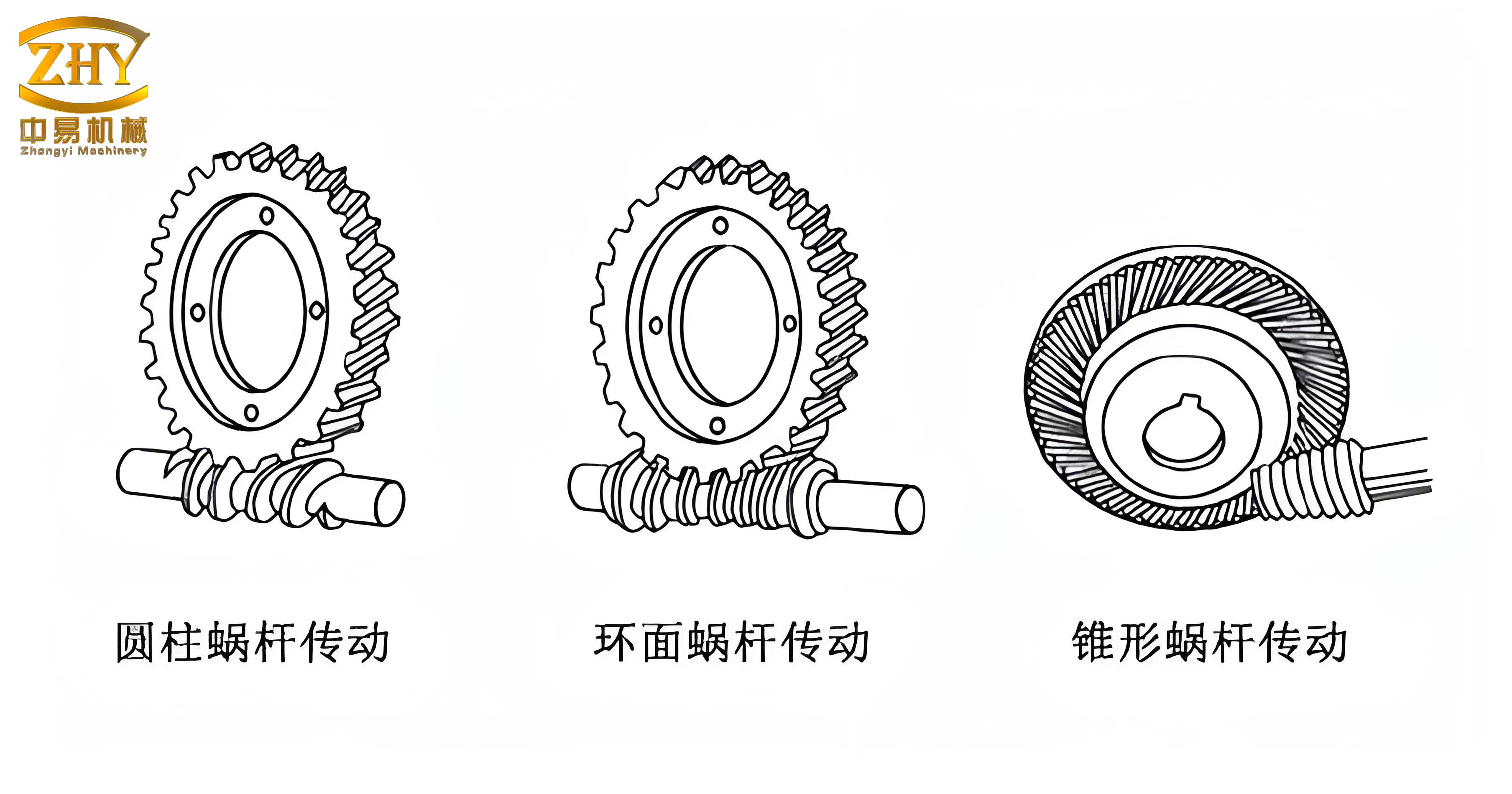
Mathematical Modeling of Screw Gears
1. Screw Gear (Worm) Modeling
The Archimedes screw gear is analogous to a thread, formed by scanning a trapezoidal tooth profile along an Archimedes spiral. The tooth profile geometry in the axial plane is critical. Based on my analysis, the coordinates of key points in the tooth profile can be derived as follows. Let the tooth profile be defined in a coordinate system where the x-axis aligns with the axial direction and the y-axis represents the radial direction. The parameters include: tooth form angle $\alpha$ (typically $20^\circ$), addendum circle diameter $d_{a1}$, pitch circle diameter $d_1$, dedendum circle diameter $d_{f1}$, axial pitch $p_x$, and number of starts $z_1$. The vertex coordinates for the trapezoid are:
$$ X_1 = \frac{p_x}{4} + \tan \alpha \cdot \frac{d_{a1} – d_1}{2}, \quad Y_1 = \frac{d_{a1}}{2} $$
$$ X_2 = \frac{p_x}{4} – \tan \alpha \cdot \frac{d_1 – d_{f1}}{2}, \quad Y_2 = \frac{d_{f1}}{2} $$
$$ X_3 = -X_2 = \tan \alpha \cdot \frac{d_1 – d_{f1}}{2} – \frac{p_x}{4}, \quad Y_3 = Y_2 = \frac{d_{f1}}{2} $$
$$ X_4 = -X_1 = -\frac{p_x}{4} – \tan \alpha \cdot \frac{d_{a1} – d_1}{2}, \quad Y_4 = Y_1 = \frac{d_{a1}}{2} $$
The lead of the screw gear is given by $p_z = z_1 \cdot p_x$, which determines the spiral progression. The modeling steps in SolidWorks involve:
- Extruding a base cylinder using the addendum circle diameter to create the worm blank, with length $L$.
- Creating an Archimedes spiral helix with the pitch circle as the base circle, height $L$, and pitch equal to the lead $p_z$.
- Sketching the trapezoidal tooth profile based on the above coordinates.
- Performing a sweep-cut operation using the tooth profile as the contour and the helix as the guide curve to generate a single thread.
- If multiple starts exist, applying a circular pattern around the central axis to replicate the sweep-cut feature $z_1$ times.
To summarize the key parameters for screw gear design, I have compiled Table 1, which lists essential variables and their descriptions. This table aids in understanding the interdependencies in parametric modeling.
| Parameter | Symbol | Description | Typical Value/Range |
|---|---|---|---|
| Tooth Form Angle | $\alpha$ | Pressure angle in axial plane | $20^\circ$ |
| Addendum Circle Diameter | $d_{a1}$ | Outer diameter of worm | Derived from module and starts |
| Pitch Circle Diameter | $d_1$ | Reference diameter for engagement | $m \cdot q$ (module × diameter factor) |
| Dedendum Circle Diameter | $d_{f1}$ | Root diameter of worm | $d_1 – 2.4m$ |
| Axial Pitch | $p_x$ | Distance between adjacent teeth axially | $\pi m$ (m: module) |
| Number of Starts | $z_1$ | Number of helical threads on worm | 1 to 4 (common in agriculture) |
| Lead | $p_z$ | Axial advancement per revolution | $z_1 \cdot p_x$ |
| Worm Length | $L$ | Total axial length of worm | Based on design requirements |
The screw gear model is thus a precise representation of these parameters, enabling accurate digital prototyping. The use of parametric equations ensures that any change in basic inputs automatically updates the entire geometry, which is fundamental for efficient design iterations.
2. Worm Wheel Modeling
The worm wheel meshes with the screw gear in the intermediate plane as an involute gear. Since SolidWorks lacks native involute curve tools, I approximated the involute using a series of points computed from parametric equations. The involute of a circle is defined by the base circle radius $r_b$, and for any point on the involute at radius $r_k$, the coordinates in a local coordinate system can be expressed. Let $d_1$ and $d_2$ be the pitch diameters of the worm and worm wheel, respectively. The involute parameter equations are:
$$ X(r_k) = r_k \sin(\phi + \theta_k), \quad Y(r_k) = r_k \cos(\phi + \theta_k) $$
Where:
$$ \theta_k = \tan \alpha_k – \alpha_k, \quad \alpha_k = \arccos\left( \frac{r_b}{r_k} \right), \quad \phi = \frac{\pi}{2z_2} – \tan \alpha + \alpha $$
Here, $z_2$ is the number of teeth on the worm wheel, $r_b$ is the base circle radius, and $\alpha$ is the pressure angle. The range for $r_k$ is between the dedendum circle radius $d_{f2}/2$ and the addendum circle radius $d_{a2}/2$. To obtain the tooth profile in the intermediate plane, I transformed coordinates to align with the worm wheel’s geometry. The mirrored coordinates for symmetric tooth flanks are:
$$ X’ = -X(r_k), \quad Y’ = \frac{d_1}{2} + \frac{d_2}{2} + Y(r_k) $$
The modeling steps for the worm wheel are:
- Extrude a base cylinder using the worm wheel’s outer diameter to create the blank.
- Generate multiple points using the involute equations for various $r_k$ values, then fit a spline curve to approximate one side of the tooth space. Mirror this curve to get the symmetric side.
- Define the tooth space profile bounded by the involutes, throat circle, and root circle.
- Create an Archimedes spiral on a new reference plane (based on the worm’s helix) as a guide curve.
- Perform a sweep-cut using the tooth space profile and the spiral to create a single tooth gap.
- Apply a circular pattern to replicate the tooth gap $z_2$ times around the axis.
- Add finishing features like chamfers, fillets, and keyways.
To facilitate parameter management, Table 2 outlines the critical parameters for worm wheel design. This table complements Table 1, providing a comprehensive view of screw gear pair specifications.
| Parameter | Symbol | Description | Typical Value/Range |
|---|---|---|---|
| Number of Teeth | $z_2$ | Teeth on worm wheel | $z_2 = i \cdot z_1$ (i: transmission ratio) |
| Pitch Circle Diameter | $d_2$ | Reference diameter for worm wheel | $m \cdot z_2$ |
| Addendum Circle Diameter | $d_{a2}$ | Outer diameter of worm wheel | $d_2 + 2m$ |
| Dedendum Circle Diameter | $d_{f2}$ | Root diameter of worm wheel | $d_2 – 2.4m$ |
| Base Circle Radius | $r_b$ | Radius for involute generation | $\frac{d_2}{2} \cos \alpha$ |
| Pressure Angle | $\alpha$ | Angle in intermediate plane | $20^\circ$ |
| Throat Diameter | $d_{t2}$ | Diameter at worm wheel throat | $d_2 + 2m$ (often equals $d_{a2}$) |
The mathematical rigor ensures that the screw gear pair models are accurate and suitable for downstream applications. The parametric approach allows for quick adjustments; for example, changing the module $m$ automatically updates all derived dimensions, which is a significant advantage over manual modeling.
Parametric Design Implementation via SolidWorks Secondary Development
To automate the modeling process, I utilized SolidWorks二次开发 capabilities, primarily through API functions and VB programming. The goal was to create a plugin that accepts basic screw gear parameters and outputs a 3D model without manual intervention. The process involved three main phases: macro recording and editing, VB programming with form integration, and plugin compilation. Each phase is detailed below, with emphasis on the technical steps and code snippets.
1. Macro Recording and Editing
SolidWorks macros record user interactions as VB scripts. I started by creating a new part in SolidWorks 2009 and initiating macro recording via Tools > Macro > Record. Then, I manually modeled a screw gear pair following the steps outlined earlier. After completing the model, I stopped the recording and saved the macro. The recorded macro contained VB code for all actions, including redundant clicks and selections. For example, the code for creating a helix might look like:
Dim swApp As Object
Set swApp = Application.SldWorks
Dim Part As Object
Set Part = swApp.ActiveDoc
Part.InsertHelix True, True, d1/2, L, pz, 0, 0, True
However, the raw macro often includes unnecessary commands. I edited the macro by removing redundant lines, adding comments, and optimizing logic. Key modifications included defining variables for parameters like $d_1$, $z_1$, and $p_x$, and replacing hard-coded values with these variables. This editing phase is crucial for creating a clean, reusable script. For instance, to handle multiple starts in a screw gear, I added code for circular patterning:
boolstatus = Part.SetUserPreferenceToggle(swUserPreferenceToggle_e.swDisplayTemporaryAxes, True)
boolstatus = Part.Extension.SelectByID2("Sweep-Cut1", "BODYFEATURE", 0, 0, 0, False, 4, Nothing, 0)
boolstatus = Part.Extension.SelectByID2("", "AXIS", 0, 0, 0, True, 1, Nothing, 0)
Part.FeatureManager.FeatureCircularPattern2 z1, 2 * 3.14159265358988 / z1, False, "NULL", False
This code selects the sweep-cut feature and the axis, then patterns it $z_1$ times around the circle. By parameterizing $z_1$, the macro adapts to different screw gear configurations.
2. VB Programming and Form Integration
After editing the macro, I used VB to create a user-friendly interface. I added a form (dialog box) with input fields for screw gear parameters, such as module, number of starts, pressure angle, and dimensions. The form also included buttons to generate the worm and worm wheel models. The VB code behind the form modified the macro script to accept these inputs and drive the SolidWorks API. For example, when a user enters values, the code assigns them to variables like:
Dim m As Double ' module
m = txtModule.Value
Dim z1 As Integer ' number of starts
z1 = txtStarts.Value
' Calculate derived parameters
Dim px As Double
px = Math.PI * m
Dim pz As Double
pz = z1 * px
Then, these variables are passed to API functions for feature creation. The form design emphasized simplicity, allowing agricultural engineers to quickly input specifications without deep CAD knowledge. Table 3 summarizes the input parameters required in the form and their effects on the screw gear model.
| Parameter Input | Variable | Effect on Model | Example Value |
|---|---|---|---|
| Module (m) | $m$ | Scales tooth sizes, pitch diameters | 5 mm |
| Number of Starts (z1) | $z_1$ | Determines lead and multi-start pattern | 2 |
| Pressure Angle (α) | $\alpha$ | Affects tooth profile shape | 20° |
| Worm Pitch Diameter (d1) | $d_1$ | Sets worm size, often via diameter factor | 50 mm |
| Worm Length (L) | $L$ | Defines axial extent of worm | 100 mm |
| Worm Wheel Teeth (z2) | $z_2$ | Determines wheel size and transmission ratio | 30 |
| Face Width (b) | $b$ | Width of worm wheel teeth | 20 mm |
The integration of forms with SolidWorks API enables a seamless workflow. Users input data, click “Generate,” and the plugin automatically executes the modeling steps, producing a 3D screw gear assembly. This eliminates manual sketching and feature creation, saving hours of design time.
3. Plugin Development and Loading
To make the tool persistent in SolidWorks, I compiled it as an add-in plugin. Using Microsoft Visual Studio with the SolidWorks API SDK, I created a new SolidWorks Add-In project in Visual Basic.NET. I imported the edited macro code and added references to SolidWorks type libraries (e.g., SolidWorks 2009 Type Library, SolidWorks Constant Type Library). The add-in code structured the form and functions into a DLL file. Key steps included:
- Defining a class that implements ISwAddIn for integration.
- Adding menu items to SolidWorks via sldworks.AddMenu.
- Linking the form to a toolbar button for easy access.
The compilation generated a DLL file (e.g., ScrewGearPlugin.dll). To load it in SolidWorks, I used Tools > Add-Ins, browsed to the DLL, and activated it. Alternatively, the plugin can add a custom menu to the SolidWorks interface programmatically. Once loaded, the plugin appears as a toolbar icon, clicking which opens the input form. This makes the parametric design tool readily available for daily use.
The plugin also supports engineering drawing generation. Since SolidWorks supports model-drawing associativity, after creating the screw gear model, users can automatically produce 2D drawings with proper annotations, dimensions, and bill of materials (BOM). By setting properties like part name, material, and weight in the model, the drawing updates dynamically, ensuring compliance with agricultural machinery standards.
Advantages and Applications in Agricultural Machinery
The parametric design system for screw gears offers several benefits. First, it drastically reduces modeling time—from hours to minutes—by automating repetitive tasks. Second, it enhances accuracy by eliminating human errors in sketching and dimensioning. Third, it facilitates design optimization; engineers can quickly test different parameters (e.g., varying module or number of starts) to achieve desired performance characteristics like torque capacity or efficiency. Fourth, the models are ready for further analysis, such as finite element analysis (FEA) for stress evaluation or dynamic simulation for motion studies.
In agricultural contexts, screw gears are used in demanding applications. For example, in tractor steering systems, the screw gear mechanism must be precise and durable; parametric design allows rapid prototyping and testing of different geometries. In greenhouse curtain machines, where space is limited, the compactness of screw gears is critical; this tool helps design customized sizes. For hand tillers, adjustable height mechanisms rely on screw gears; parameterization enables quick adaptations for various farmer ergonomics. Table 4 compares traditional vs. parametric design approaches, highlighting efficiency gains.
| Aspect | Traditional SolidWorks Modeling | Parametric Design Plugin | Improvement |
|---|---|---|---|
| Modeling Time | 2-4 hours per gear pair | 5-10 minutes | ~90% reduction |
| Error Probability | High (manual sketches) | Low (automated calculations) | Minimized |
| Design Iterations | Slow, tedious changes | Fast, parameter-driven updates | Rapid prototyping |
| Skill Requirement | Expert CAD knowledge needed | Basic input understanding | Accessible to non-experts |
| Integration with Analysis | Manual model preparation | Directly usable for FEA/CFD | Streamlined workflow |
Moreover, the parametric system supports data management. By storing models with linked parameters, designers can maintain libraries of standard screw gear configurations for agricultural machinery, speeding up future projects. The plugin can be extended to include material databases, cost estimation, and manufacturing outputs, further enhancing its utility.
Mathematical Extensions and Formula Derivations
To deepen the parametric design, I derived additional formulas for screw gear performance metrics. For instance, the transmission ratio $i$ of a screw gear pair is given by:
$$ i = \frac{z_2}{z_1} $$
The center distance $a$ between worm and worm wheel axes is critical for assembly and calculated as:
$$ a = \frac{d_1 + d_2}{2} = \frac{m(q + z_2)}{2} $$
Where $q$ is the diameter factor ($q = d_1 / m$). The efficiency $\eta$ of a screw gear drive, important for power transmission in agricultural machines, can be estimated using:
$$ \eta = \frac{\tan \gamma}{\tan(\gamma + \rho)} $$
Here, $\gamma$ is the lead angle, with $\tan \gamma = \frac{p_z}{\pi d_1} = \frac{z_1 m}{d_1}$, and $\rho$ is the friction angle. These formulas can be incorporated into the plugin to provide performance feedback alongside geometry generation. For example, users might input desired efficiency, and the plugin could suggest optimal parameters.
Another aspect is tooth contact analysis. The length of contact in screw gears affects load distribution. Using the geometry, the contact length $L_c$ can be approximated as:
$$ L_c = \sqrt{ \left( \frac{d_{a1}}{2} \right)^2 – \left( \frac{d_1}{2} \right)^2 } + \sqrt{ \left( \frac{d_{a2}}{2} \right)^2 – \left( \frac{d_2}{2} \right)^2 } $$
This formula helps in evaluating wear and durability. By integrating such calculations, the parametric design system becomes a comprehensive tool for screw gear engineering.
Conclusion and Future Directions
In this work, I developed a parametric design system for screw gears within SolidWorks, targeting agricultural machinery applications. By establishing mathematical models for both worm and worm wheel, and leveraging SolidWorks二次开发 through VB programming, I created a plugin that automates 3D model generation from basic parameters. This system simplifies the modeling process, reduces design time, and improves accuracy, thereby supporting the rapid development of efficient agricultural equipment. The use of tables and formulas throughout this paper underscores the technical rigor involved.
Future enhancements could include expanding the plugin to handle other types of screw gears, such as helical or double-enveloping designs, common in heavy-duty agricultural machinery. Additionally, integration with cloud-based parameter libraries could enable collaborative design across teams. Incorporating machine learning algorithms to optimize gear parameters based on performance criteria (e.g., minimum weight, maximum strength) would further advance the tool. Ultimately, this parametric approach paves the way for fully digitalized design workflows in agriculture, from concept to manufacturing.
The success of this project highlights the importance of software customization in mechanical engineering. As screw gears continue to evolve in agricultural technology, parametric design tools will remain essential for innovation and efficiency. I encourage fellow engineers to explore similar二次开发 techniques to address domain-specific challenges, pushing the boundaries of what’s possible in CAD-driven design.