
The design and analysis of mechanical drive systems are fundamental to modern engineering. Among these, the screw gear system, commonly known as a worm gear drive, represents a crucial component for achieving high reduction ratios and self-locking capabilities in compact spaces. This system typically consists of a worm (the screw) and a worm wheel. The effectiveness of a screw gear design hinges on precise geometric modeling and an accurate understanding of its dynamic behavior under operational conditions. Traditional theoretical calculations, while foundational, often lack the capability to visualize complex interactions, predict dynamic loads, or identify potential interference before physical prototyping. This is where the integration of advanced Computer-Aided Design (CAD) and Multi-Body Dynamics (MBD) simulation software becomes indispensable. The synergistic use of parametric modeling tools and dynamic analysis platforms allows engineers to create, validate, and optimize screw gear systems in a virtual environment, significantly reducing development time and cost while enhancing performance and reliability. This article details a comprehensive methodology for the design and dynamic simulation of a screw gear system, leveraging the strengths of parametric modeling and advanced dynamics analysis.
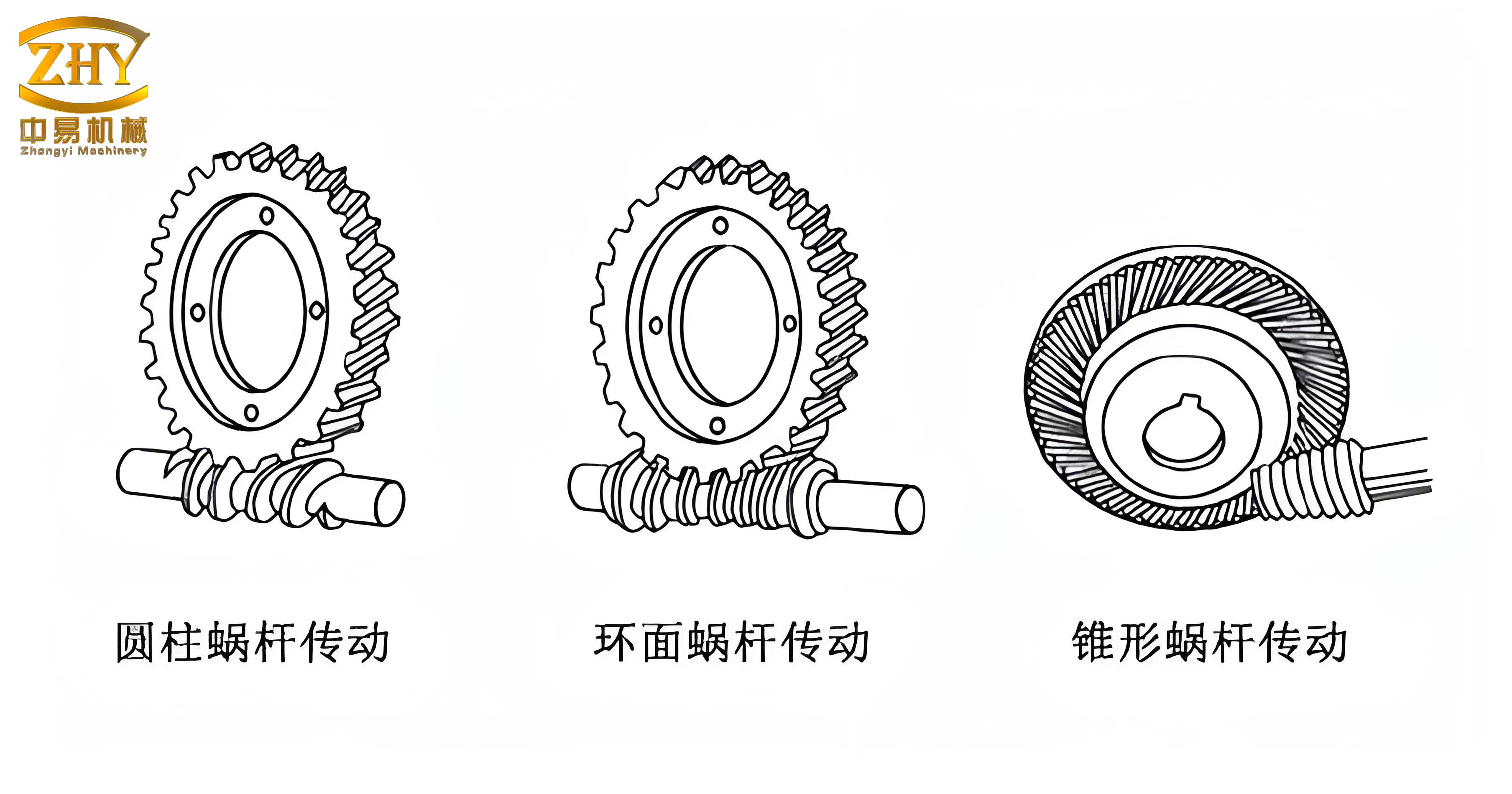
Fundamentals of Screw Gear Systems
The kinematics and geometry of a screw gear system are defined by the meshing between the threaded worm and the toothed worm wheel. The primary motion transfer occurs through sliding contact along the helical thread. The key geometric and kinematic relationships are governed by the following parameters and formulas:
- Module (m): The basic metric defining tooth size.
- Pressure Angle (α): Typically 20° or 14.5°, defining the tooth profile angle.
- Diameter Quotient (q): The ratio of the worm reference diameter (d1) to the module (m). It is a key design parameter influencing stiffness and efficiency: $$ q = \frac{d_1}{m} $$
- Lead Angle (γ): The angle of the worm thread at the reference cylinder, critical for determining the transmission ratio and self-locking tendency. It is related to the number of worm threads (z1) and the diameter quotient: $$ \tan(\gamma) = \frac{z_1}{q} = \frac{z_1 \cdot m}{d_1} $$
- Transmission Ratio (i): For a single-start worm (z1=1), the speed reduction ratio is primarily determined by the number of teeth on the worm wheel (z2): $$ i = \frac{\omega_1}{\omega_2} = \frac{z_2}{z_1} $$ where ω1 and ω2 are the angular velocities of the worm and worm wheel, respectively.
- Center Distance (a): The distance between the axes of the worm and the worm wheel: $$ a = \frac{d_1 + d_2}{2} = \frac{m \cdot (q + z_2)}{2} $$ where d2 is the reference diameter of the worm wheel (d2 = m * z2).
The efficiency of a screw gear drive is significantly influenced by the lead angle and the coefficient of friction. The theoretical efficiency (η) for the worm driving the wheel can be approximated by: $$ \eta = \frac{\tan(\gamma)}{\tan(\gamma + \rho’)} $$ where ρ’ is the equivalent friction angle. This relationship highlights why larger lead angles generally yield higher efficiency but may compromise self-locking ability.
Parametric 3D Modeling of the Screw Gear
The first step in the virtual prototyping process is the creation of accurate 3D solid models. A parametric, feature-based CAD system is ideal for this purpose, as it allows for easy modification of critical design parameters (like module, number of teeth, pressure angle) and automatically updates the entire geometry. The modeling process for a screw gear system is sequential.
Worm (Screw) Modeling
The worm is essentially a helical gear with one or more threads. Its profile is based on an involute or an Archimedean spiral relative to its axis. The modeling procedure involves:
- Creating a cylindrical blank with a diameter equal to the worm’s reference diameter (d1 = m * q).
- Defining a helical sweep trajectory. The helix pitch (Pz) is calculated from the lead angle and module: $$ P_z = \pi \cdot m \cdot z_1 \cdot \cot(\gamma) $$ For a single-start worm, Pz = π * m * cot(γ).
- Sketching the tooth profile (typically a trapezoidal shape based on the module and pressure angle) in a plane normal to the trajectory.
- Using the “Helical Sweep” or “Sweep” feature to cut the tooth space by sweeping the profile along the defined helix. The number of threads is controlled by the number of full helical revolutions and the start/end sections.
Worm Wheel Modeling
The worm wheel resembles a helical gear but is throated to envelop the worm partially, increasing the contact area. Its modeling is more complex:
- Creating a cylindrical blank for the wheel body.
- Generating a datum curve that represents the path of a worm tooth cross-section as it would mesh with the wheel. This often involves using a “Wrap” feature or creating a curve from the equation of intersection.
- Using this datum curve as a trajectory for a sweep operation to create one tooth space. The tooth profile for this sweep is defined in a plane normal to this spatial curve and must match the conjugate profile to the worm.
- Patterning this cut feature around the wheel’s axis to create all `z2` tooth spaces.
- Adding throat radius features to the wheel’s outer diameter to complete the enveloping form.
Virtual Assembly and Interference Check
After modeling both components, they are assembled in the CAD environment. The assembly constraints are critical: the axes of the worm and worm wheel must be positioned at the calculated center distance (a) and be at 90° to each other (for most common configurations). A key constraint is aligning a datum plane on the worm with a corresponding plane on the wheel to ensure proper phasing of the meshing teeth. Once assembled, the CAD software’s built-in interference detection tool should be used to visually and analytically check for any geometric clashes in the static assembled position. This step verifies the correctness of the geometric design before proceeding to dynamic analysis. The table below summarizes a sample set of parameters for a modeled screw gear system.
| Parameter | Symbol | Value | Unit |
|---|---|---|---|
| Module | m | 2.0 | mm |
| Pressure Angle | α | 20.0 | deg |
| Worm Diameter Quotient | q | 7.0 | – |
| Number of Worm Threads | z₁ | 1 | – |
| Number of Wheel Teeth | z₂ | 28 | – |
| Face Width | b | 10.0 | mm |
| Calculated Lead Angle | γ | ≈ 8.13 | deg |
| Calculated Center Distance | a | 35.0 | mm |
| Theoretical Transmission Ratio | i | 28.0 | – |
Multi-Body Dynamics Simulation Fundamentals
To transition from a static geometric model to a dynamic simulation, a Multi-Body Dynamics (MBD) solver is required. MBD software treats each component as a rigid or flexible body, interconnected by joints (kinematic constraints) and acted upon by forces. The governing equations are derived from Newton-Euler equations or Lagrangian mechanics. For a system of `n` bodies, the equations of motion can be expressed in a general matrix form: $$ \mathbf{M}(\mathbf{q})\ddot{\mathbf{q}} + \mathbf{C}_{\mathbf{q}}^T \mathbf{\lambda} = \mathbf{Q}(\mathbf{q}, \dot{\mathbf{q}}, t) $$ where:
- $\mathbf{M}$ is the system mass matrix.
- $\mathbf{q}$ is the vector of generalized coordinates.
- $\mathbf{C}_{\mathbf{q}}$ is the Jacobian matrix of the constraint equations.
- $\mathbf{\lambda}$ is the vector of Lagrange multipliers (representing constraint forces).
- $\mathbf{Q}$ is the vector of generalized applied forces (including Coriolis and centrifugal terms).
The solver integrates these differential-algebraic equations (DAEs) over time to compute positions, velocities, accelerations, and reaction forces for every body in the system.
Data Transfer and Model Preparation for Dynamics
A critical step in the workflow is transferring the accurately assembled 3D screw gear model from the CAD environment to the MBD environment without losing geometric integrity. While several neutral file formats exist (e.g., STEP, IGES), the Parasolid geometric kernel format (.x_t, .x_b) is highly recommended due to its robust representation of precise boundary representation (B-Rep) geometry and excellent compatibility with most MBD solvers. The transfer process typically involves exporting the assembly from the CAD software as a Parasolid file. In some cases, an intermediate step through another CAD system might be necessary if the primary CAD tool does not support direct Parasolid export. Once imported into the MBD environment (e.g., ADAMS), the software automatically recognizes the individual solid bodies (the worm and the worm wheel) as distinct parts. The ground (fixed world reference frame) is also defined. At this stage, the model contains only geometry and mass properties (calculated automatically from the geometry and a default material density). To make it a dynamic system, joints, contacts, and drives must be applied.
Defining the Dynamic Simulation Model
The imported geometric assembly must be endowed with dynamic properties to simulate real-world behavior. This involves defining materials, constraints (joints), the specific screw gear pair interaction, and inputs.
Material Properties and Rigid Body Definition
While the geometry defines shape, dynamic behavior depends on mass and inertia. Assigning correct material properties (density, ρ) is essential. For a steel screw gear pair, a density of approximately 7850 kg/m³ is assigned. The MBD software then calculates the mass (m) and inertia tensor (I) for each part: $$ m = \rho \cdot V, \quad I = \int_V \rho \cdot \mathbf{r}^2 dV $$ where V is the volume and r is the distance from the center of mass. For initial dynamic analysis, parts are typically treated as rigid bodies, meaning they do not deform under load.
Applying Kinematic Joints and Constraints
Joints define how parts can move relative to each other. For the screw gear system, two fundamental joints are required:
- Revolute Joint (Worm to Ground): This joint connects the worm to the fixed ground, allowing it only one rotational degree of freedom (DOF) about its own axis. The joint location is defined by selecting the worm’s axis and a point on it.
- Revolute Joint (Worm Wheel to Ground): Similarly, this joint connects the worm wheel to the ground, allowing it to rotate only about its own axis, which is perpendicular to the worm’s axis. The center distance ‘a’ is implicitly defined by the relative placement of these two revolute joint axes.
These two joints remove 10 DOFs (5 per joint) from the 12 total DOFs of two free bodies in 3D space, leaving the system with 2 rotational DOFs.
Creating the Screw Gear Pair Constraint
This is the most crucial step in setting up the screw gear simulation. A generic “gear pair” constraint in MBD software does not model physical contact; it is a kinematic constraint that forces a specific velocity ratio between two existing joints (the two revolute joints). It requires defining a “common velocity marker” (or “contact marker”) which acts as the theoretical meshing point. The setup must correctly reflect the screw gear kinematics:
- Joints Selection: The gear pair is defined between the worm’s revolute joint (J1) and the worm wheel’s revolute joint (J2).
- Meshing Point (Marker) Definition: A marker (a local coordinate system) must be created at the theoretical pitch point where the two pitch cylinders/tori touch. Its position (P) lies on the line connecting the two joint axes. For a screw gear with a 90° shaft angle, if the worm axis is along the global X-axis and the wheel axis is along the global Z-axis, and the center distance is ‘a’, the marker location could be: $$ P = (d_1/2, 0, a – d_2/2) $$ This position must be adjusted based on the actual assembly coordinates.
- Marker Orientation: The orientation of this marker is critical. Its Z-axis must be aligned along the common normal to the tooth surfaces at the meshing point. For a screw gear, this direction is not simply along the line of centers. It is rotated by the pressure angle (α) in one plane and by the lead angle (γ) in another. Typically, the orientation is set such that one axis is tangent to the lead direction on the worm.
- Velocity Ratio: The gear pair constraint enforces the condition that the relative velocity at the common marker is zero along the common normal. This mathematically enforces the theoretical transmission ratio: $$ \omega_1 \cdot r_1 \cdot \cos(\gamma) = \omega_2 \cdot r_2 $$ where r1 and r2 are the pitch radii. The software often calculates the ratio internally based on the joint definitions and marker location.
Applying Motion Input and Loads
To animate the system, a motion input is applied. This is typically a rotational motion (MOTION) applied to the worm’s revolute joint, defining its angular velocity or displacement as a function of time. For example, a constant velocity of 360 deg/s (or 2π rad/s) can be applied: $$ \theta_1(t) = \omega_1 \cdot t $$ Optionally, a load torque can be applied to the worm wheel’s revolute joint to simulate resistance, allowing the calculation of dynamic forces and required input torque.
| Simulation Component | Type | Applied To | Purpose/Value |
|---|---|---|---|
| Worm Body | Rigid Body / Steel | PART_1 | Defines mass & inertia |
| Wheel Body | Rigid Body / Steel | PART_2 | Defines mass & inertia |
| Worm Joint | Revolute Joint | PART_1 to GROUND | Allows rotation about worm axis |
| Wheel Joint | Revolute Joint | PART_2 to GROUND | Allows rotation about wheel axis |
| Meshing Point | Marker | On GROUND at pitch point | Defines kinematic contact location |
| Screw Gear Pair | Kinematic Gear Constraint | Between the two Revolute Joints | Enforces the velocity ratio |
| Input Drive | Rotational Motion | On Worm Revolute Joint | ω₁ = 360 deg/s (constant) |
| Simulation Control | Analysis | Full System | Duration=1s, Steps=100 |
Executing the Simulation and Analyzing Results
With the complete dynamic model—comprising rigid bodies, joints, the screw gear pair constraint, and the input motion—the simulation is executed. The solver calculates the system’s state at discrete time steps. The primary outputs of interest for the screw gear system are:
- Angular Displacement, Velocity, and Acceleration: Plots of θ2(t), ω2(t), and α2(t) for the worm wheel. The steady-state angular velocity of the wheel should confirm the theoretical ratio: $$ \omega_{2, measured} = \frac{\omega_1}{i} $$ For the example with i=28 and ω1=360 deg/s, ω2 should be approximately 12.86 deg/s. Simulation results typically match this precisely for a kinematically driven gear pair.
- Reaction Forces at Joints: These forces (Fx, Fy, Fz) and torques (Tx, Ty, Tz) at the worm and wheel bearings are critical for mechanical design. They result from the kinematic constraints and any applied loads. The forces at the worm wheel’s revolute joint, for instance, represent the radial and axial loads imposed by the meshing of the screw gear.
- Constraint Force in the Screw Gear Pair: The Lagrange multiplier (λ) associated with the gear pair constraint represents the force along the common normal that is required to maintain the kinematic relationship. This is analogous to the meshing force component.
The simulation validates the kinematic design. A successful run with the expected velocity ratio proves that the 3D geometry was modeled and assembled correctly, and that the dynamic constraints were applied properly. The real power of simulation, however, extends beyond this basic validation.
Advanced Analysis: From Kinematics to Contact Dynamics
While the kinematic gear pair is excellent for motion validation, a more realistic simulation involves modeling physical contact between the worm and wheel teeth. This approach, using a force-based contact model, allows for the analysis of dynamic effects, impact forces, vibration, and efficiency losses that a pure kinematic constraint cannot capture.
Defining a Contact Force Model
In this advanced setup, the kinematic screw gear pair constraint is removed and replaced with a force element that generates contact forces when the geometries penetrate each other. A typical model is the “Impact” or “Solid-to-Solid” contact force model, which computes force (F) based on penetration depth (δ) and its rate (δ̇): $$ F = k \cdot \delta^n + \text{STEP}(\delta, 0, 0, d_{max}, c_{max}) \cdot \dot{\delta} $$ where:
- $k$ is the contact stiffness (N/mmⁿ).
- $n$ is the force exponent (typically 1.5 for metallic contact).
- $\text{STEP}$ is a function that ramps up the damping coefficient from 0 to $c_{max}$ as penetration increases from 0 to $d_{max}$.
This model requires careful tuning of stiffness (k) and damping (c) parameters, which should be derived from material properties (Young’s modulus, Poisson’s ratio) and estimated contact area. The contact is defined between the entire worm body and the entire worm wheel body, or between specific geometry groups representing the tooth surfaces.
Analysis of Dynamic Contact Results
Simulating with a contact force model yields richer, more realistic data:
- Transient Dynamics: The simulation will show the initial engagement impact and the settling into steady-state motion. Plots of ω2(t) will show small oscillations around the theoretical mean value due to the compliance in the contact.
- Meshing Force History: The contact force magnitude varies cyclically as different tooth pairs engage and disengage. This force profile is crucial for fatigue analysis and noise/vibration prediction in the screw gear system.
- Efficiency Estimation: By applying a load torque to the output wheel and measuring the required input torque on the worm, an estimate of the system’s mechanical efficiency can be made, accounting for friction losses defined in the contact model: $$ \eta_{sim} = \frac{\tau_{out} \cdot \omega_{out}}{\tau_{in} \cdot \omega_{in}} $$
The table below contrasts the key characteristics of the kinematic constraint method versus the dynamic contact method for screw gear simulation.
| Aspect | Kinematic Gear Pair | Dynamic Contact Force |
|---|---|---|
| Model Basis | Ideal constraint (DAE) | Force generation based on penetration |
| Computation Speed | Very Fast | Slower (smaller time steps required) |
| Primary Output | Ideal motion, joint reactions | Realistic motion, contact forces, vibrations |
| Force Calculation | Constraint forces (Lagrange multipliers) | Computed from material/geometry properties |
| Ability to Simulate Loss of Contact/Impact | No | Yes |
| Best Used For | Initial kinematic validation, mechanism motion study | Detailed stress analysis, noise/vibration, efficiency study |
Design Optimization and Parameter Studies
The integrated CAD-MBD workflow facilitates powerful design optimization. Since the 3D model is parametric, key design variables of the screw gear system can be linked to the simulation model. An optimization loop can then be automated to find the best design within constraints. Potential studies include:
- Center Distance Minimization: For a given torque and ratio, find the minimum center distance (a) subject to contact stress and bending stress limits derived from simulated forces.
- Lead Angle Optimization: Vary the lead angle (γ) by changing the diameter quotient (q) or number of starts (z1) to maximize simulated efficiency or minimize input torque for a given load.
- Pressure Angle Sensitivity: Study the effect of pressure angle (α) on the simulated contact force magnitude and distribution across the tooth face of the screw gear.
The objective function (e.g., minimize mass, maximize efficiency) and constraints (e.g., maximum contact force < allowable stress, minimum safety factor) are defined. The optimizer iteratively changes the CAD parameters, updates the geometry, re-runs the dynamic simulation, and evaluates the results until an optimum is found.
Conclusion
The integration of high-fidelity parametric CAD modeling with advanced multi-body dynamics simulation provides a robust and efficient framework for the design and analysis of screw gear systems. The process begins with the precise geometric creation of the worm and worm wheel, ensuring correct tooth profiles and assembly. Transferring this model into a dynamics environment via a reliable format like Parasolid preserves this accuracy. The subsequent definition of bodies, joints, and the critical screw gear kinematic constraint or a more advanced dynamic contact force model enables a comprehensive virtual prototype. This virtual screw gear system can be exercised to verify its fundamental kinematics, predict dynamic loads on supporting bearings, estimate contact stresses, and even optimize key design parameters for performance, size, or weight. This methodology dramatically accelerates the design cycle, reduces reliance on physical prototypes, and leads to more reliable and optimized screw gear drives for a wide array of mechanical applications, from automotive steering systems to heavy industrial machinery.