
In the realm of mechanical engineering, the accurate and efficient modeling of spur gears is paramount for finite element analysis (FEA) in applications ranging from automotive transmissions to industrial machinery. Traditional methods for creating finite element models often involve time-consuming processes or compatibility issues, leading to inefficiencies. In this article, I explore a novel approach that leverages Jscript programming within the ANSYS Workbench environment to rapidly generate precise 3D models of spur gears. This method not only streamlines the modeling workflow but also enhances flexibility for parametric adjustments, making it ideal for iterative design processes. By integrating coordinate transformation theory for involute tooth profiles and utilizing Jscript’s scripting capabilities, we can automate the creation of spur gear geometries, thereby reducing manual errors and improving analysis accuracy. Throughout this discussion, I will emphasize the importance of spur gears in mechanical systems and how this methodology can revolutionize their simulation-based design.
Finite element modeling serves as the foundation for stress analysis, vibration studies, and durability assessments of spur gears. Conventionally, engineers rely on three primary techniques: importing models from CAD software like SolidWorks or Pro/ENGINEER, which may introduce geometric distortions; using graphical user interfaces (GUIs) in ANSYS or Workbench, which are cumbersome for complex or repetitive tasks; or employing ANSYS Parametric Design Language (APDL), which has a steep learning curve due to its FORTRAN-based syntax. These limitations underscore the need for a more accessible and automated solution. The use of Jscript, an active scripting language similar to JavaScript, offers a promising alternative. Jscript is inherently object-oriented, making it easier to write and understand scripts that interact with Workbench’s Geometry module. By programming the geometric definitions directly, we can achieve high precision and repeatability in modeling spur gears, which are critical components in power transmission systems. This article delves into the mathematical derivations, scripting strategies, and practical implementations to demonstrate how Jscript can be harnessed for spur gear modeling.
To begin, understanding the geometry of a spur gear is essential. The tooth profile of a standard spur gear is based on an involute curve, which ensures smooth meshing and constant velocity ratio. The involute is defined as the locus of a point on a taut string unwinding from a base circle. In polar coordinates, the parametric equations for an involute are given by:
$$ r_K = \frac{r_b}{\cos \alpha_K} $$
$$ \theta_K = \text{inv} \alpha_K = \tan \alpha_K – \alpha_K $$
Here, $r_K$ represents the radius at any point on the involute, $r_b$ is the base circle radius, $\alpha_K$ is the pressure angle at that point, and $\theta_K$ is the involute angle. For spur gears, converting this to a Cartesian coordinate system facilitates easier modeling in software. By defining a coordinate system where the y-axis aligns with the tooth centerline, we can derive the transformed equations. Let $u = \alpha_K + \theta_K = \tan \alpha_K$, then in an intermediate coordinate system $x’oy’$, the involute equations are:
$$ x’ = r_b \cos u + r_b u \sin u $$
$$ y’ = r_b \sin u – r_b u \cos u $$
To rotate this to the desired orientation with the tooth centerline as the vertical axis, we apply a rotation matrix. The rotation angle $\gamma$ is determined by the gear parameters: $\gamma = \frac{s}{2r} + \theta_0$, where $s$ is the tooth thickness on the pitch circle, $r$ is the pitch radius, and $\theta_0$ is the involute angle at the pitch point. For standard spur gears, $\theta_0 = \text{inv} \alpha_0$, with $\alpha_0$ being the pressure angle at the pitch circle. The transformed coordinates $(x, y)$ in the final system are:
$$ x = x’ \sin \gamma + y’ \cos \gamma $$
$$ y = x’ \cos \gamma – y’ \sin \gamma $$
Substituting the expressions for $x’$ and $y’$, we obtain the comprehensive parametric equations for the involute tooth profile of a spur gear:
$$ x = \frac{1}{2} m z \cos \alpha_0 \left[ (\cos(\tan \alpha_K) + \tan \alpha_K \sin(\tan \alpha_K)) \sin\left(\frac{\pi}{2z} + \text{inv} \alpha_0\right) + (\sin(\tan \alpha_K) – \tan \alpha_K \cos(\tan \alpha_K)) \cos\left(\frac{\pi}{2z} + \text{inv} \alpha_0\right) \right] $$
$$ y = \frac{1}{2} m z \cos \alpha_0 \left[ (\cos(\tan \alpha_K) + \tan \alpha_K \sin(\tan \alpha_K)) \cos\left(\frac{\pi}{2z} + \text{inv} \alpha_0\right) – (\sin(\tan \alpha_K) – \tan \alpha_K \cos(\tan \alpha_K)) \sin\left(\frac{\pi}{2z} + \text{inv} \alpha_0\right) \right] $$
In these equations, $m$ is the module, $z$ is the number of teeth, and $\alpha_0$ is typically 20° for standard spur gears. This formulation allows us to compute discrete points along the involute curve, which are then used to generate a spline for accurate tooth geometry. The key parameters for a standard spur gear are summarized in the table below:
| Parameter | Symbol | Formula |
|---|---|---|
| Base Circle Radius | $r_b$ | $r_b = \frac{m z \cos \alpha_0}{2}$ |
| Pitch Circle Radius | $r$ | $r = \frac{m z}{2}$ |
| Tooth Thickness on Pitch Circle | $s$ | $s = \frac{\pi m}{2}$ |
| Addendum Circle Radius | $r_a$ | $r_a = \frac{(z + 2) m}{2}$ |
| Dedendum Circle Radius | $r_f$ | $r_f = \frac{(z – 2.5) m}{2}$ |
For instance, consider a spur gear with module $m = 4 \, \text{mm}$, teeth $z = 40$, and pressure angle $\alpha_0 = 20^\circ$. Using the above formulas, we calculate $r_a = 84 \, \text{mm}$ and $r_f = 75 \, \text{mm}$. To model the involute accurately, we compute points at regular intervals of the pressure angle, say every $2^\circ$. The coordinates for these points are derived from the parametric equations and can be tabulated as follows:
| Point | x-coordinate (mm) | y-coordinate (mm) |
|---|---|---|
| 1 | -1.52240000 | 83.98870000 |
| 2 | -1.69110000 | 83.61590000 |
| 3 | -2.28750000 | 82.25330000 |
| 4 | -2.76890000 | 81.02790000 |
| 5 | -3.14110000 | 79.93650000 |
| 6 | -3.43180000 | 78.96690000 |
| 7 | -3.65680000 | 78.11900000 |
| 8 | -3.80510000 | 77.38300000 |
| 9 | -3.92600000 | 76.75310000 |
| 10 | -3.99620000 | 76.22760000 |
| 11 | -4.03630000 | 75.80080000 |
| 12 | -4.06480000 | 75.47700000 |
| 13 | -4.07280000 | 75.24970000 |
| 14 | -4.07320000 | 75.10920000 |
| 15 | -4.07060000 | 75.06510000 |
| 16 | -3.99800000 | 74.89320000 |
These points serve as the foundation for creating a spline curve that approximates the involute tooth profile of the spur gear. With the mathematical framework established, we can now focus on the scripting aspect using Jscript. Jscript is an interpreted, object-oriented active scripting language developed by Microsoft, closely related to JavaScript. It supports dynamic code execution, expando functions, and untyped programming, making it highly flexible for automation tasks. In the context of ANSYS Workbench, Jscript is embedded within the DesignModeler and Meshing applications, allowing users to programmatically control geometric operations. This integration enables the creation of complex models like spur gears through scripts that call built-in functions for sketching and solid modeling. For example, Jscript provides functions such as Circle() for drawing circles, ArcCtrEdge() for arcs, SplineXY() for splines, Extrude() for extrusion, and Revolve() for rotation. Additionally, it supports standard programming constructs like for loops and while loops, which are essential for repetitive tasks such as generating multiple teeth in a spur gear.
The modeling process for a spur gear using Jscript involves several steps. First, we initialize a script that defines the gear parameters and computes the involute points. Then, we use the SplineXY() function to create a spline through these points, forming one side of the tooth profile. Next, we draw the addendum and dedendum circles using ArcCtrEdge() or Circle() functions, and connect them to the spline to close the tooth contour. This creates a 2D sketch of a single tooth. To build the entire spur gear, we employ a for loop to copy and rotate this tooth sketch around the gear’s center, followed by an extrusion operation to give it a 3D volume. Below is an illustrative snippet of Jscript code for this process:
// Define gear parameters
var m = 4; // module in mm
var z = 40; // number of teeth
var alpha0 = 20 * Math.PI / 180; // pressure angle in radians

// Calculate derived parameters
var rb = (m * z * Math.cos(alpha0)) / 2;
var gamma = Math.PI / (2 * z) + Math.tan(alpha0) - alpha0;

// Create a sketch for the tooth profile
var sketch = agb.CreateSketch();
sketch.Activate();

// Generate points for the involute spline
var spline = sketch.SplineBegin();
spline.SplineFlexibility = agc.Yes;
for (var i = 0; i <= 16; i++) {
    var alphaK = ... // compute pressure angle for point i
    var x = ... // compute x-coordinate using parametric equations
    var y = ... // compute y-coordinate using parametric equations
    spline.SplineXY(x, y);
}
sketch.SplineEnd(spline);

// Draw the addendum circle
sketch.ArcCtrEdge(0, 0, ...); // specify center and edge points

// Draw the dedendum circle
sketch.ArcCtrEdge(0, 0, ...); // similar approach

// Complete the tooth sketch and extrude it
var toothSketch = sketch.Finalize();
var extrude = agb.Extrude(agc.Add, toothSketch, agc.DirNormal, agc.ExtentFixed, 30, ...);

// Use a loop to create all teeth
for (var tooth = 1; tooth < z; tooth++) {
    var rotatedSketch = ... // copy and rotate the tooth sketch
    var extrudeTooth = agb.Extrude(agc.Add, rotatedSketch, ...);
}
This script automates the entire modeling process, ensuring consistency and speed. When executed in Workbench’s Geometry module via the “Run Script” option, it rapidly generates a 3D model of the spur gear. The ability to modify parameters like module, tooth count, or pressure angle by simply adjusting variables in the script makes this method highly adaptable for different spur gear designs. For visualization, here is an image depicting a typical spur gear model created through such scripting techniques:
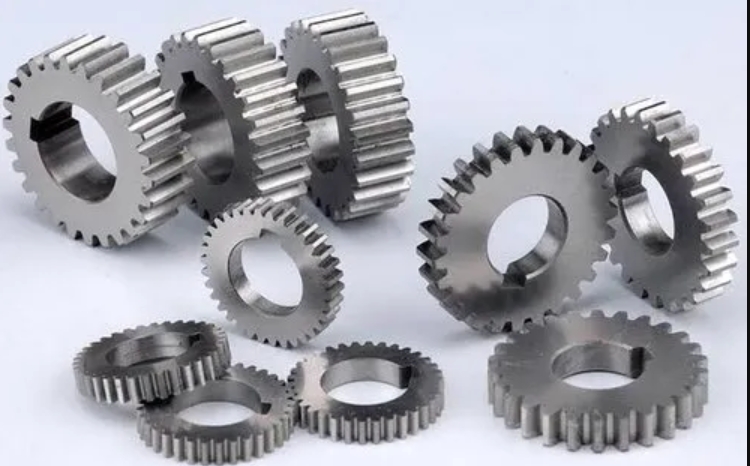
The resulting model, as shown, accurately represents the geometry of a spur gear with involute teeth, ready for meshing and finite element analysis. This approach offers significant advantages over traditional methods. For one, it eliminates the need for manual sketching in GUIs, which can be error-prone for complex spur gears. Moreover, it avoids the potential geometric distortions that may occur when importing CAD models, as the geometry is generated natively within Workbench. The use of Jscript also enhances productivity; for instance, if a design iteration requires changing the spur gear’s module from 4 mm to 5 mm, we only need to update the corresponding variable in the script and re-run it, rather than recreating the entire model from scratch. This parametric capability is particularly beneficial for optimization studies where multiple spur gear configurations must be analyzed.
To further illustrate the efficiency, consider the time saved in modeling a spur gear with varying tooth counts. Using GUI-based methods, each tooth might require individual attention, but with Jscript, the loop structure automatically replicates the tooth profile around the gear. This scalability is crucial for spur gears used in high-precision applications, such as in aerospace or robotics, where even minor geometric inaccuracies can lead to performance issues. Additionally, the mathematical rigor in deriving the involute equations ensures that the tooth profile adheres to theoretical standards, promoting proper meshing behavior in simulations. In terms of finite element analysis, a precise geometric model reduces meshing errors and improves convergence in stress calculations, ultimately leading to more reliable predictions of spur gear performance under load.
Beyond standard spur gears, this Jscript-based methodology can be extended to model modified spur gears, such as those with profile shifts or asymmetric teeth. By incorporating additional parameters into the equations, we can tailor the tooth geometry for specific applications. For example, the addendum and dedendum circles can be adjusted to account for manufacturing tolerances or wear considerations. The flexibility of Jscript allows for such modifications without overhauling the entire scripting framework. Moreover, the integration with Workbench enables seamless transition from modeling to simulation, as the same script can be extended to automate meshing and boundary condition setup for the spur gear. This end-to-end automation streamlines the FEA workflow, making it easier to conduct parametric studies on spur gear designs.
In conclusion, the combination of Jscript programming and ANSYS Workbench provides a powerful tool for the rapid and accurate finite element modeling of spur gears. This method addresses the shortcomings of conventional approaches by offering a scriptable, parametric, and precise way to generate involute tooth profiles. The derived parametric equations, coupled with Jscript’s capabilities, allow for efficient creation of spur gear models that are essential for mechanical analysis. As demonstrated, this approach not only saves time but also enhances model fidelity, contributing to better design outcomes for spur gear systems. Future work could explore applying similar techniques to other gear types, such as helical or bevel gears, further expanding the utility of scripting in engineering simulation. Ultimately, embracing such automated modeling practices will drive innovation in the design and analysis of spur gears and beyond.