
The pursuit of high-performance, low-noise, and durable power transmission in intersecting-axis applications has cemented the importance of spiral bevel gears. Their complex, spatially curved tooth geometry, characterized by a gradually changing curvature along the face width, enables smooth, gradual engagement, higher load capacity, and superior performance compared to straight bevel gears. However, this very complexity poses a significant challenge in the digital design and analysis cycle. A geometrically accurate three-dimensional (3D) model is not merely a visual aid; it is the fundamental prerequisite for subsequent advanced engineering analyses, such as Finite Element Analysis (FEA) for stress and contact evaluation, computational fluid dynamics for lubrication studies, and motion simulation for dynamic behavior prediction. Traditional 3D Computer-Aided Design (CAD) software lacks direct, parametric commands to generate these intricate tooth surfaces. Therefore, constructing a precise digital twin of a spiral bevel gear requires a synergistic approach that bridges theoretical gear geometry, computational programming, and advanced CAD techniques.
This article details a comprehensive methodology for generating precise 3D solid models of spiral bevel gears. The core of the process lies in deriving the mathematical definition of the tooth surface based on the principles of gear generation—simulating the machining process virtually. The coordinates of points constituting this surface are then calculated programmatically. Finally, these points are utilized within a commercial CAD environment to construct the solid model. This model serves as the critical foundation for transferring geometry into simulation platforms like ANSYS or Abaqus for in-depth performance validation.
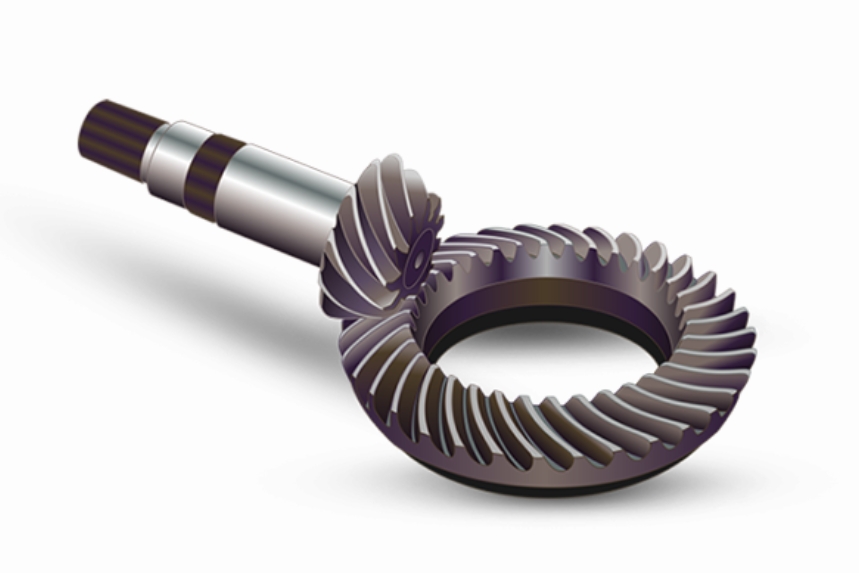
The accurate modeling of a spiral bevel gear tooth begins with a rigorous mathematical description of its surface. The geometry is defined by simulating the gear manufacturing process, typically using a face-milling or face-hobbing method with a circular cutter. The following sections outline the theoretical framework for deriving the tooth surface equations for the gear member.
1. Theoretical Foundation: Geometry of the Spiral Bevel Gear Tooth
1.1 Coordinate Systems for Gear Generation
To mathematically describe the generation process, a series of right-handed Cartesian coordinate systems are established, as shown in the conceptual diagram below. The relationships between these systems capture all machine tool settings and kinematic motions.
Machine Coordinate System \( S_{o}(O_o, X_o, Y_o, Z_o) \): Fixed to the machine bed. \( Z_o \) is the main machine axis, perpendicular to the machine plane and passing through the cradle center.
Cradle Coordinate System \( S_{g}(O_g, X_g, Y_g, Z_g) \): Attached to the rotating cradle. It rotates about the \( Z_o \) axis of the machine system through an angle \( \phi_g \).
Cutter Coordinate System \( S_{t}(O_t, X_t, Y_t, Z_t) \): Fixed to the cutter head. Its origin \( O_t \) is at the cutter center. The \( X_tY_t \) plane coincides with the cutter’s tip plane.
Workpiece (Gear) Coordinate System \( S_{p}(O_p, X_p, Y_p, Z_p) \): Attached to the gear blank. It rotates about its own axis during generation.
Auxiliary Coordinate Systems \( S_f \) and \( S_a \): Intermediate systems used to simplify the transformation chain, accounting for offsets like sliding base (\(X_B\)), machine center to back (\(S_r\)), blank offset (\(E\)), and workpiece mounting angle (\(\gamma\)).
The key machine settings and motion parameters include:
- \( S_r \): Radial Distance (Cutter Center to Machine Center).
- \( E \): Work Offset.
- \( X_B \): Sliding Base Setting.
- \( \gamma \): Workpiece Installation (Root) Angle.
- \( \phi_g \): Cradle Rotation Angle (Generation Motion).
- \( \phi_p \): Workpiece Rotation Angle (Indexing Motion).
1.2 Mathematical Model of the Cutter Surface
The generating tool is modeled as a circular cuter with a straight-sided blade profile. In the cutter coordinate system \( S_t \), the surface of the cutter (the generating surface) can be defined using two parameters: \( u \) (distance along the blade) and \( \theta \) (rotation angle around the cutter axis).
Cutter Surface Equation:
$$ \vec{r}_t(u, \theta) = \begin{bmatrix} (r_G – u \sin \alpha) \cos \theta \\ (r_G – u \sin \theta) \sin \theta \\ -u \cos \alpha \\ 1 \end{bmatrix} $$
Unit Normal Vector to Cutter Surface:
$$ \vec{n}_t(\theta) = \begin{bmatrix} \cos \alpha \cos \theta \\ \cos \alpha \sin \theta \\ -\sin \alpha \end{bmatrix} $$
Where:
- \( r_G \): Point Radius (or Cutter Radius).
- \( \alpha \): Cutter Blade Pressure Angle (positive for convex side generation, negative for concave side).
- \( u, \theta \): Independent surface parameters.
1.3 Coordinate Transformations and Tooth Surface Derivation
The cutter surface must be mapped onto the gear blank through a series of coordinate transformations that embody the machine kinematics. The general transformation from the cutter system \( S_t \) to the workpiece system \( S_p \) involves sequential rotations and translations:
$$ \vec{r}_p(u, \theta, \phi_g) = \mathbf{M}_{p,a}(\phi_g) \cdot \mathbf{M}_{a,f} \cdot \mathbf{M}_{f,o} \cdot \mathbf{M}_{o,g}(\phi_g) \cdot \mathbf{M}_{g,t} \cdot \vec{r}_t(u, \theta) $$
Similarly, the surface normal vector transforms as:
$$ \vec{n}_p(\theta, \phi_g) = \mathbf{L}_{p,a}(\phi_g) \cdot \mathbf{L}_{a,f} \cdot \mathbf{L}_{f,o} \cdot \mathbf{L}_{o,g}(\phi_g) \cdot \mathbf{L}_{g,t} \cdot \vec{n}_t(\theta) $$
Here, \( \mathbf{M}_{i,j} \) are 4×4 homogeneous transformation matrices and \( \mathbf{L}_{i,j} \) are the corresponding 3×3 rotation matrices (the upper-left 3×3 submatrix of \( \mathbf{M}_{i,j} \)).
The final tooth surface is defined by the locus of cutter surface points that satisfy the condition of tangency (conjugacy) between the generating surface and the workpiece. This is governed by the equation of meshing, derived from the condition that the relative velocity at the contact point is perpendicular to the common normal:
$$ \vec{n} \cdot \vec{v}^{(12)} = 0 $$
Expressed in a fixed coordinate system (e.g., \( S_o \)), this becomes:
$$ f(u, \theta, \phi_g) = \vec{n}_o^{(g)} \cdot \vec{v}_o^{(gp)} = 0 $$
$$ \text{where } \vec{v}_o^{(gp)} = (\vec{\omega}_o^{(g)} – \vec{\omega}_o^{(p)}) \times \vec{r}_o – \vec{\omega}_o^{(p)} \times \vec{a}_o $$
Here, \( \vec{\omega}_o^{(g)} \) and \( \vec{\omega}_o^{(p)} \) are the angular velocity vectors of the cradle and workpiece, respectively, \( \vec{r}_o \) is the position vector of the contact point, and \( \vec{a}_o \) is the vector connecting the origins of the rotation axes. Solving this equation for \( u \) yields \( u = u(\theta, \phi_g) \).
The mathematical definition of the spiral bevel gear tooth surface in the workpiece system is therefore a vector function of two independent parameters (e.g., \( \theta \) and \( \phi_g \)):
$$ \vec{r}_p = \vec{r}_p(\theta, \phi_g) $$
2. Computational Extraction of the Tooth Surface
The analytical surface \( \vec{r}_p(\theta, \phi_g) \) represents the entire family of points generated during the machining cycle. However, the actual tooth flank is only a bounded portion of this theoretical surface. The boundaries are defined by the gear’s macro-geometry: the tip cone (addendum), root cone (dedendum), front cone (toe), and back cone (heel).
To obtain the discrete point cloud for a single tooth flank, the parameter ranges for \( \theta \) and \( \phi_g \) must be determined such that the resulting points lie within these four bounding surfaces. This is typically achieved by:
- Defining the equations for the four conical boundaries in the gear coordinate system.
- For a grid of \( \phi_g \) values covering the generating roll, solving for the corresponding \( \theta \) values where the surface intersects each boundary cone.
- This defines the valid \( (\theta, \phi_g) \) domain. Points are then calculated within this domain at a specified resolution.
This computational task is ideally suited for MATLAB, a high-level language and interactive environment renowned for its powerful numerical computation, matrix manipulation, and algorithmic development capabilities. A script can be written that:
- Accepts all spiral bevel gear design and machine setting parameters as inputs.
- Implements the coordinate transformation matrices and the equation of meshing.
- Solves for the boundary limits and iterates over the parameter domain.
- Computes the (x, y, z) coordinates for thousands of points on both the convex and concave flanks of the spiral bevel gear tooth.
- Outputs these coordinates into structured text files (e.g., .txt or .csv).
| Parameter Category | Symbol | Description |
|---|---|---|
| Gear Design | \( z_{1,2} \) | Number of teeth (Pinion, Gear) |
| \( m \) | Module (or Diametral Pitch) | |
| \( \beta \) | Mean Spiral Angle | |
| \( \alpha \) | Pressure Angle | |
| \( \Sigma \) | Shaft Angle | |
| Machine Settings | \( r_G \) | Cutter Point Radius |
| \( \alpha_c \) | Cutter Blade Angle (Concave/Convex) | |
| \( S_r \) | Radial Setting | |
| \( E \) | Work Offset | |
| \( X_B \) | Sliding Base | |
| \( \gamma \) | Root Angle |
3. 3D Solid Model Construction in CAD
With the point cloud data generated, the next phase involves constructing a watertight, editable solid model in a CAD system. SolidWorks, with its robust Application Programming Interface (API), is an excellent platform for this task. The process can be automated using SolidWorks API via VBA (Visual Basic for Applications) or another supported language like C#.
3.1 Point Cloud to Surface Patches
The core steps implemented in the API script are:
- Data Import: Read the text files containing the coordinate sets for one convex flank and one concave flank.
- Curve Generation: For each flank, the points corresponding to constant \( \phi_g \) (or constant \( \theta \)) values are connected to form multiple 3D sketch splines. These splines run approximately along the lengthwise (face width) direction of the spiral bevel gear tooth.
- Surface Lofting: Using the “Lofted Surface” feature, these splines are used as profiles. The resulting output is a single, smooth B-Rep (Boundary Representation) surface patch representing the complete tooth flank.
- Duplicate for Opposite Flank: The process is repeated with the second set of data to create the surface for the opposite flank of the same spiral bevel gear tooth space.
| Step | Action in SolidWorks | Input | Output |
|---|---|---|---|
| 1 | Create 3D Sketch | Point Coordinates (from MATLAB) | Multiple 3D Splines |
| 2 | Insert: Surface > Lofted Surface | Selection of 3D Splines as Profiles | Single NURBS Surface (Tooth Flank) |
| 3 | Repeat Steps 1-2 | Coordinates for second flank | Second Tooth Flank Surface |
| 4 | Create Planar Surfaces | Sketch on Tip, Root, Toe, Heel cones | Four Boundary Surfaces |
| 5 | Knit Surfaces | All six boundary surfaces | Closed, watertight body |
| 6 | Solid Creation | Knit operation with “Create solid” option | Solid body of one tooth space |
3.2 Creating the Solid Tooth and Full Gear Model
Two flank surfaces alone do not form a solid. To enclose the volume of a single tooth (or the tooth space), boundary surfaces must be created:
- Tip Cone & Root Cone Surfaces: Revolved surfaces are created based on the gear’s addendum and dedendum angles.
- Toe & Heel Surfaces: Planar surfaces are extruded or created on planes tangent to the front and back cones, trimmed by the flank surfaces.
All six surfaces (two flanks, tip, root, toe, heel) are then “Knit” together into a single surface body. If this body fully encloses a volume, the “Knit” command can be set to “Create solid,” resulting in a solid body of one tooth segment (or the empty space between teeth).
For a positive gear model:
- The solid tooth space body is subtracted (Boolean Cut) from a solid conical blank representing the gear’s basic outer shape, creating the gap between teeth.
- Alternatively, a solid tooth can be created directly by knitting the flank surfaces with the tip, root, and side surfaces. This solid tooth body is then patterned circularly around the gear axis using the Circular Pattern feature, with the instance number equal to the number of teeth \( z \).
- The patterned teeth are merged (Boolean Union) with the gear body (hub, web, etc.) to complete the full spiral bevel gear model.
4. Case Study and Model Validation
To demonstrate the methodology, consider a spiral bevel gear pair with the following design parameters:
| Parameter | Pinion (Driver) | Gear (Driven) |
|---|---|---|
| Number of Teeth (\( z \)) | 11 (Left-Hand) | 34 (Right-Hand) |
| Module (\( m \)) | 6.5 mm | |
| Mean Spiral Angle (\( \beta \)) | 37° | |
| Pressure Angle (\( \alpha \)) | 20° | |
| Shaft Angle (\( \Sigma \)) | 90° | |
The machine settings for generating the gear member are calculated based on these design parameters using established spiral bevel gear design formulas or software. These settings (\( S_r, E, X_B, \gamma, \text{etc.} \)) are fed into the MATLAB program.
The MATLAB script calculates the point coordinates. A sample extract from the output file for the gear’s convex flank might look like this (coordinates in mm):
X, Y, Z
75.6400, 9.9649, -28.0806
...
82.4037, 5.8029, -32.0575
83.7564, 4.8396, -32.7795
...
These files are processed by the SolidWorks API macro. The resulting model progresses through the stages: from imported points to splines, from splines to lofted surfaces, from surfaces to a solid tooth, and finally to the fully patterned spiral bevel gear. The final, precise 3D model is now ready. Its accuracy can be preliminarily validated by checking basic dimensions (pitch diameter, face width, cone angles) and by performing a simple assembly with its mating pinion to visually inspect the contact pattern and clearance. This valid, watertight solid model is in the ideal format (e.g., STEP, Parasolid) for seamless import into FEA pre-processors to conduct high-fidelity contact stress analysis, bending stress analysis, and dynamic simulation of the spiral bevel gear pair.
5. Conclusion
The development of a precise digital model for spiral bevel gears is a critical but non-trivial step in modern engineering design and analysis workflows. This article has presented a robust, integrated framework that addresses this challenge. The method is grounded in the rigorous mathematical simulation of the gear generation process, leading to an accurate analytical definition of the complex tooth surface. The computational power of MATLAB is leveraged to discretize this surface into a manageable point cloud, effectively bridging the gap between theory and digital representation. Finally, the automation capabilities within SolidWorks, accessed via its API, are utilized to transform this point data into a fully-featured, parametric 3D solid model.
The significance of this methodology extends beyond mere model creation. The resulting geometrically accurate model of the spiral bevel gear serves as the single source of truth for the entire virtual product development cycle. It enables reliable linear and non-linear Finite Element Analysis to predict stress concentrations, fatigue life, and transmission error. It facilitates the generation of tool paths for CNC machining or additive manufacturing. Furthermore, it allows for dynamic system simulation to analyze vibration and noise characteristics. By providing a clear, step-by-step framework that integrates fundamental gear theory, numerical computation, and advanced CAD techniques, this approach empowers engineers to tackle the design and analysis of spiral bevel gears with greater confidence, efficiency, and precision, ultimately contributing to the development of more reliable and high-performance power transmission systems.