
In the field of mechanical engineering, the transmission system involving screw gears, commonly referred to as worm and worm wheel sets, plays a pivotal role in numerous applications due to its ability to provide high reduction ratios and compact design. The three-dimensional modeling of these screw gear components is essential for advanced design processes, finite element analysis, manufacturing simulations, and virtual prototyping. However, the complex tooth surface geometry, which must satisfy specific mathematical equations and constraints, poses significant challenges when using standard 3D modeling software directly. This paper explores an innovative approach to achieving high-precision 3D modeling of screw gears through secondary development of Mechanical Desktop (MDT) using Visual Basic programming. By leveraging MDT’s built-in functionalities, such as 3D helical sweep operations, this method facilitates accurate and efficient creation of screw gear models, making it accessible for designers and researchers alike.
The secondary development is based on the ActiveX Automation Interface technology, which allows seamless integration between MDT and programming environments. This approach not only enhances modeling precision but also simplifies the process, enabling users to generate screw gear models with minimal manual intervention. The focus here is on cylindrical screw gears, including types like the Archimedean screw gear, involute screw gear, and normal straight-line screw gear, each requiring tailored modeling strategies. Throughout this discussion, the term “screw gear” will be emphasized to underscore its significance in transmission systems, and the methodology presented can be extended to other gear types as well.
The core idea involves simulating the manufacturing process of screw gears. For the screw gear (worm), the tooth surface is generated by sweeping a cutter profile along a helical path, mimicking the cutting action on a lathe. Similarly, for the worm wheel (the gear component of the screw gear set), a cutter section is swept along a helical path on a cylindrical blank to carve out the tooth spaces. This parametric modeling ensures that the tooth geometry adheres to theoretical specifications, resulting in highly accurate 3D representations. Below, I will detail the steps for both components, incorporating mathematical formulations and tabular data to summarize key parameters.
Modeling of the Screw Gear (Worm)
The modeling of the screw gear begins with creating a cutter profile that corresponds to the tool used in machining. Depending on the screw gear type, the cutter geometry varies. For instance, an Archimedean screw gear requires a straight-edged cutter positioned such that its plane passes through the screw gear axis, while an involute screw gear uses two cutters offset from the axis. The coordinates of the cutter profile points are derived from standard gear design equations. Let \( m \) be the module, \( q \) the diameter factor, \( \alpha \) the pressure angle, \( h_a^* \) the addendum coefficient, and \( c^* \) the clearance coefficient. The coordinates for a typical cutter profile are calculated as follows:
$$
\begin{aligned}
&X_1 = 0, \quad Y_1 = m q – (h_a^* + c^*) m \\
&X_2 = c^* m, \quad Y_2 = Y_1 \\
&X_3 = \frac{\pi m}{4} – h_a^* m \tan \alpha, \quad Y_3 = c^* m + Y_1 \\
&X_4 = \frac{\pi m}{4} + h_a^* m \tan \alpha, \quad Y_4 = (2h_a^* + c^*) m + Y_1 \\
&X_5 = X_4, \quad Y_5 = 1.5 Y_1 \\
&X_6 = 0, \quad Y_6 = Y_5
\end{aligned}
$$
These points form a polyline representing the cutter shape. In programming, this is implemented by assigning the coordinates to a 2D array and using the AddLightWeightPolyline method in MDT’s model space. To define the cutter as a sketch, the AddSketch method is employed. Additionally, a bulge factor is set for arcs, such as between points 1 and 2, to simulate root fillets. For example, curves(0).SetBulge 1, 0.2 sets a convexity for the curve segment.
Next, a cylindrical blank with length \( L \) and outer diameter equal to the screw gear’s tip diameter is created as the base feature. The helical sweep path is defined with a pitch \( P \) calculated as \( P = \pi m Z_1 \), where \( Z_1 \) is the number of threads (or teeth) on the screw gear. The number of revolutions is \( \text{Revolutions} = L / P \). This path guides the cutter sweep to cut the tooth spaces into the blank. The key programming steps include creating a feature descriptor for extrusion, defining the helical sketch, and performing the sweep operation with a cut combine type. For multi-threaded screw gears, the cut feature is arrayed polarly around the axis, with the number of instances equal to \( Z_1 \).
To summarize the parameters involved in screw gear modeling, the following table provides a concise overview:
| Parameter | Symbol | Description |
|---|---|---|
| Module | \( m \) | Basic size parameter for screw gear teeth |
| Diameter Factor | \( q \) | Ratio of pitch diameter to module |
| Pressure Angle | \( \alpha \) | Angle defining tooth inclination |
| Addendum Coefficient | \( h_a^* \) | Factor for tooth addendum height |
| Clearance Coefficient | \( c^* \) | Factor for root clearance |
| Number of Threads | \( Z_1 \) | Thread count on the screw gear |
| Pitch | \( P \) | Helical lead for sweep path |
This parametric approach ensures that the screw gear model is adaptable to various design specifications, enhancing its utility in custom applications.
Modeling of the Worm Wheel in Screw Gear Sets
The worm wheel, as the mating component in a screw gear system, requires a complementary modeling strategy. Its tooth spaces are generated by sweeping a cutter profile along a helical path on a cylindrical blank. The cutter profile is derived from the worm wheel’s tooth geometry, which depends on the meshing conditions with the screw gear. The coordinates for the cutter section are computed based on the worm wheel’s pitch radius \( R \), tip radius \( R_a \), root radius \( R_f \), and base radius \( R_b \). For a standard involute profile, the points are determined as follows:
$$
\begin{aligned}
&X_1 = 0, \quad Y_1 = R_f \\
&X_2 = R_f \sin(\theta_3/3), \quad Y_2 = R_f \cos(\theta_3/3) \\
&X_3 = R_b \sin(\theta_3), \quad Y_3 = R_b \cos(\theta_3) \\
&X_4 = R \sin(\theta_3 + \tan \alpha – \alpha), \quad Y_4 = R \cos(\theta_3 + \tan \alpha – \alpha) \\
&X_5 = R_a \sin(\theta_3 + \tan \alpha – \alpha), \quad Y_5 = R_a \cos(\theta_3 + \tan \alpha – \alpha) \\
&X_6 = X_5, \quad Y_6 = Y_5 + 2.25 m \\
&X_7 = 0, \quad Y_7 = Y_6
\end{aligned}
$$
where \( \theta_3 \) is calculated from the base circle parameters: \( \theta_3 = (\pi m \cos \alpha – S_b) / (2 S_b) \), with \( S_b = \cos \alpha (\pi m / 2 + m Z_2 (\tan \alpha – \alpha)) \) and \( Z_2 \) being the number of teeth on the worm wheel. In practice, these points are used to create a composite curve consisting of polylines and splines. The AddSpline method is employed for the involute segment to ensure smooth curvature, while polylines handle straight sections. The entire curve group is then mirrored to form a symmetric cutter profile and defined as a sketch.
A cylindrical blank with diameter equal to the worm wheel’s tip diameter and height \( B \) (face width) is created. The helical sweep path is defined on this blank’s surface, with a pitch \( P_w = 2 \pi R_a \tan(\pi/2 – \beta) \), where \( \beta \) is the helix angle of the worm wheel. The number of revolutions is \( \text{Revolutions} = B / P_w \). The cutter sketch is swept along this path to cut a single tooth space, and this feature is arrayed polarly around the axis with \( Z_2 \) instances to complete the worm wheel model. This process mirrors the screw gear modeling but accounts for the conjugate tooth form required for proper meshing in the screw gear system.
The accuracy of the worm wheel tooth profile depends on the number of fit points used in the spline creation. More points yield higher precision, and the use of MDT’s built-in sweep function ensures axial fidelity, outperforming methods like lofting that rely on segment counts. To encapsulate the key parameters for worm wheel modeling, consider the table below:
| Parameter | Symbol | Description |
|---|---|---|
| Number of Teeth | \( Z_2 \) | Tooth count on the worm wheel |
| Pitch Radius | \( R \) | Radius at pitch circle for screw gear meshing |
| Tip Radius | \( R_a \) | Outer radius of worm wheel |
| Root Radius | \( R_f \) | Radius at tooth root |
| Base Radius | \( R_b \) | Radius for involute generation |
| Helix Angle | \( \beta \) | Angle of tooth spiral on worm wheel |
| Face Width | \( B \) | Axial length of worm wheel |
By integrating these calculations into the MDT environment, the modeling process becomes automated and repeatable, facilitating rapid prototyping of screw gear assemblies.
Practical Example and Implementation
To illustrate the methodology, consider a double-threaded Archimedean screw gear set with the following parameters: module \( m = 5 \, \text{mm} \), diameter factor \( q = 10 \), pressure angle \( \alpha = 20^\circ \), number of screw gear threads \( Z_1 = 2 \), and worm wheel teeth \( Z_2 = 31 \). The screw gear length \( L \) is set to 100 mm, and the worm wheel face width \( B \) is 30 mm. Using the formulas above, the pitch for the screw gear is \( P = \pi \times 5 \times 2 = 31.42 \, \text{mm} \), and for the worm wheel, the helix angle \( \beta \) is derived from the screw gear lead. The modeling steps are executed programmatically in MDT, resulting in precise 3D models.
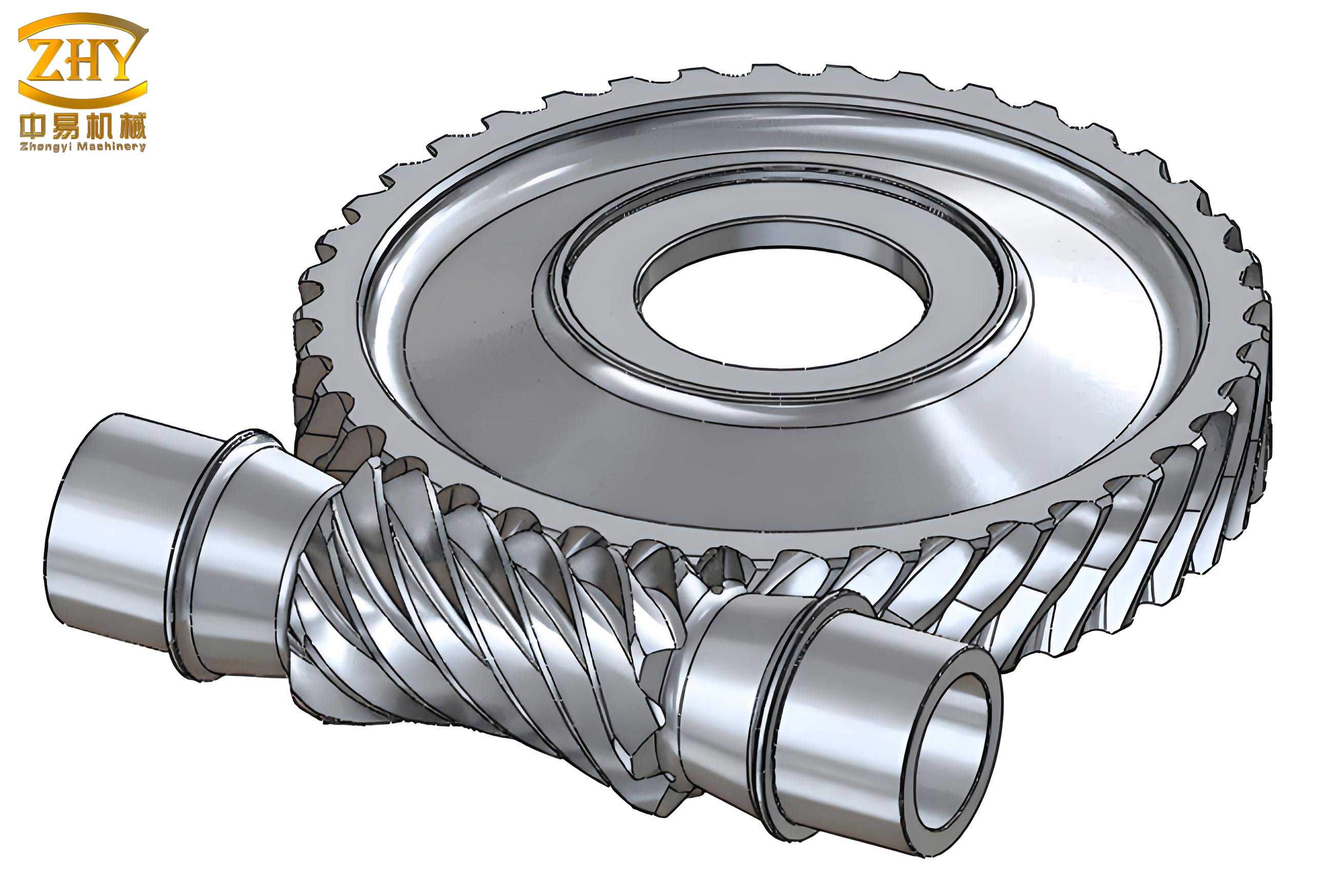
The image above showcases the final 3D model of the screw gear set, highlighting the smooth tooth surfaces and accurate meshing geometry. This visual output confirms the effectiveness of the secondary development approach, as the screw gear components exhibit minimal artifacts and high geometric fidelity. The modeling process, from cutter definition to helical sweep, ensures that the screw gear teeth conform to theoretical standards, enabling reliable performance in virtual simulations.
In terms of programming implementation, the Visual Basic code leverages MDT’s object model to automate each step. For instance, creating the helical path involves methods like CreateSketchDescriptor with the mcHelicalPath constant, while the sweep operation uses CreateFeatureDescriptor for mcSweep. The polar array feature is applied via mcPolarArray to replicate tooth spaces. This code structure is modular, allowing easy adaptation for different screw gear types or parameters. The use of ActiveX Automation ensures that MDT responds dynamically to script commands, streamlining the modeling workflow.
The advantages of this method are manifold. First, it achieves high precision in screw gear tooth profiles by directly incorporating gear theory into the modeling process. Second, it reduces the learning curve for designers familiar with AutoCAD or MDT, as the interface is consistent with these widely used tools. Third, the automated nature minimizes human error and speeds up model generation, which is crucial for iterative design processes. Moreover, the models generated are suitable for downstream applications like finite element analysis or CNC machining, as they represent true geometry rather than approximations.
Extended Applications and Future Directions
The technique described here for screw gear modeling can be extended to other complex gear systems, such as helical gears, bevel gears, or non-standard tooth forms. By adjusting the cutter profiles and sweep parameters, similar precision can be achieved. Additionally, the integration of optimization algorithms could further enhance the design process—for example, automatically adjusting parameters to minimize stress concentrations or maximize efficiency in screw gear transmissions. The use of MDT’s API also opens doors for coupling with external databases or simulation software, creating a comprehensive design environment for screw gear applications.
In industrial contexts, screw gears are often used in heavy machinery, automotive systems, and robotics, where reliable modeling is essential for performance prediction. This secondary development approach provides a robust toolset for engineers to create custom screw gear models tailored to specific requirements. Furthermore, the methodology supports educational purposes, allowing students to explore gear geometry and manufacturing simulations without the need for expensive specialized software. As 3D printing and additive manufacturing advance, accurate digital models of screw gears will become even more critical for prototyping and production.
To further illustrate the mathematical foundation, consider the general equation for a helical surface in a screw gear. The tooth surface can be represented parametrically as:
$$
\begin{aligned}
x(u, v) &= r(u) \cos(v) + p v \sin(\phi) \\
y(u, v) &= r(u) \sin(v) – p v \cos(\phi) \\
z(u, v) &= u
\end{aligned}
$$
where \( r(u) \) is the radius function along the axis, \( p \) is the pitch parameter, \( v \) is the angular parameter, and \( \phi \) is the lead angle. This equation underpins the sweep operations in MDT, ensuring that the generated surfaces are mathematically correct. By discretizing these equations into points for spline fitting, the modeling process maintains high accuracy, which is vital for the functional integrity of screw gear systems.
In conclusion, the secondary development of MDT using Visual Basic offers a powerful and accessible means to create precise 3D models of screw gears. By simulating manufacturing processes and leveraging helical sweep functionalities, this method produces accurate tooth geometries that meet design specifications. The inclusion of parametric calculations and automated workflows makes it suitable for both novice and expert users. As screw gears continue to be integral in mechanical transmissions, tools like this will play a key role in advancing design and analysis capabilities. Future work may involve enhancing the user interface or integrating real-time simulation features, but the core methodology established here provides a solid foundation for screw gear modeling in the digital age.